- Home
- Podprti posredniki
- Trading212
Kako Izpolniti Davke Trading212 2026
Enostavno izračunaj svoje naložbene davke Trading212 s Tax-Wizard. Avtomatiziraj davčno poročanje Trading212 in poenostavi napoved za 2026.
Zadnja posodobitev: · Pregledala ekipa Tax-Wizard · Uradni center za pomoč Trading 212 ↗
Ta vodnik je zasnovan, da pomaga vsakomur, ki ima naložbe pri Trading212 in išče jasnost o tem, kako plačati davke. Informacije, ki jih najdete tukaj, naj bi vam koristile pri izračunu davkov od naložb pri Trading212. Kljub temu je pomembno, da ta vodnik dopolnite s davčnimi predpisi, ki veljajo v vaši državi.
Če morate izračunati davke za svoje naložbe pri Trading212, ste na pravem mestu! Obstaja več načinov, kako to storiti: ročni izračun v Excelu, uporaba avtomatiziranega davčnega orodja, kot je Tax-wizard, ali najem davčnega strokovnjaka. Vaša izbira je pogosto odvisna od proračuna in osebnih preferenc.
Kako izvoziti zgodovino Trading212
Najprej se prijavite v svoj račun Trading212.
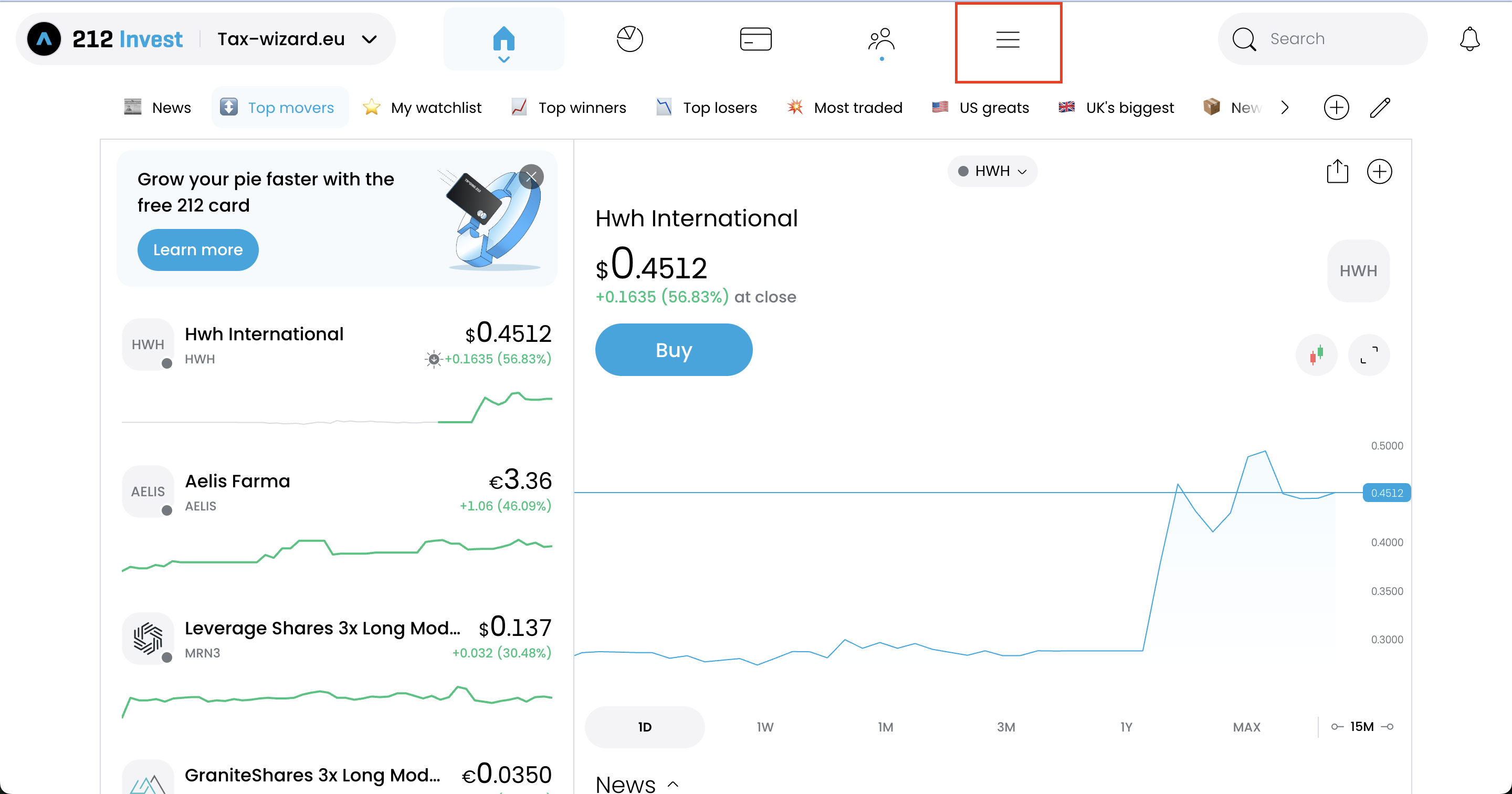
V računu Trading212 uporabite meni (ikono hamburger), da dostopate do "History".
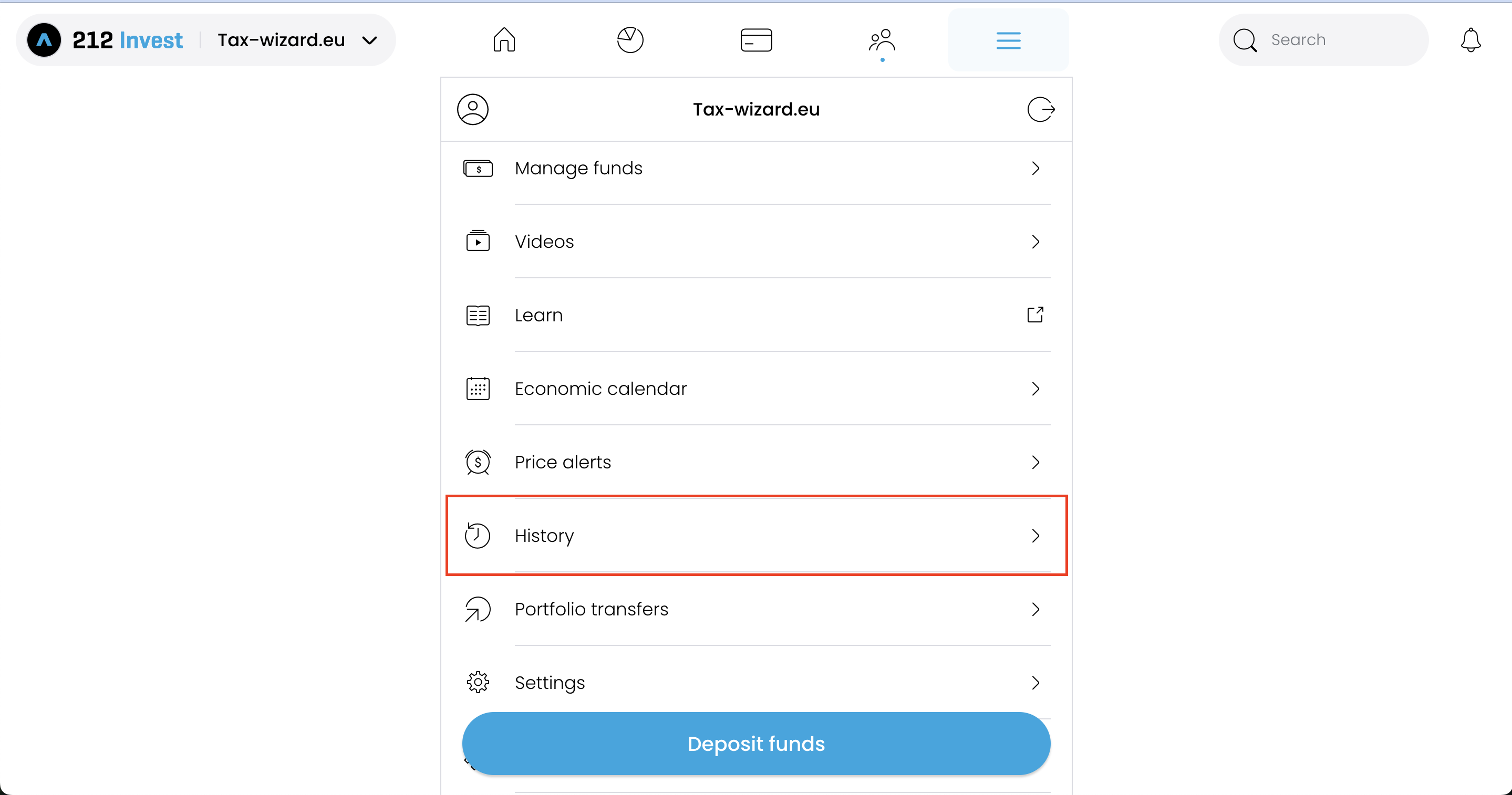
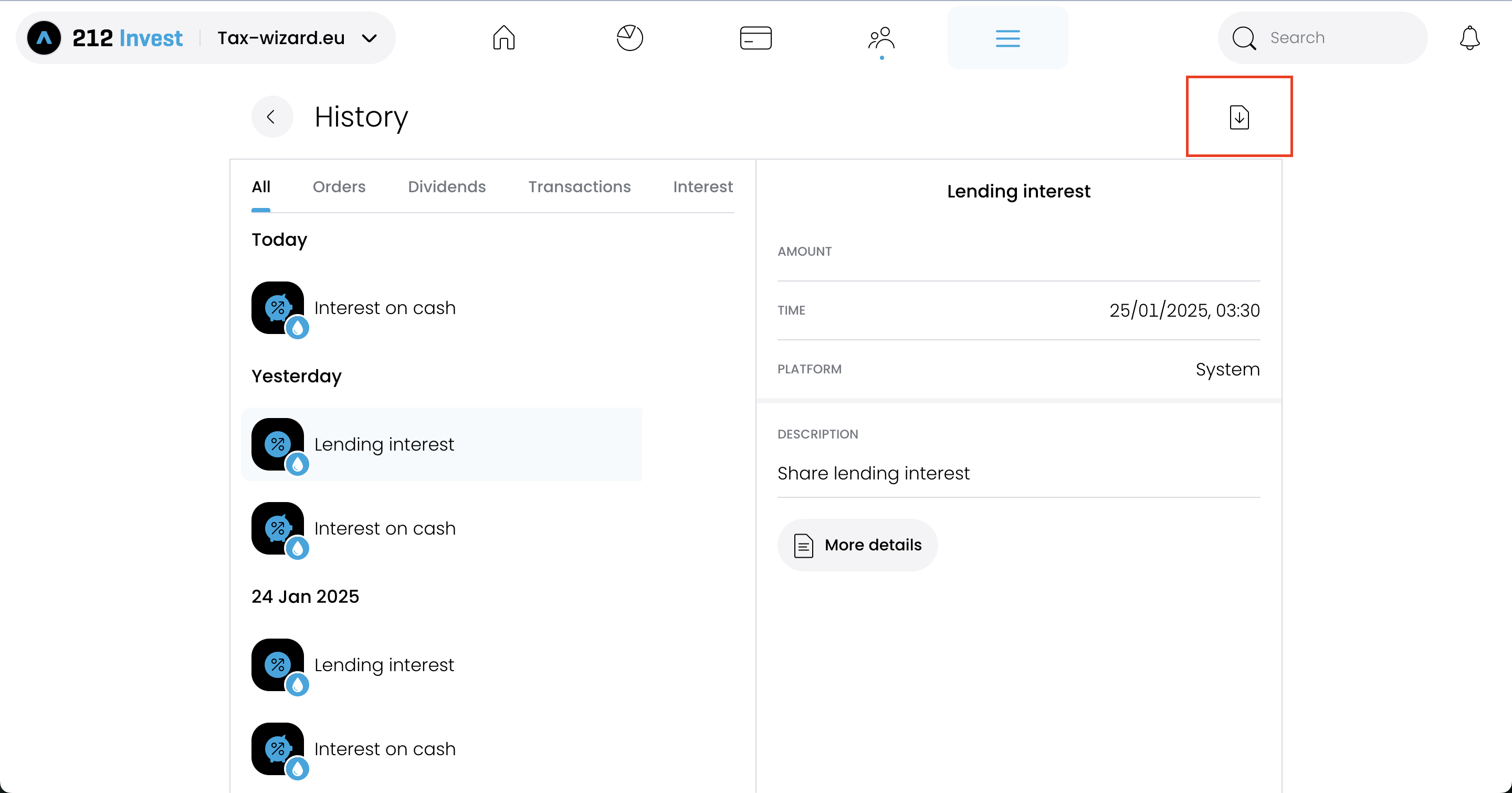
Na strani "History" morate izbrati možnost v zgornjem desnem kotu z ikono za prenos.
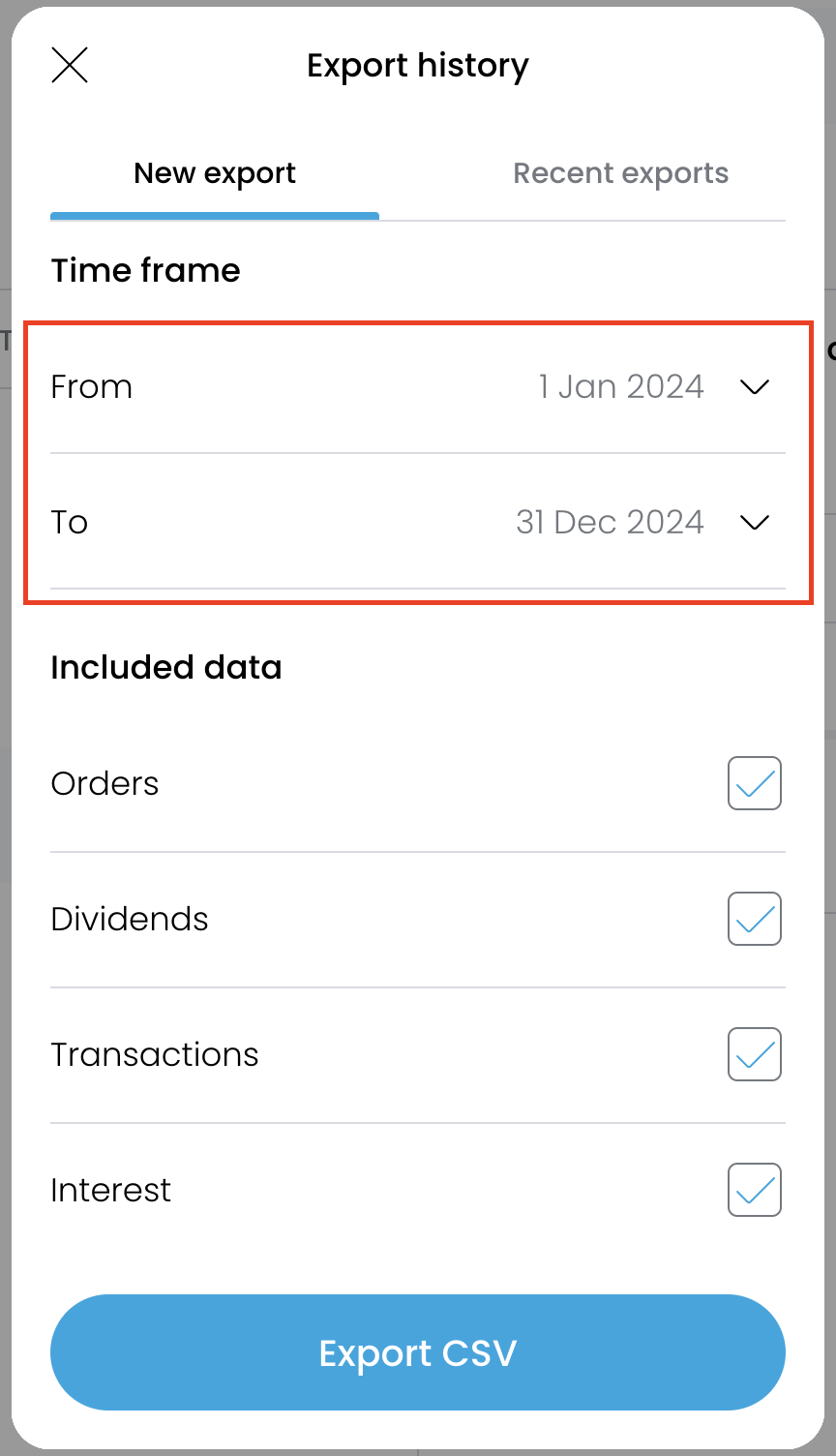
Da bodo poročila natančna, morate prenesti eno datoteko za vsako leto, v katerem ste imeli
odprt račun pri Trading212.
Po izbiri vsakega leta kliknite gumb "Export CSV", da izvozite datoteko.
Kako v Tax-wizard naložiti več datotek?
Vse datoteke morate oddati hkrati, da jih Tax-wizard lahko obdela skupaj. Sledijo navodila, kako hkrati naložiti več datotek. Sledite tem korakom:
- Windows
- 1. Kliknite eno od datotek, ki jo želite izbrati.
- 2. Pridržite tipko Control (Ctrl).
- 3. Medtem ko držite tipko Control, kliknite še ostale datoteke, ki jih želite izbrati.
- 4. Tipko Control držite pritisnjeno, dokler ne izberete vseh želenih datotek.
- Mac
- 1. Kliknite eno od datotek, ki jo želite izbrati.
- 2. Pridržite tipko Command ali Shift.
- 3. Medtem ko držite tipko Command ali Shift, kliknite še ostale datoteke, ki jih želite izbrati.
- 4. Tipko Command ali Shift držite pritisnjeno, dokler ne izberete vseh želenih datotek.
Če sledite tem korakom, boste zagotovili, da imate prave datoteke, potrebne za uporabo s
Tax-wizard.
Od tu jih lahko naložite v Tax-wizard in v nekaj minutah boste imeli pripravljeno davčno
poročilo.
Kako obravnavati brezplačne delnice Trading212
Trading212 vas včasih nagradi z brezplačnimi (promocijskimi) delnicami. Ko tako delnico kasneje prodate, izvožena datoteka CSV pogosto ne vsebuje izvirnega zapisa o nakupu, zato Tax-wizard nima nobenega nakupa, ki bi ga lahko povezal s prodajo. V tem primeru se transakcija prikaže kot nepopolna, kapitalskega dobička pa ni mogoče pravilno izračunati.
Za rešitev tega po izbiri Trading212 na nadzorni plošči kliknite "Dodaj manjkajoče brezplačne delnice v poročilo" in za vsako brezplačno delnico vnesite: ticker, ceno delnice na dan prejema, prejeto količino in datum prejema. Tax-wizard nato ustvari ustrezen zapis o nakupu, tako da se nabavna vrednost in kapitalski dobički pravilno izračunajo.
Pogosta vprašanja
Zakaj se vrednosti v Tax-wizard lahko razlikujejo od Annual Statement Trading212?
Obstaja več razlogov, zakaj se seštevki lahko ne ujemajo, tudi če izhajajo iz istih transakcij:
- Metoda izračuna nabavne vrednosti. Annual Statement Trading212 uporablja metodo povprečnih stroškov (stolpec "Average Price" je drseče povprečje delnic v portfelju). Tax-wizard vam omogoča izbiro med FIFO, LIFO, povprečnimi stroški in posebno metodo za Združeno kraljestvo, pri čemer je FIFO privzeta metoda, saj je zahtevana v večini evropskih jurisdikcij. Za isti vrednostni papir, kupljen po različnih cenah v različnih obdobjih, različne metode ustvarijo različne kapitalske dobičke za posamezno transakcijo.
- Pretvorba valute. Trading212 poroča v valuti instrumenta in v vašo osnovno valuto pretvori le enkrat, ob koncu leta. Tax-wizard uporablja uradne tečaje Evropske centralne banke, kot to zahteva davčna zakonodaja.
Ali lahko v Tax-wizard reproduciram številke iz Annual Statement?
Da. Na nadzorni plošči pri možnosti "Metoda izračuna" izberite "Povprečni stroški" - to je metoda, ki jo Trading212 uporablja interno. Seštevki so praviloma zelo blizu Annual Statement (zaradi pretvorbe valute in provizij lahko ostanejo manjše preostale razlike).
Upoštevajte, da metoda, ki je sprejeta v vaši davčni napovedi, je odvisna od davčne jurisdikcije. Večina evropskih davčnih uprav zahteva FIFO, zato mora biti uradno poročilo, ki ga oddate, običajno pripravljeno z metodo FIFO. Ostale možnosti (LIFO, povprečni stroški, Združeno kraljestvo) so na voljo za analizo in za uporabnike v jurisdikcijah, kjer se te metode uporabljajo.
Kako prijavim naložbe pri Trading 212 v Sloveniji?
Trading 212 je tuji posrednik in ne odvede slovenskega davka namesto vas - napoved oddate sami prek eDavkov. Rok za oddajo je 28. februar za preteklo leto.
- Kapitalski dobički iz vrednostnih papirjev gredo na obrazec Doh-KDVP, dividende na Doh-Div, izvedeni finančni instrumenti pa na D-IFI.
- Ob nakupu in ob prodaji se prizna 1 % normiranih stroškov, ki zniža davčno osnovo.
- Zneske v tujih valutah je treba preračunati v evre po tečaju na dan posamezne transakcije.
- Za vsak vrednostni papir je treba navesti vsak posamezen nakup - tudi tiste iz prejšnjih let, saj je od datuma nakupa odvisna davčna stopnja.
Koliko znaša davek na kapitalski dobiček v Sloveniji?
Stopnja je odvisna od obdobja imetništva: 25 % do 5 let, 20 % od 5 do 10 let, 15 % od 10 do 15 let in 0 % po 15 letih imetništva. Izvedeni finančni instrumenti so od 1. januarja 2026 obdavčeni po enotni 25-odstotni stopnji, ne glede na obdobje imetništva (Uradni list RS 85/2025).
Dividende in obresti so obdavčene po 25 %. Obresti na depozite v Sloveniji in EU so oproščene do 1.000 EUR letno, tuji davek pa se prizna kot odbitek do višine slovenskega davka.
Za podrobnosti o obrazcih, prenosu izgube in oddaji prek eDavkov preberite celoten vodnik po obdavčitvi naložb v Sloveniji. S Tax-wizardom naložite zgoraj izvožene datoteke Trading 212 in v nekaj minutah dobite izračun ter XML za uvoz v eDavke.
Koliko je res vreden vaš čas?
Upoštevajte vrednost svojega časa in mir, ki ga prinaša zanesljivo in natančno orodje za davčno poročanje
(plačilo pokriva letošnjo oddajo za davčno leto 2025 in prejšnja leta, ročno podaljšanje prihodnje leto)
Premium
Vse funkcije za Revolut, Degiro, eToro, XTB, Trading212, Interactive Brokers, Freedom24, Lightyear, Trade Republic, Coinbase, Robinhood Crypto,...
- Podpora za vse posrednike in valute
- Samodejni izračun kapitalskih dobičkov
- Poročilo s pridobitvami, realizacijami, dividendami in obrestmi
- Poročilo o odprtih pozicijah in statistika
- Statistika transakcij in dividend
- Izvoz odprtih pozicij v Yahoo Finance
Poslovni
Vse premium funkcije za računovodje, finančne svetovalce, davčne svetovalce ali druge strokovnjake in podjetja, ki želijo uporabljati Tax-Wizard za več strank.
- Podpora za vse posrednike in valute
- Samodejni izračun kapitalskih dobičkov
- Poročilo s pridobitvami, realizacijami, dividendami in obrestmi
- Poročilo o odprtih pozicijah in statistika
- Statistika transakcij in dividend
- Izvoz odprtih pozicij v Yahoo Finance