- Home
- Podporovaní brokeři
- Trading212
Daně z Trading 212 2026: průvodce Tax-Wizard
Snadno spočítejte daně z investic u Trading 212 s Tax-Wizard. Zautomatizujte daňové výkaznictví Trading 212 a zjednodušte si přiznání za rok 2026.
Naposledy aktualizováno: · Zkontrolováno týmem Tax-Wizard · Oficiální centrum nápovědy Trading 212 ↗
Tento návod je určen všem, kdo investují přes Trading212 a chtějí mít jasno v tom, jak odvést daně. Uvedené informace by vám měly pomoci při výpočtu daní z investic u Trading212. Je ale důležité doplnit si tento návod o daňové předpisy platné ve vaší zemi.
Pokud potřebujete spočítat daně ze svých investic u Trading212, jste na správném místě! Možností je několik — spočítat daně ručně v Excelu, použít automatický daňový nástroj jako Tax-Wizard, nebo se obrátit na daňového poradce. Volba obvykle závisí na vašem rozpočtu a preferencích.
Jak exportovat historii z Trading212
Začněte přihlášením ke svému účtu Trading212.
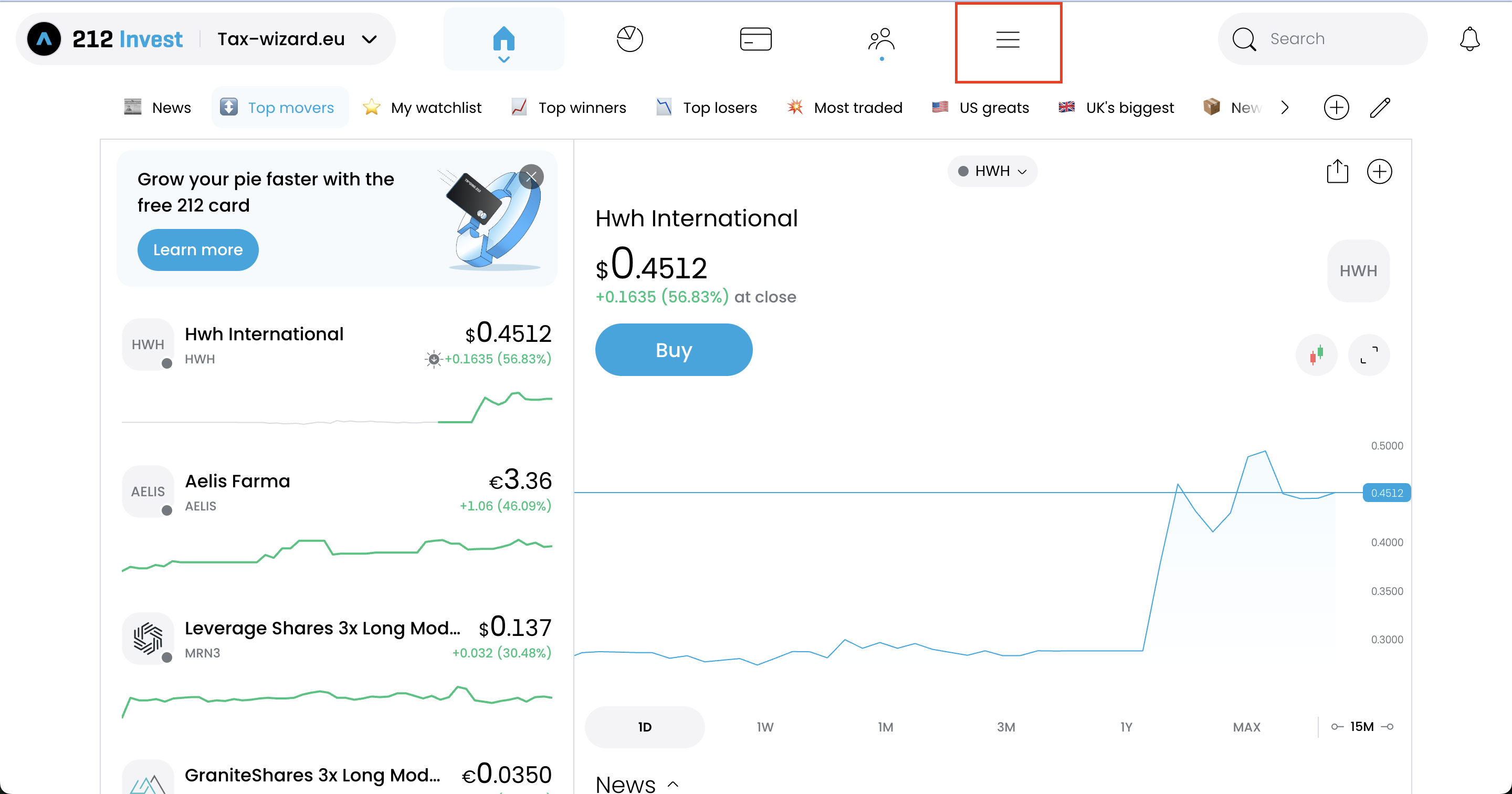
Přes hamburgerové menu svého účtu Trading212 přejděte do "History".
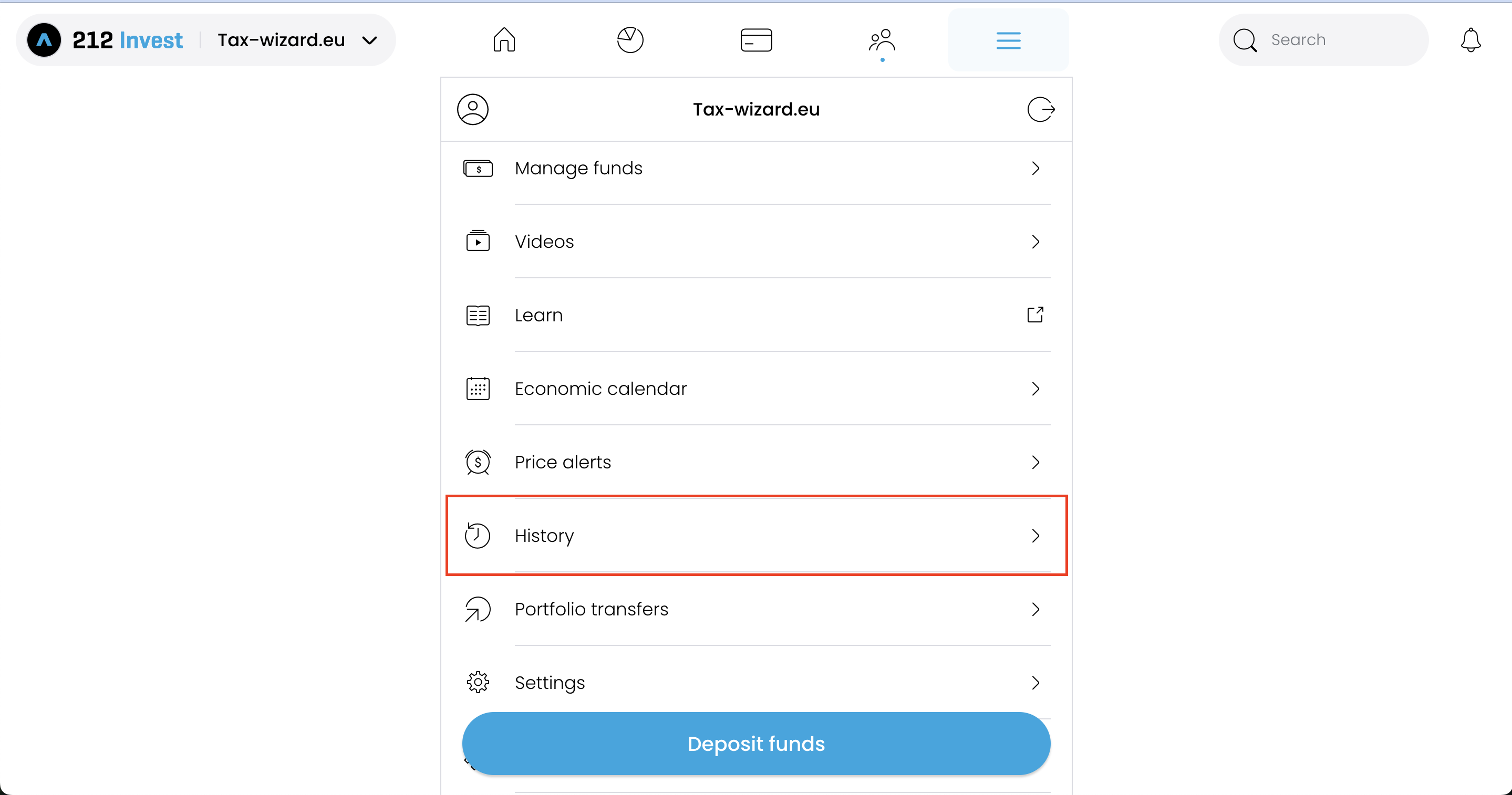
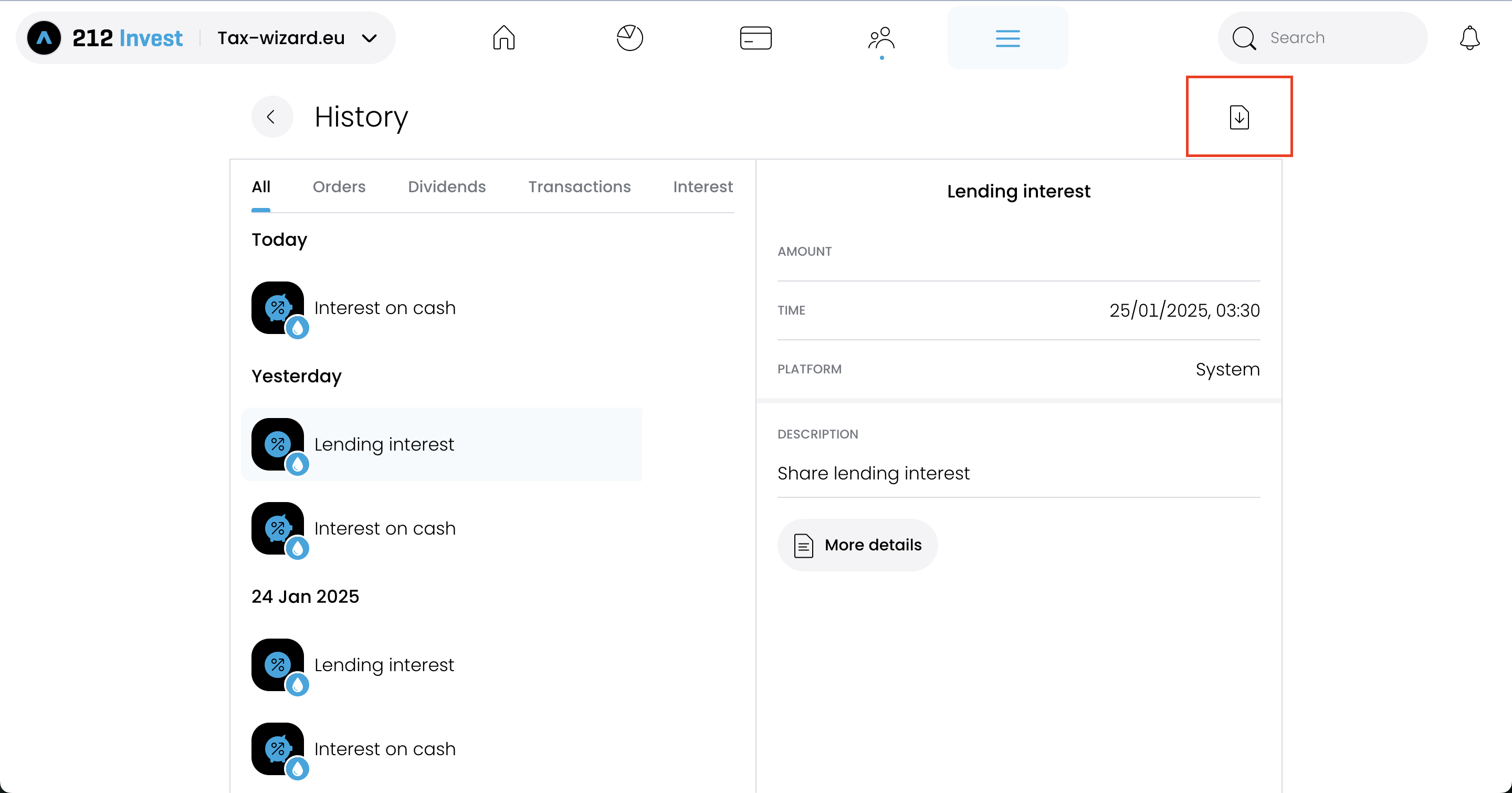
Na stránce "History" zvolte v pravém horním rohu možnost s ikonou stahování.
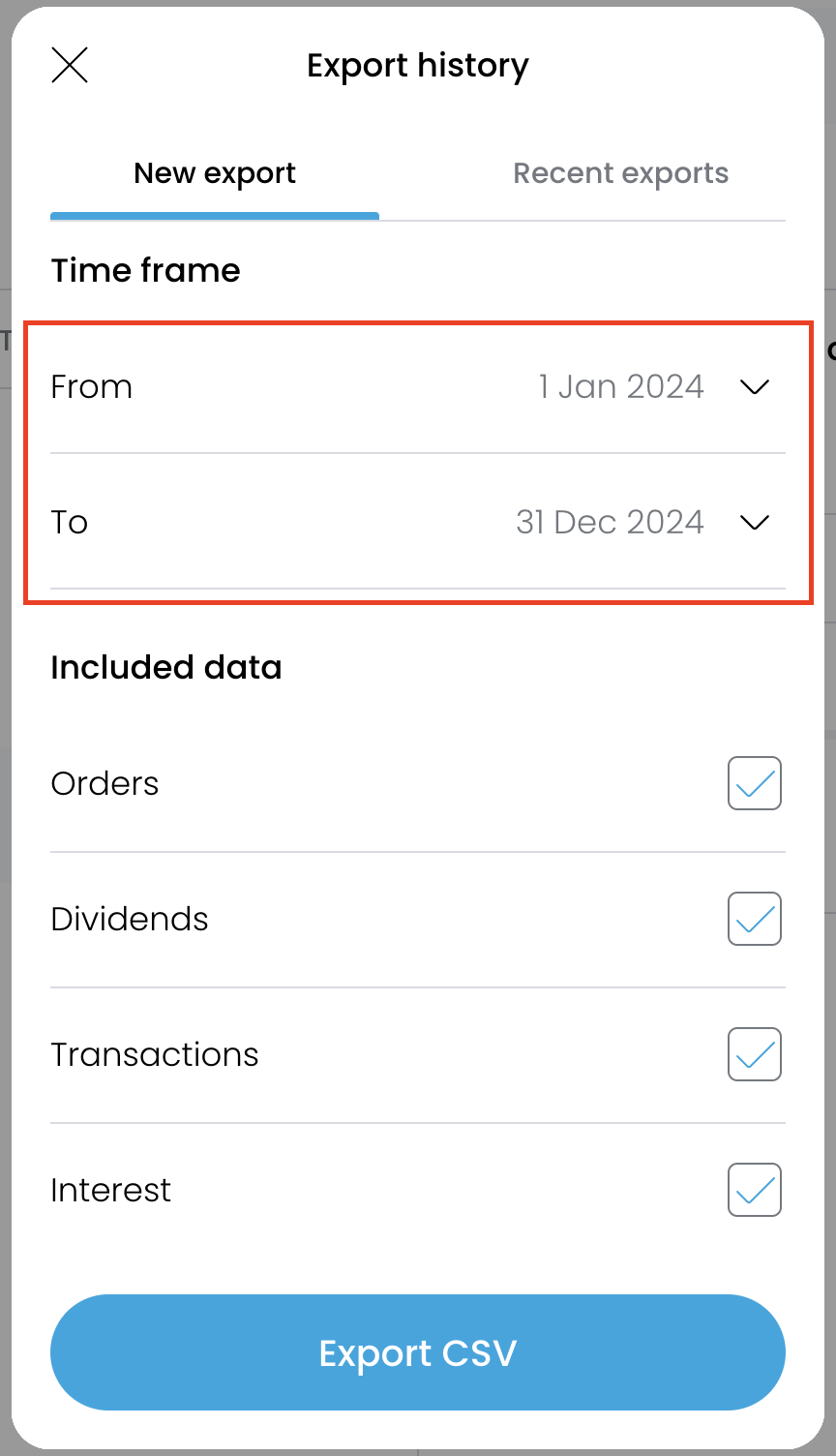
Aby byly reporty přesné, stáhněte si jeden soubor za každý rok, po který jste měli účet u
Trading212 otevřený.
Po výběru každého roku klikněte na tlačítko "Export CSV" a soubor se vyexportuje.
Jak nahrát do Tax-Wizard více souborů najednou?
Všechny soubory musíte odeslat současně, aby je Tax-Wizard mohl zpracovat společně. Zde je návod, jak nahrát více souborů najednou. Postupujte takto:
- Windows
- 1. Klikněte na jeden ze souborů, které chcete vybrat.
- 2. Podržte klávesu Control (Ctrl).
- 3. Se stisknutou klávesou Control klikněte na další soubory, které chcete vybrat.
- 4. Klávesu Control držte, dokud nemáte vybrané všechny požadované soubory.
- Mac
- 1. Klikněte na jeden ze souborů, které chcete vybrat.
- 2. Podržte klávesu Command nebo Shift.
- 3. Se stisknutou klávesou Command nebo Shift klikněte na další soubory, které chcete vybrat.
- 4. Klávesu Command nebo Shift držte, dokud nemáte vybrané všechny požadované soubory.
Když se budete držet těchto kroků, budete mít správné soubory pro použití s Tax-Wizard.
Odtud je stačí do Tax-Wizard nahrát a daňový report máte hotový během několika minut.
Jak naložit s akciemi zdarma od Trading212
Trading212 vás občas odmění akciemi zdarma (promo akcie). Když takovou akcii později prodáte, v exportovaném CSV často chybí původní záznam o nabytí, takže Tax-Wizard nemá k prodeji co spárovat. V takovém případě se akcie objeví jako neúplná transakce a její kapitálový zisk nelze spočítat správně.
Napravíte to tak, že po zvolení Trading212 na nástěnce kliknete na "Doplnit do reportu chybějící akcie zdarma" a u každé akcie zdarma vyplníte: ticker, cenu akcie v den, kdy jste ji obdrželi, počet obdržených kusů a datum obdržení. Tax-Wizard pak vytvoří odpovídající nákupní záznam, takže se pořizovací cena i zisky spočítají správně.
Často kladené otázky
Proč se čísla z Tax-Wizard mohou lišit od mého ročního výpisu Trading212?
Součty se nemusí shodovat hned z několika důvodů, i když obě strany vycházejí ze stejných obchodů:
- Metoda stanovení pořizovací ceny. Roční výpis Trading212 používá průměrnou cenu (sloupec "Average Price" je klouzavý průměr otevřených pozic). Tax-Wizard vám nabízí FIFO, LIFO, průměrnou cenu a britskou metodu Section 104, přičemž výchozí je FIFO, protože ji vyžaduje většina evropských jurisdikcí. U nástroje nakupovaného postupně za různé ceny dávají různé metody různé zisky na jednotlivých obchodech.
- Přepočet měny. Trading212 vykazuje v měně nástroje a na vaši základní měnu přepočítává jen jednou, na konci roku. Tax-Wizard používá oficiální kurzy Evropské centrální banky, které vyžaduje daňový předpis.
Můžu čísla z ročního výpisu v Tax-Wizard zreprodukovat?
Ano. Na nástěnce zvolte u "Metoda výpočtu" možnost "Vážený průměr pořizovací ceny" — to je metoda, kterou Trading212 používá interně. Součty pak s ročním výpisem obvykle úzce souhlasí (drobné rozdíly mohou zůstat kvůli přepočtu měny a poplatkům).
Mějte na paměti, že metoda přípustná ve vašem daňovém přiznání závisí na vaší jurisdikci. Většina evropských správců daně nařizuje FIFO, takže oficiální report, který podáváte, byste běžně měli vytvořit s FIFO. Ostatní možnosti (LIFO, průměrná cena, britská Section 104) slouží k analýze a uživatelům v jurisdikcích, kde se tyto metody uplatňují — například Itálie nařizuje LIFO (čl. 67 odst. 1-bis TUIR).
Jak přiznám investice u Trading 212 v České republice?
Trading 212 je zahraniční broker a nic za vás finanční správě nehlásí - daňové přiznání není nikde předvyplněné a vyplňujete ho celé sami. Prodeje cenných papírů patří do Přílohy č. 2 daňového přiznání (tiskopis 25 5405) jako ostatní příjmy podle § 10, dividendy a úroky do § 8 na ř. 38, a zápočet zahraniční daně do Přílohy č. 3 - podle § 38f odst. 8 zvlášť za každý stát.
Kdy se zisk nedaní vůbec
- Časový test tří let - přesáhne-li doba mezi nabytím a prodejem cenného papíru tři roky, je celý příjem osvobozen podle § 4 odst. 1 písm. u), bez ohledu na výši zisku. Od roku 2026 už u cenných papírů neplatí ani strop 40 mil. Kč.
- Limit 100 000 Kč - nepřesáhne-li úhrn příjmů z prodeje cenných papírů za rok 100 000 Kč, je osvobozen (§ 4 odst. 1 písm. t)). Jde o práh měřený z hrubých příjmů, ne o odpočet ze zisku: při 100 001 Kč se zdaní celý zisk.
- Akumulační ETF - český zákon nezná fiktivní rozdělení zisku (nic jako německá Vorabpauschale), takže se do prodeje nedaní nic.
Osvobození je ale automatické, ne volitelné: dlouho držená pozice prodaná se ztrátou přinese osvobozený příjem - a tím i nulový odpočet.
Ztráty se nesčítají napříč druhy příjmů
§ 10 odst. 4 posuzuje každý jednotlivý druh příjmu samostatně a Pokyn GFŘ D-59 uvádí prodej cenných papírů (kód D), prodej movitých věcí - kam patří kryptoaktiva (kód C) - a jiné ostatní příjmy jako deriváty a měnové páry (kód F) jako různé druhy. Ztráta z jednoho nikdy nesníží zisk z druhého, a skončí-li druh příjmu v mínusu, k rozdílu se nepřihlíží. Do dalších let se nepřevádí nic: § 5 odst. 3 zná daňovou ztrátu jen z příjmů podle § 7 a § 9.
Dividendy, úroky a kurzy
Příjmy podle § 8 se daní hrubé - § 8 odst. 4 i odst. 5 výslovně vylučují snížení o výdaje, takže sražená zahraniční daň není nákladem, jen případným zápočtem. Na ř. 323 Přílohy č. 3 přitom patří jen daň do výše, kterou mohl stát zdroje vybrat podle smlouvy: srazí-li Trading 212 z amerických dividend 30 %, započtete 15 % a zbytek reklamujete v USA. Zahraniční dividendy a úroky z vkladů lze volitelně zdanit rovnou sazbou 15 % v samostatném základu daně podle § 16a - volba je „všechno, nebo nic“ a úroky ze zápůjček a P2P do ní nikdy nepatří.
Přepočet na koruny se řídí § 38: buď denním kurzem ČNB pro den vzniku položky, nebo jednotným kurzem za celý rok - a § 38 odst. 7 zakazuje obojí v jednom zdaňovacím období kombinovat.
Podrobný rozbor včetně lhůt, oznámení osvobozeného příjmu nad 5 mil. Kč (§ 38v) a XML pro MOJE daně najdete v našem průvodci zdaněním investic v ČR.
Jakou hodnotu má váš čas doopravdy?
Zvažte hodnotu svého času a klid, který přináší spolehlivý a přesný nástroj pro vaše daňové přiznání
(platba pokrývá letošní přiznání za rok 2025 i předchozí roky, obnovení příští rok probíhá ručně)
Premium
Všechny funkce, pro Revolut, Degiro, eToro, XTB, Trading212, Interactive Brokers, Freedom24, Lightyear, Trade Republic, Coinbase, Robinhood Crypto,...
- Podpora všech brokerů a měn
- Automatický výpočet kapitálových zisků
- Report s pořízeními, realizacemi, dividendami a úroky
- Report a statistiky otevřených pozic
- Statistiky transakcí a dividend
- Export otevřených pozic do Yahoo Finance
Business
Všechny funkce Premium, pro účetní, finanční poradce, daňové poradce a další profesionály i firmy, které chtějí Tax-Wizard využívat pro více klientů.
- Podpora všech brokerů a měn
- Automatický výpočet kapitálových zisků
- Report s pořízeními, realizacemi, dividendami a úroky
- Report a statistiky otevřených pozic
- Statistiky transakcí a dividend
- Export otevřených pozic do Yahoo Finance