- Home
- Podprti posredniki
- Interactive Brokers
Kako Izpolniti Davke IBKR 2026
Enostavno izračunaj davke Interactive Brokers (IBKR) s Tax-Wizard. Avtomatiziraj davčno poročanje IBKR in prihrani čas pri napovedi za 2026.
Zadnja posodobitev: · Pregledala ekipa Tax-Wizard · Uradni center za pomoč Interactive Brokers ↗
Ta vodič je namenjen vsem, ki imate naložbe pri Interactive Brokers (IBKR) in iščete jasnost o tem, kako plačati davke. Informacije v tem vodiču vam bodo v pomoč pri izračunu davkov za vaše naložbe pri Interactive Brokers. Kljub temu je pomembno, da ta vodič dopolnite z davčnimi predpisi, ki veljajo v vaši državi.
Če morate izračunati davke za svoje naložbe pri Interactive Brokers, ste na pravem mestu! To lahko storite na več načinov, na primer ročno v Excelu, z avtomatiziranim davčnim orodjem, kot je Tax-wizard, ali z najemom davčnega strokovnjaka. Izbira je pogosto odvisna od vašega proračuna in osebnih preferenc.
Kako izvoziti zgodovino iz Interactive Brokers
Najprej se prijavite v svoj račun Interactive Brokers.
V osrednjem meniju svojega računa IBKR odprite "Performance & Reports" in izberite
"Statements".
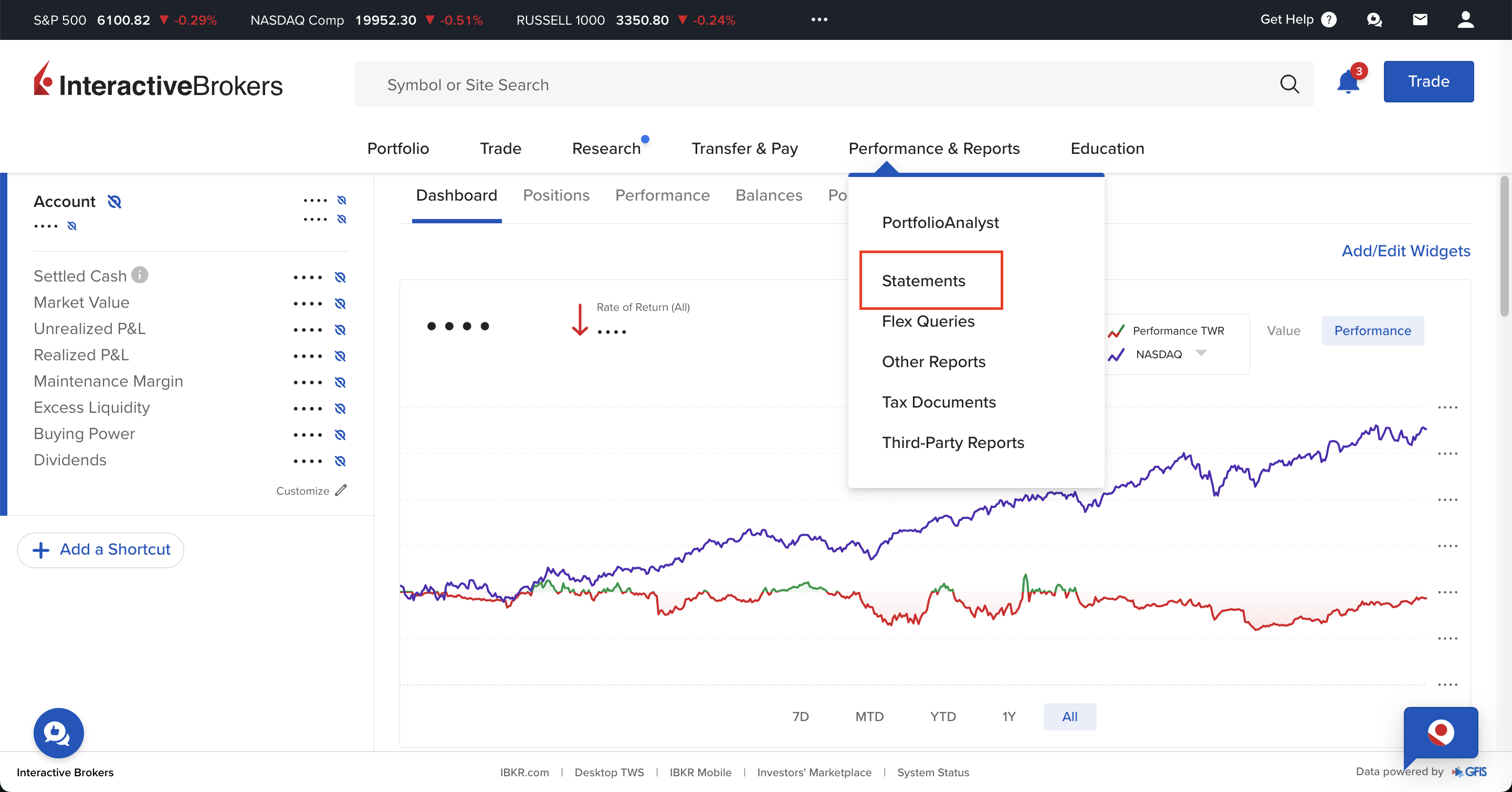
Na strani "Performance & Reports" je na voljo več možnosti; znotraj zavihka Statements izberite "Activity".
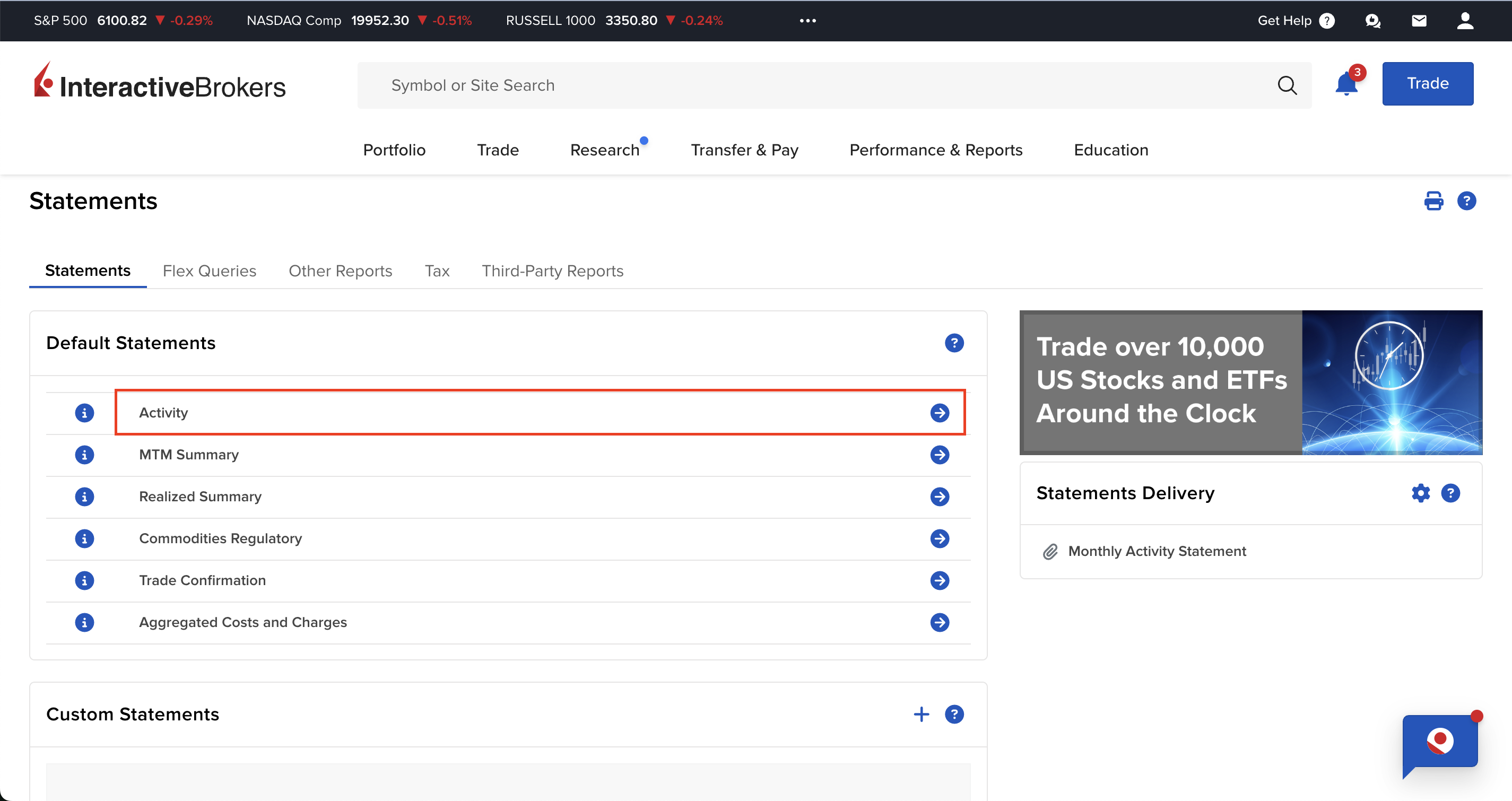
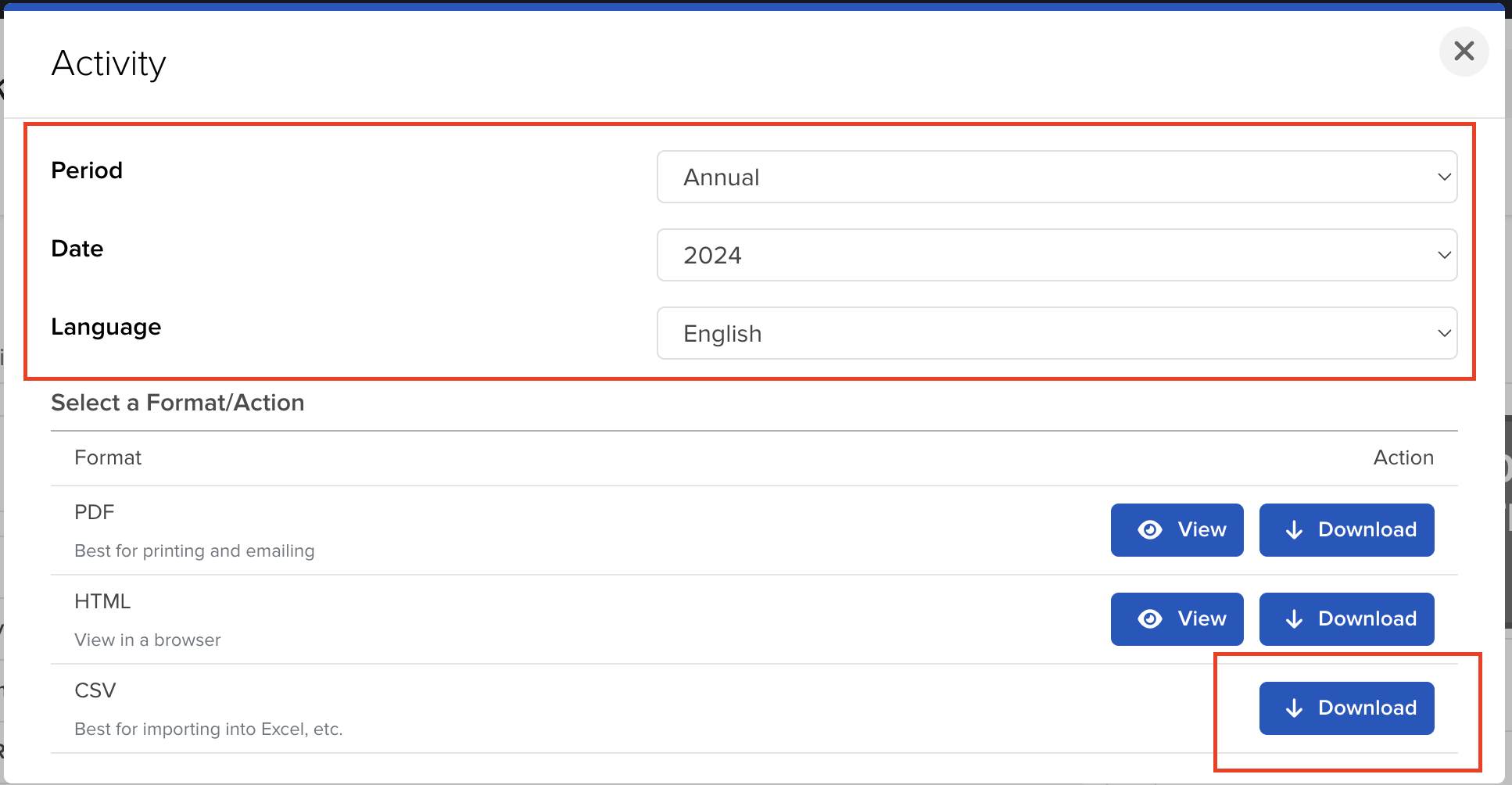
Na strani "Activity" lahko izberete obdobje in obliko zapisa, ki ju želite izvoziti.
Da bodo poročila natančna, morate prenesti eno datoteko za vsako leto, v katerem ste imeli odprt
račun pri Interactive Brokers.
Ko izberete obdobje, kliknite gumb "Download", da izvozite datoteko.
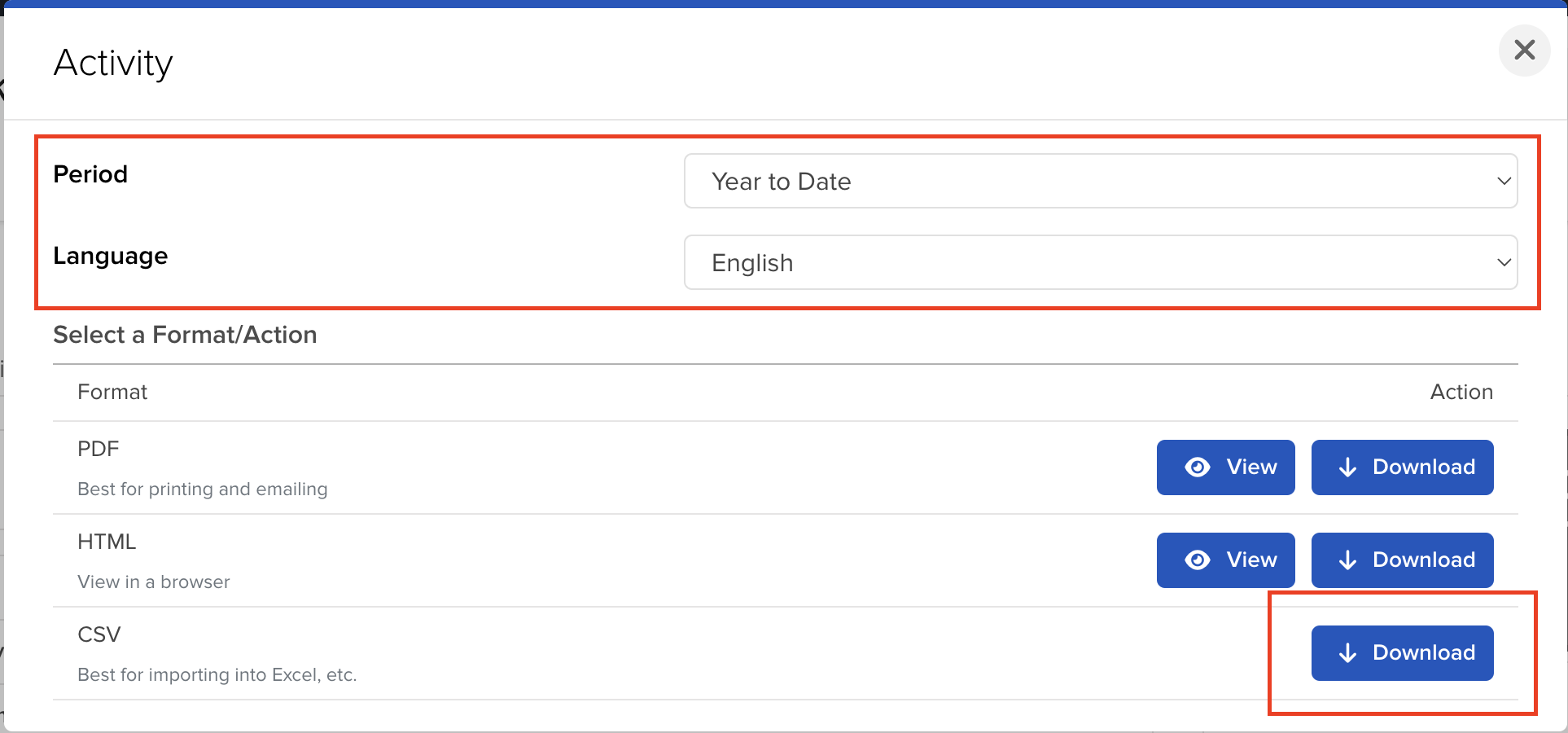
Če želite vključiti tudi tekoče leto, lahko izberete možnost "Year to Date".
Kako v Tax-wizard naložiti več datotek hkrati?
Vse datoteke morate oddati hkrati, da jih Tax-wizard lahko obdela skupaj. Tukaj so navodila, kako hkrati naložiti več datotek. Sledite tem korakom:
- Windows
- 1. Kliknite eno od datotek, ki jo želite izbrati.
- 2. Pridržite tipko Control (Ctrl).
- 3. Medtem ko držite tipko Control, kliknite še druge datoteke, ki jih želite izbrati.
- 4. Tipko Control držite pritisnjeno, dokler ne izberete vseh želenih datotek.
- Mac
- 1. Kliknite eno od datotek, ki jo želite izbrati.
- 2. Pridržite tipko Command ali Shift.
- 3. Medtem ko držite tipko Command ali Shift, kliknite še druge datoteke, ki jih želite izbrati.
- 4. Tipko Command ali Shift držite pritisnjeno, dokler ne izberete vseh želenih datotek.
Če sledite tem korakom, boste zagotovo imeli prave datoteke, ki jih potrebujete za uporabo s
Tax-wizard.
Od tu jih lahko naložite v Tax-wizard in v nekaj minutah boste imeli pripravljeno davčno poročilo.
Frequently Asked Questions
Are Interactive Brokers fractional shares derivatives?
No. IBKR's official disclosure states: "The client will always be the beneficial owner of any fractional Shares … segregated … in the same manner and to the same extent as whole shares." You are the beneficial owner of real shares - not a derivative or a CFD.
So for tax purposes they are treated as ordinary shares, taxed as capital gains on securities, not as derivatives. IBKR records fractions to 4 decimal places, so a decimal quantity is normal. Learn more here.
How are Interactive Brokers capital gains taxed?
IBKR is a foreign broker, so you self-report your capital gains in your country of tax residence. Tax-Wizard separates shares and ETFs from derivatives (options, futures, CFDs) and produces a country-specific report for Portugal (Anexo J), Spain (IRPF), Italy, Germany, Ireland and more, automatically.
Kako prijavim naložbe pri Interactive Brokers v Sloveniji?
Interactive Brokers je tuji posrednik in ne odvede slovenskega davka namesto vas - napoved oddate sami prek eDavkov. Rok za oddajo je 28. februar za preteklo leto.
- Kapitalski dobički iz vrednostnih papirjev gredo na obrazec Doh-KDVP, dividende na Doh-Div, izvedeni finančni instrumenti pa na D-IFI.
- Ob nakupu in ob prodaji se prizna 1 % normiranih stroškov, ki zniža davčno osnovo.
- Zneske v tujih valutah je treba preračunati v evre po tečaju na dan posamezne transakcije.
- Za vsak vrednostni papir je treba navesti vsak posamezen nakup - tudi tiste iz prejšnjih let, saj je od datuma nakupa odvisna davčna stopnja.
Koliko znaša davek na kapitalski dobiček v Sloveniji?
Stopnja je odvisna od obdobja imetništva: 25 % do 5 let, 20 % od 5 do 10 let, 15 % od 10 do 15 let in 0 % po 15 letih imetništva. Izvedeni finančni instrumenti so od 1. januarja 2026 obdavčeni po enotni 25-odstotni stopnji, ne glede na obdobje imetništva (Uradni list RS 85/2025).
Dividende in obresti so obdavčene po 25 %. Obresti na depozite v Sloveniji in EU so oproščene do 1.000 EUR letno, tuji davek pa se prizna kot odbitek do višine slovenskega davka.
Za podrobnosti o obrazcih, prenosu izgube in oddaji prek eDavkov preberite celoten vodnik po obdavčitvi naložb v Sloveniji. S Tax-wizardom naložite zgoraj izvožene datoteke Interactive Brokers in v nekaj minutah dobite izračun ter XML za uvoz v eDavke.
Koliko je res vreden vaš čas?
Upoštevajte vrednost svojega časa in mir, ki ga prinaša zanesljivo in natančno orodje za davčno poročanje
(plačilo pokriva letošnjo oddajo za davčno leto 2025 in prejšnja leta, ročno podaljšanje prihodnje leto)
Premium
Vse funkcije za Revolut, Degiro, eToro, XTB, Trading212, Interactive Brokers, Freedom24, Lightyear, Trade Republic, Coinbase, Robinhood Crypto,...
- Podpora za vse posrednike in valute
- Samodejni izračun kapitalskih dobičkov
- Poročilo s pridobitvami, realizacijami, dividendami in obrestmi
- Poročilo o odprtih pozicijah in statistika
- Statistika transakcij in dividend
- Izvoz odprtih pozicij v Yahoo Finance
Poslovni
Vse premium funkcije za računovodje, finančne svetovalce, davčne svetovalce ali druge strokovnjake in podjetja, ki želijo uporabljati Tax-Wizard za več strank.
- Podpora za vse posrednike in valute
- Samodejni izračun kapitalskih dobičkov
- Poročilo s pridobitvami, realizacijami, dividendami in obrestmi
- Poročilo o odprtih pozicijah in statistika
- Statistika transakcij in dividend
- Izvoz odprtih pozicij v Yahoo Finance