- Home
- Tuetut välittäjät
- Interactive Brokers
Näin hoidat IBKR-verot 2026 - Interactive Brokers -opas
Laske Interactive Brokersin (IBKR) sijoitusverot helposti Tax-Wizardilla. Automatisoi IBKR:n veroraportointi ja yksinkertaista vuoden 2026 veroilmoitusta.
Viimeksi päivitetty: · Tax-Wizard-tiimin tarkistama · Virallinen Interactive Brokers-tukikeskus ↗
This guide is designed to assist anyone who have investments on Interactive Brokers (IBKR) and is seeking clarity on how to pay taxes. The information provided here should be useful when calculating your Interactive Brokers taxes. However, it’s important to supplement this guide with the tax regulations specific to your country.
If you need to calculate taxes for your Interactive Brokers investments, you’re in the right place! There are several ways to do this, such as calculating taxes manually in Excel, using an automated tax tool like Tax-wizard, or hiring a tax professional. Your choice will often depend on your budget and preferences.
How to export your Interactive Brokers history
Start by Login to your Interactive Brokers account.
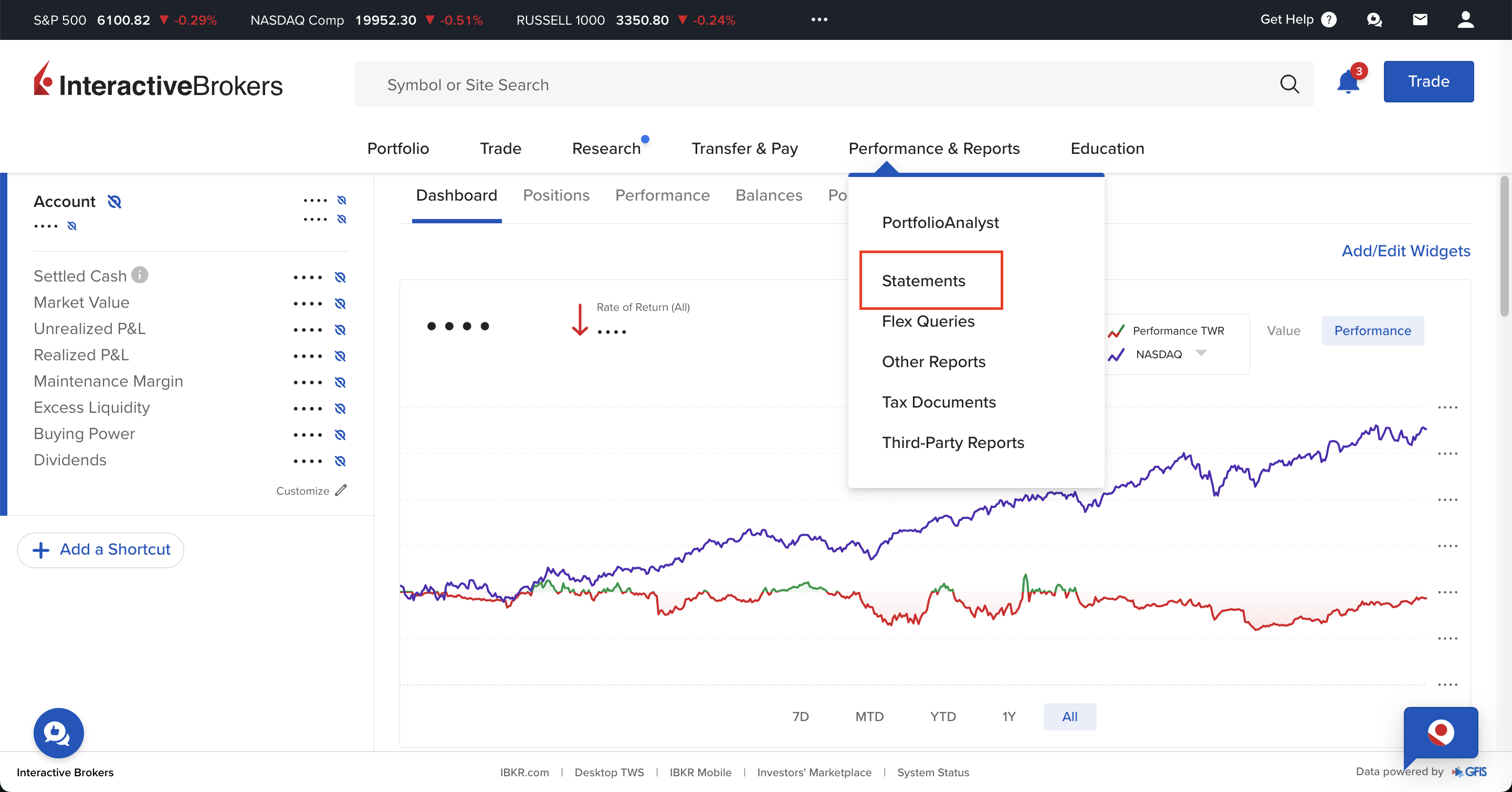
Use the central menu in your IBKR account to access "Performance & Reports",
and select "Statements".
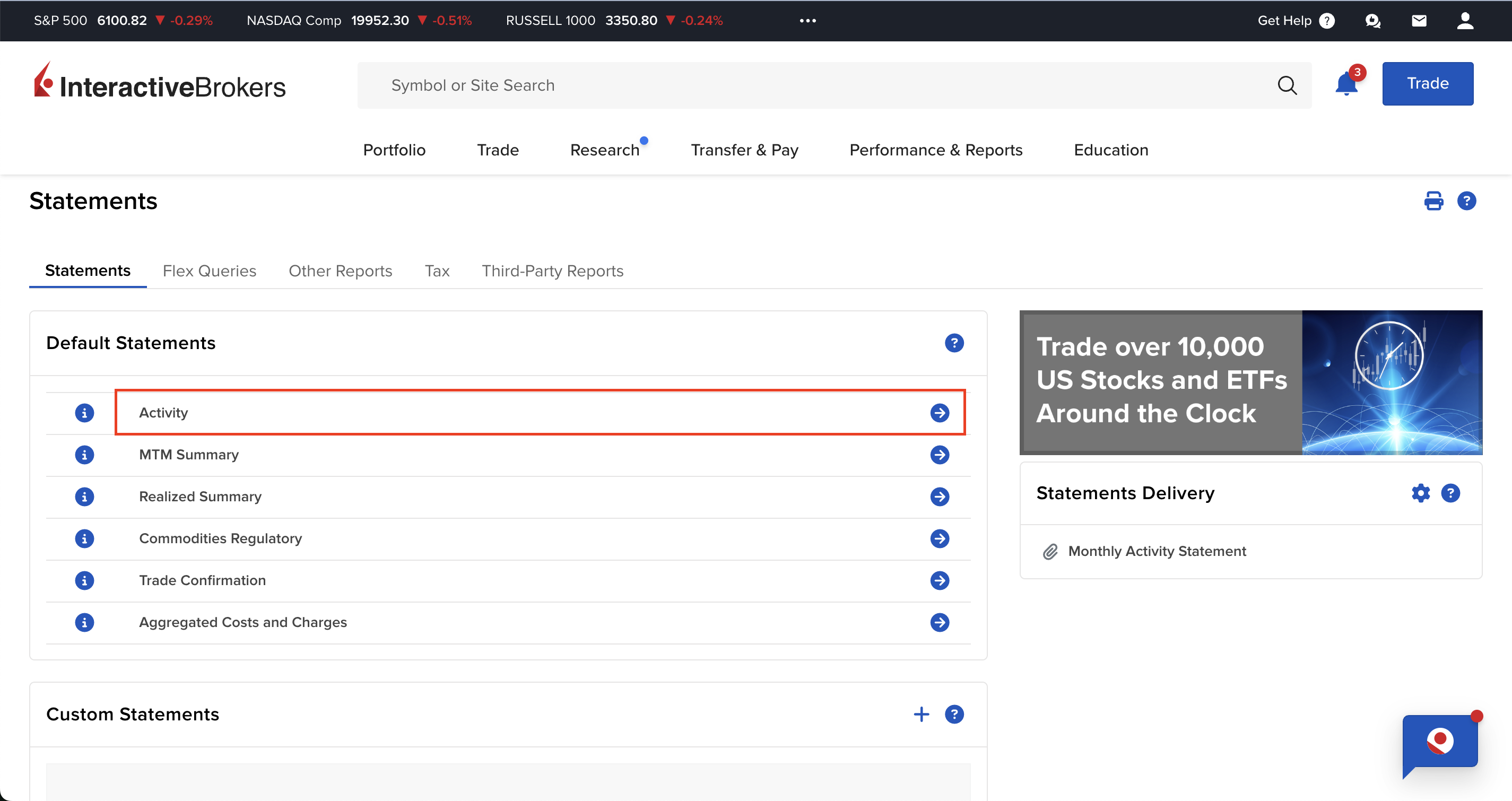
On the "Performance & Reports" page there are several options available, you should select "Activity" inside the Statements tab.
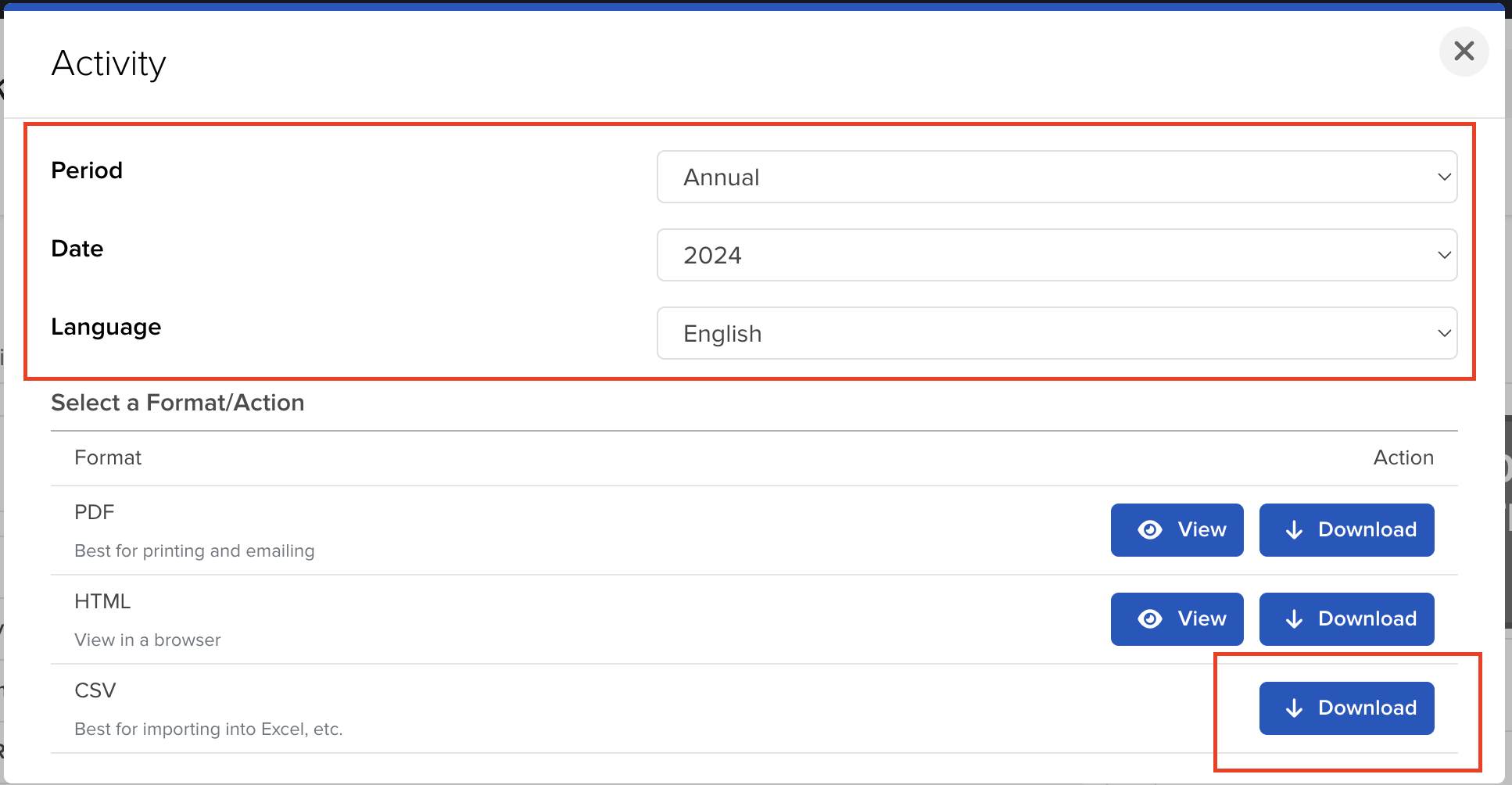
On the "Activity" page, you can select the period and the format you want to export.
For the reports to be accurate you should download one file per each year you had your Interactive
Brokers account open.
After selecting the period, click on the "Download" button to export the file.
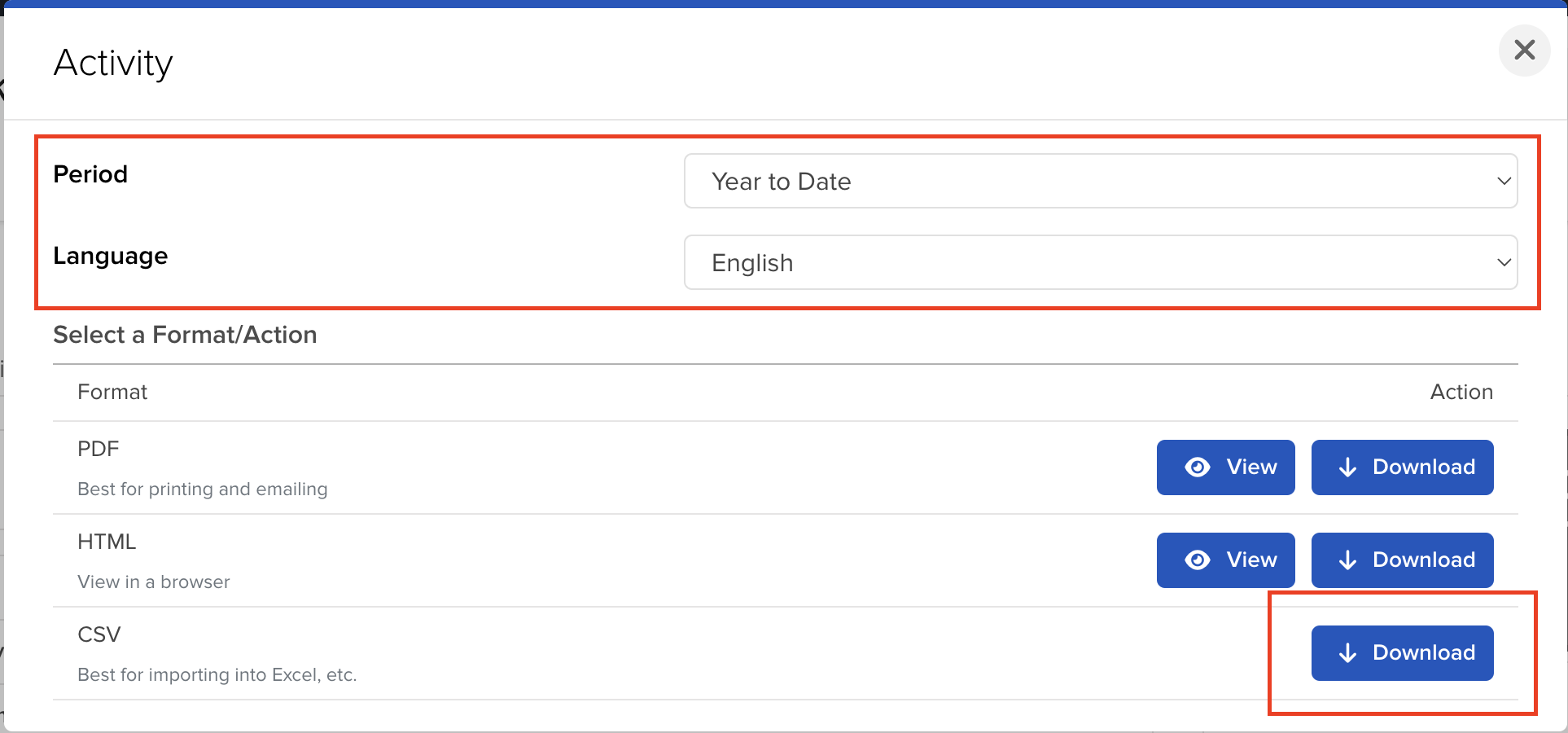
If you want to include the current year as well, you can select the "Year to Date" option.
How to upload multiple files to Tax-wizard?
You must submit all files at the same time for Tax-wizard to be able to process them together. Here are the instructions on how to upload multiple files simultaneously. Follow these steps:
- Windows
- 1. Click on one of the files you wish to select.
- 2. Hold down the Control (Ctrl) key.
- 3. While holding down the Control key, click on the other files you want to select.
- 4. Continue holding the Control key until you have selected all the desired files.
- Mac
- 1. Click on one of the files you wish to select.
- 2. Hold down the Command or Shift key.
- 3. While holding the Command or Shift key, click on the other files you want to select.
- 4. Continue holding the Command or Shift key until you have selected all the desired files.
By following these steps, you can ensure you have the correct files needed to use with Tax-wizard.
From here you can upload them to Tax-wizard and have your tax report ready in minutes.
Frequently Asked Questions
Are Interactive Brokers fractional shares derivatives?
No. IBKR's official disclosure states: "The client will always be the beneficial owner of any fractional Shares … segregated … in the same manner and to the same extent as whole shares." You are the beneficial owner of real shares - not a derivative or a CFD.
So for tax purposes they are treated as ordinary shares, taxed as capital gains on securities, not as derivatives. IBKR records fractions to 4 decimal places, so a decimal quantity is normal. Learn more here.
How are Interactive Brokers capital gains taxed?
IBKR is a foreign broker, so you self-report your capital gains in your country of tax residence. Tax-Wizard separates shares and ETFs from derivatives (options, futures, CFDs) and produces a country-specific report for Portugal (Anexo J), Spain (IRPF), Italy, Germany, Ireland and more, automatically.
Miten ilmoitan Interactive Brokers-sijoitukseni OmaVerossa?
Interactive Brokers on ulkomainen välittäjä: se ei raportoi tietojasi Verohallinnolle eivätkä tulot näy esitäytetyllä veroilmoituksella. Sinun on lisättävä ne itse OmaVerossa omaan henkilökohtaiseen määräpäivääsi mennessä (huhtikuussa). Veroilmoituksella:
- Luovutusvoitot ja -tappiot ilmoitetaan OmaVeron luovutusvoitto-osiossa hankintaerittäin (paperilla lomake 9A): myyntipäivä, hankintapäivä, myyntihinta, kulut ja hankintameno - tai hankintameno-olettama (20 % myyntihinnasta, 40 % kun omistus on kestänyt vähintään 10 vuotta), jos se on edullisempi (TVL 46.1 §).
- Ulkomaiset osingot ja korot ilmoitetaan maittain (lomake 16B): pörssiyhtiöiden osingoista veronalaista on 85 %, ja ulkomainen lähdevero hyvitetään enintään verosopimuksen mukaiseen määrään asti (yleensä 15 %) - ylimenevä osa on perittävä takaisin lähdevaltiolta.
- Laskentajärjestys on FIFO koko historiasta, myös aiempien vuosien ostoista (TVL 47.4 §, KHO 2024:123).
- Valuuttamääräiset summat muunnetaan euroiksi kunkin tapahtumapäivän kurssilla: hankintameno hankintapäivän ja myyntihinta myyntipäivän EKP-kurssilla.
- Jos vuoden kaikkien luovutusten myyntihinnat ovat yhteensä enintään 1 000 €, voitot ovat verovapaita (TVL 48.6 §) - raja on kynnys, ei vähennys.
Lähettääkö Interactive Brokers veroraportin Suomeen?
Interactive Brokers ei tuota suomalaista OmaVero-valmista veroraporttia. Vie koko historiasi yllä olevilla ohjeilla ja lataa tiedostot Tax-Wizardiin: luovutusvoitot lasketaan FIFO-menetelmällä, jokaiselle erälle valitaan edullisempi todellinen hankintameno tai hankintameno-olettama, summat muunnetaan euroiksi ja tulokseksi saat lomakkeiden 9A, 9 ja 16B mukaiset valmiit luvut sekä arvion 30 %/34 %:n pääomatuloverosta.
Täydelliset säännöt (tappioiden vähentäminen, 30 %/34 %:n verokannat, CFD-tappioiden vähennyskelvottomuus ja täyttöesimerkit) löydät Suomen sijoitusverotuksen oppaasta. Tax-Wizardilla lataat yllä viedyt Interactive Brokers-tiedostot ja saat minuuteissa valmiit luvut jokaiseen OmaVeron kohtaan.
Kuinka arvokasta aikasi todella on?
Mieti, mikä on aikasi arvo ja millainen mielenrauha syntyy siitä, että käytössäsi on luotettava ja tarkka työkalu veroraportointiin
(maksu kattaa tämän vuoden ilmoituksen vuodelle 2025 sekä aiemmat vuodet, uusinta ensi vuonna manuaalisesti)
Premium
Kaikki ominaisuudet Revolutille, Degirolle, eTorolle, XTB:lle, Trading212:lle, Interactive Brokersille, Freedom24:lle, Lightyearille, Trade Republicille, Coinbaselle, Robinhood Cryptolle,...
- Tuki kaikille välittäjille ja valuutoille
- Luovutusvoittojen automaattinen laskenta
- Raportti hankinnoista, luovutuksista, osingoista ja korkotuloista
- Avointen positioiden raportti ja tilastot
- Transaktio- ja osinkotilastot
- Avointen positioiden vienti Yahoo Financeen
Business
Kaikki premium-ominaisuudet kirjanpitäjille, talousneuvojille, verokonsulteille tai muille ammattilaisille ja yrityksille, jotka haluavat käyttää Tax-Wizardia useille asiakkaille.
- Tuki kaikille välittäjille ja valuutoille
- Luovutusvoittojen automaattinen laskenta
- Raportti hankinnoista, luovutuksista, osingoista ja korkotuloista
- Avointen positioiden raportti ja tilastot
- Transaktio- ja osinkotilastot
- Avointen positioiden vienti Yahoo Financeen