- Home
- Mäklare som stöds
- Interactive Brokers
Skatt på Interactive Brokers (IBKR) 2026
Räkna ut skatten på dina Interactive Brokers-affärer med Tax-Wizard. Exportera dina Activity Statements och få färdiga K4-rader till deklarationen 2026.
Senast uppdaterad: · Granskad av Tax-Wizard-teamet · Officiellt hjälpcenter för Interactive Brokers ↗
This guide is designed to assist anyone who have investments on Interactive Brokers (IBKR) and is seeking clarity on how to pay taxes. The information provided here should be useful when calculating your Interactive Brokers taxes. However, it’s important to supplement this guide with the tax regulations specific to your country.
If you need to calculate taxes for your Interactive Brokers investments, you’re in the right place! There are several ways to do this, such as calculating taxes manually in Excel, using an automated tax tool like Tax-wizard, or hiring a tax professional. Your choice will often depend on your budget and preferences.
How to export your Interactive Brokers history
Start by Login to your Interactive Brokers account.
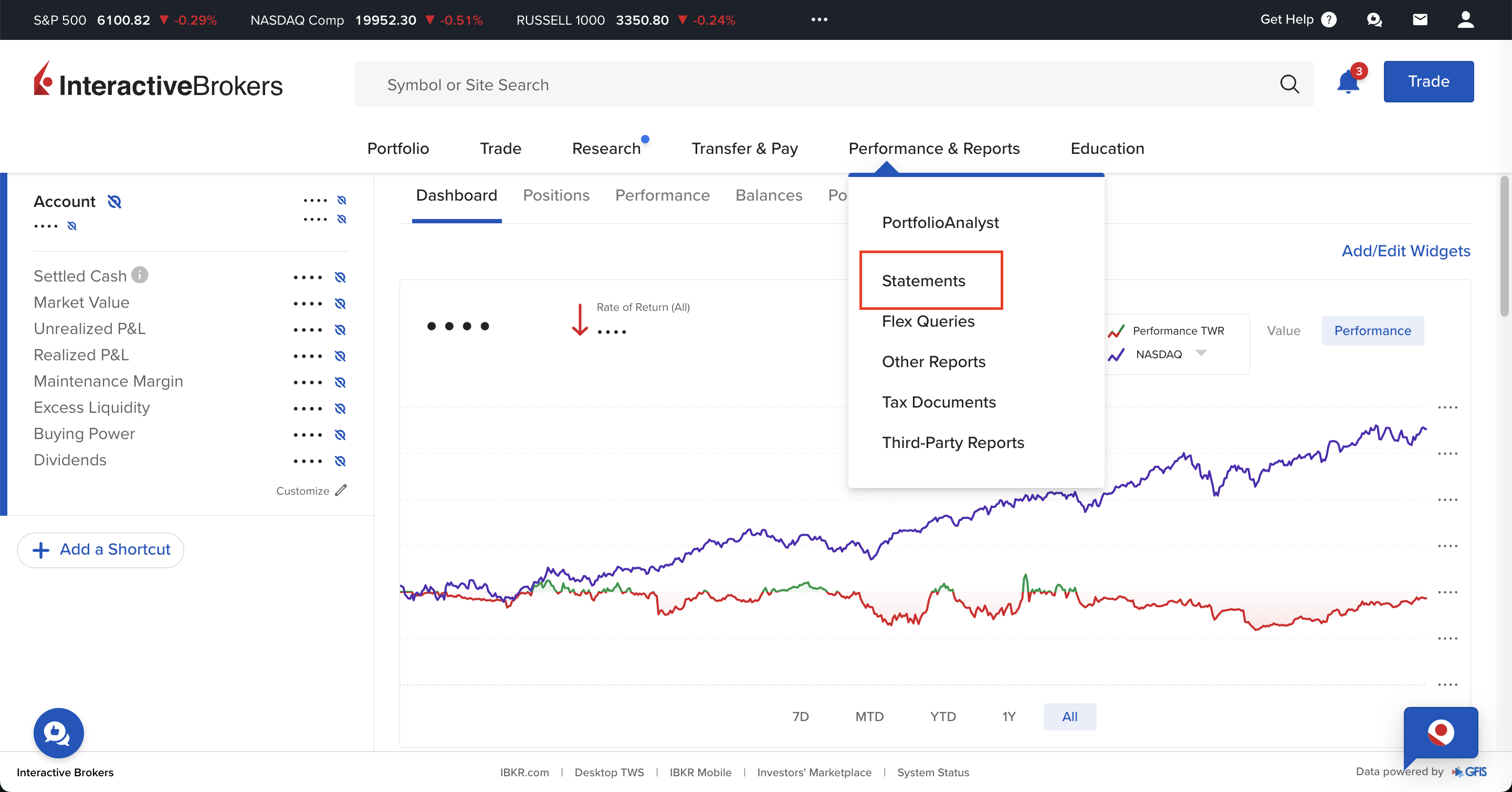
Use the central menu in your IBKR account to access "Performance & Reports",
and select "Statements".
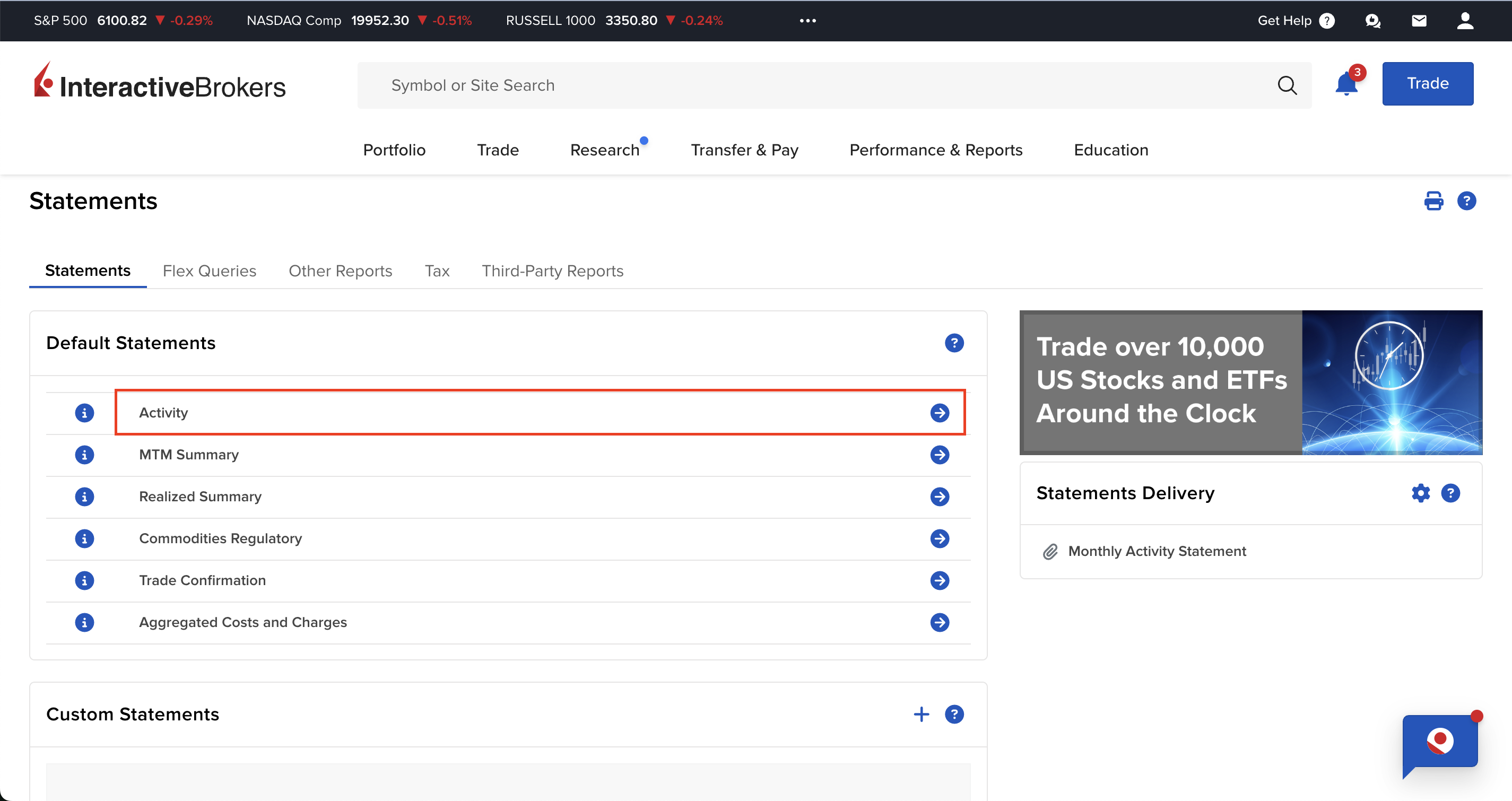
On the "Performance & Reports" page there are several options available, you should select "Activity" inside the Statements tab.
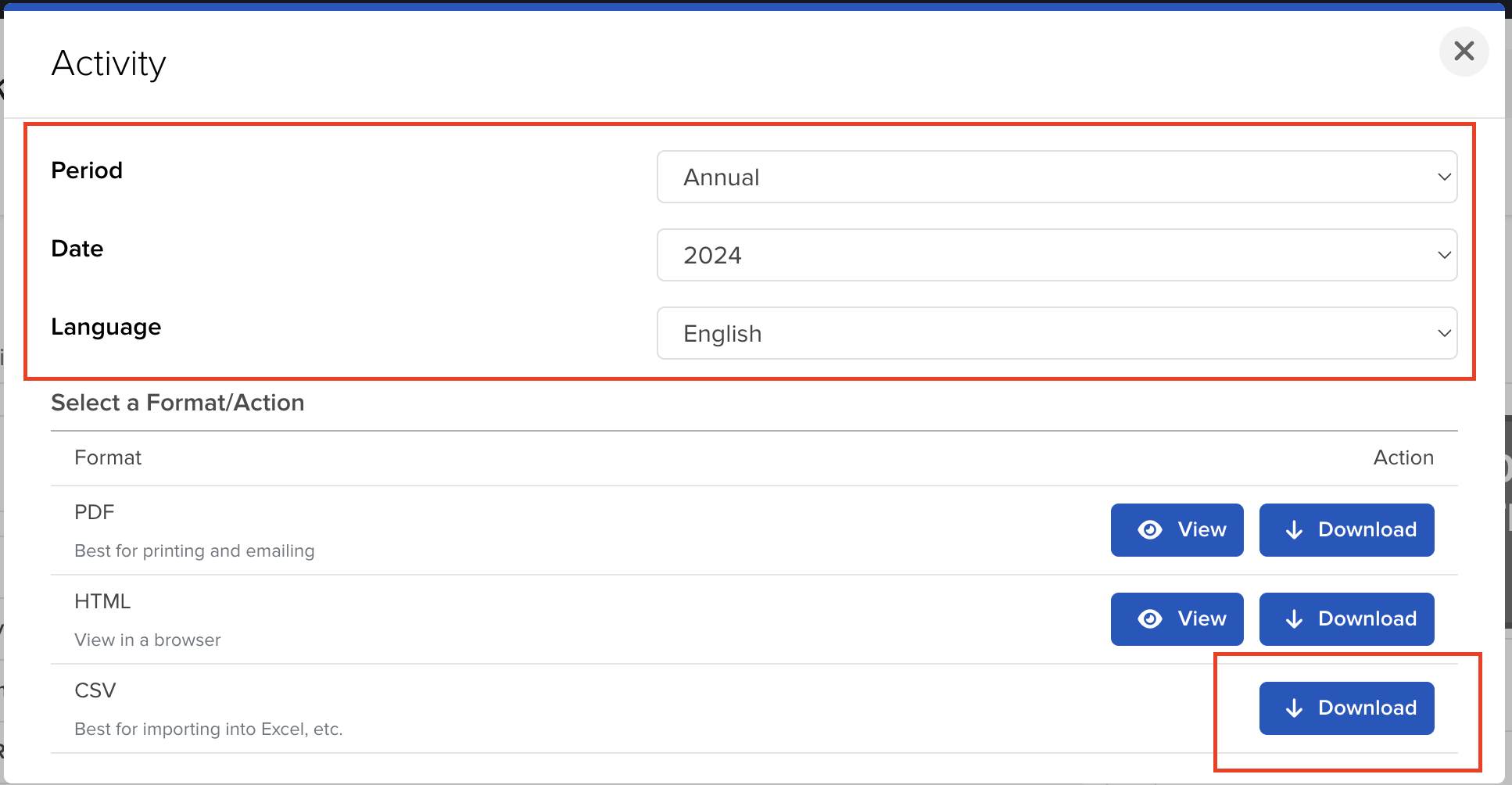
On the "Activity" page, you can select the period and the format you want to export.
For the reports to be accurate you should download one file per each year you had your Interactive
Brokers account open.
After selecting the period, click on the "Download" button to export the file.
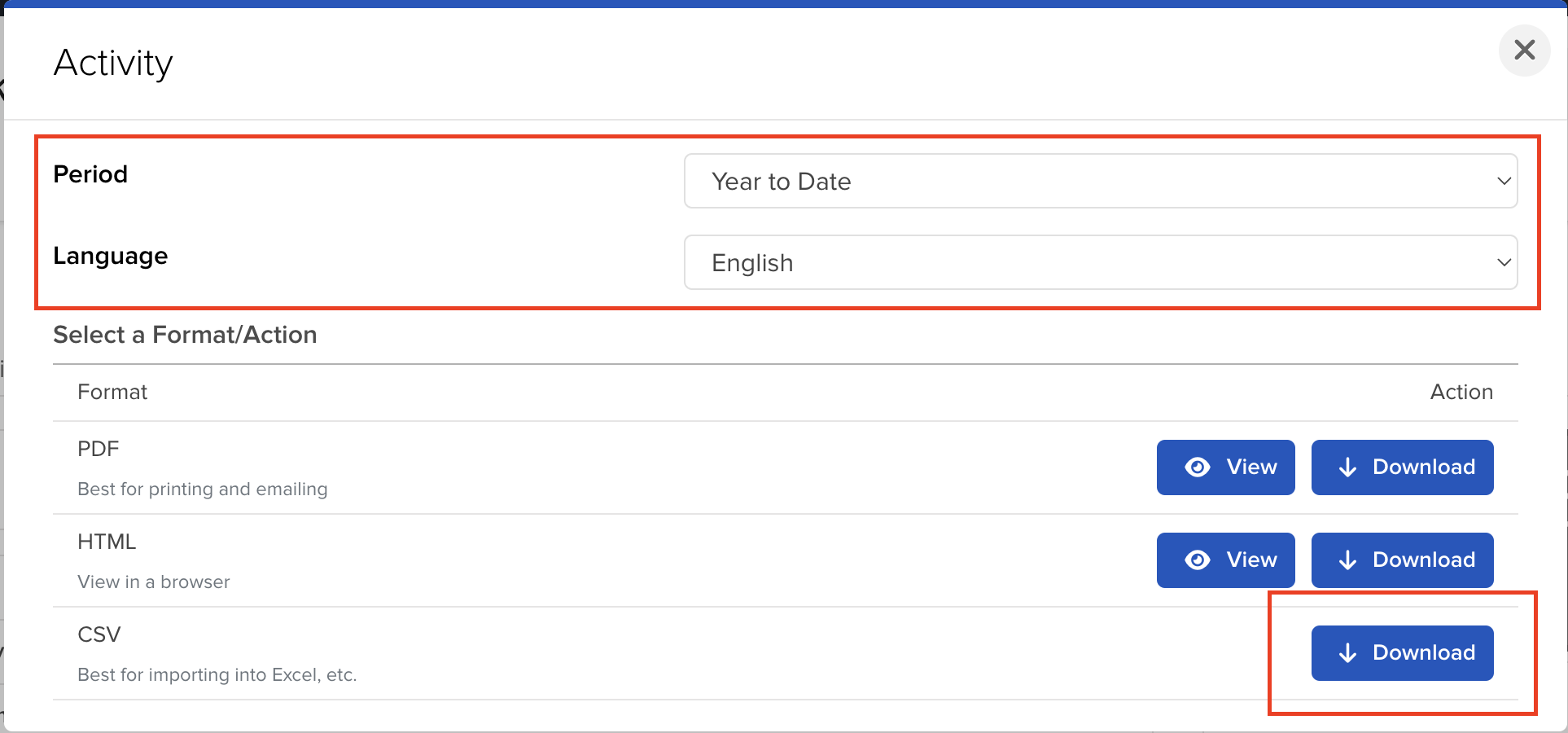
If you want to include the current year as well, you can select the "Year to Date" option.
How to upload multiple files to Tax-wizard?
You must submit all files at the same time for Tax-wizard to be able to process them together. Here are the instructions on how to upload multiple files simultaneously. Follow these steps:
- Windows
- 1. Click on one of the files you wish to select.
- 2. Hold down the Control (Ctrl) key.
- 3. While holding down the Control key, click on the other files you want to select.
- 4. Continue holding the Control key until you have selected all the desired files.
- Mac
- 1. Click on one of the files you wish to select.
- 2. Hold down the Command or Shift key.
- 3. While holding the Command or Shift key, click on the other files you want to select.
- 4. Continue holding the Command or Shift key until you have selected all the desired files.
By following these steps, you can ensure you have the correct files needed to use with Tax-wizard.
From here you can upload them to Tax-wizard and have your tax report ready in minutes.
Frequently Asked Questions
Are Interactive Brokers fractional shares derivatives?
No. IBKR's official disclosure states: "The client will always be the beneficial owner of any fractional Shares … segregated … in the same manner and to the same extent as whole shares." You are the beneficial owner of real shares - not a derivative or a CFD.
So for tax purposes they are treated as ordinary shares, taxed as capital gains on securities, not as derivatives. IBKR records fractions to 4 decimal places, so a decimal quantity is normal. Learn more here.
How are Interactive Brokers capital gains taxed?
IBKR is a foreign broker, so you self-report your capital gains in your country of tax residence. Tax-Wizard separates shares and ETFs from derivatives (options, futures, CFDs) and produces a country-specific report for Portugal (Anexo J), Spain (IRPF), Italy, Germany, Ireland and more, automatically.
Hur deklarerar jag mina Interactive Brokers-investeringar i Sverige?
Interactive Brokers är en utländsk aktör och lämnar ingen kontrolluppgift till Skatteverket - dina affärer finns alltså inte i den förifyllda deklarationen, utan du måste lägga till dem själv.
- Varje avyttring redovisas på bilaga K4: marknadsnoterade aktier i avsnitt A och övriga tillgångar, bland annat krypto, i avsnitt D.
- Kapitalvinster beskattas med 30 %.
- Belopp i utländsk valuta räknas om till kronor med Riksbankens kurs på affärsdagen; K4-beloppen anges i hela kronor.
- Skatteverket beviljar automatisk avräkning av utländsk källskatt upp till 500 kr - över det beloppet begär du avräkning särskilt.
Vilken metod ska jag använda för omkostnadsbeloppet?
Genomsnittsmetoden är huvudregel enligt IL 48 kap. 7 § : omkostnadsbeloppet poolas per värdepapper över alla dina innehav, inte per enskilt köp. För marknadsnoterade aktier får du i stället välja schablonmetoden och ta upp 20 % av försäljningspriset som omkostnadsbelopp (IL 48 kap. 15 §), vilket lönar sig när underlaget saknas eller när värdet mångdubblats.
Förluster på marknadsnoterade aktier kvittas fullt ut mot aktievinster; det som återstår är avdragsgillt till 70 %. Därför ska vinster och förluster redovisas som separata rader - nettar du ihop dem förlorar du skillnaden mellan full kvittning och 70-procentig kvotering.
Mer om K4-avsnitten, kvittningsreglerna och avräkning av utländsk källskatt hittar du i den kompletta guiden till skatt på investeringar i Sverige. Med Tax-wizard laddar du upp Interactive Brokers-filerna du exporterade ovan och får på några minuter färdiga K4-rader - och en SRU-fil du kan importera i Skatteverkets e-tjänst.
Hur mycket är din tid egentligen värd?
Tänk på värdet av din tid och tryggheten i att ha ett pålitligt och noggrant verktyg som sköter din skatterapportering
(betalningen täcker årets deklaration för 2025 och tidigare år, manuell förnyelse nästa år)
Premium
Alla funktioner, för Revolut, Degiro, eToro, XTB, Trading212, Interactive Brokers, Freedom24, Lightyear, Trade Republic, Coinbase, Robinhood Crypto,...
- Stöd för alla mäklare och valutor
- Automatisk beräkning av kapitalvinster
- Rapport med förvärv, avyttringar, utdelningar och räntor
- Rapport och statistik över öppna positioner
- Transaktions- och utdelningsstatistik
- Exportera öppna positioner till Yahoo Finance
Business
Alla premiumfunktioner, för revisorer, finansiella rådgivare, skattekonsulter eller andra yrkesverksamma och företag som vill använda Tax-Wizard för flera klienter.
- Stöd för alla mäklare och valutor
- Automatisk beräkning av kapitalvinster
- Rapport med förvärv, avyttringar, utdelningar och räntor
- Rapport och statistik över öppna positioner
- Transaktions- och utdelningsstatistik
- Exportera öppna positioner till Yahoo Finance