- Home
- Mäklare som stöds
- Revolut
Skatt på Revolut 2026 - aktier, krypto och ränta
Räkna ut skatten på dina Revolut-investeringar med Tax-Wizard. Exportera ditt konsoliderade kontoutdrag och få färdiga K4-rader till deklarationen 2026.
Senast uppdaterad: · Granskad av Tax-Wizard-teamet · Officiellt hjälpcenter för Revolut ↗
This guide is designed to assist anyone who have investments on Revolut and is seeking clarity on how to pay taxes. The information provided here should be useful when calculating your Revolut taxes. However, it’s important to supplement this guide with the tax regulations specific to your country.
If you need to calculate taxes for your Revolut investments, either on their Brokerage Account, Crypto investments, Flexible Cash Funds, or Robo-Advisor, you’re in the right place! There are several ways to do this, such as calculating taxes manually in Excel, using an automated tax tool like Tax-wizard, or hiring a tax professional. Your choice will often depend on your budget and preferences.
How to export your Revolut history
- 1. Custom Statement (Recommended)
- 2. Revolut Invest (Brokerage Account)
- 3. Revolut Robo-Advisor
- 4. Revolut Crypto
- 5. Revolut Flexible Cash Funds
Start by Login on your Revolut mobile app.

Custom Statement (Recommended)
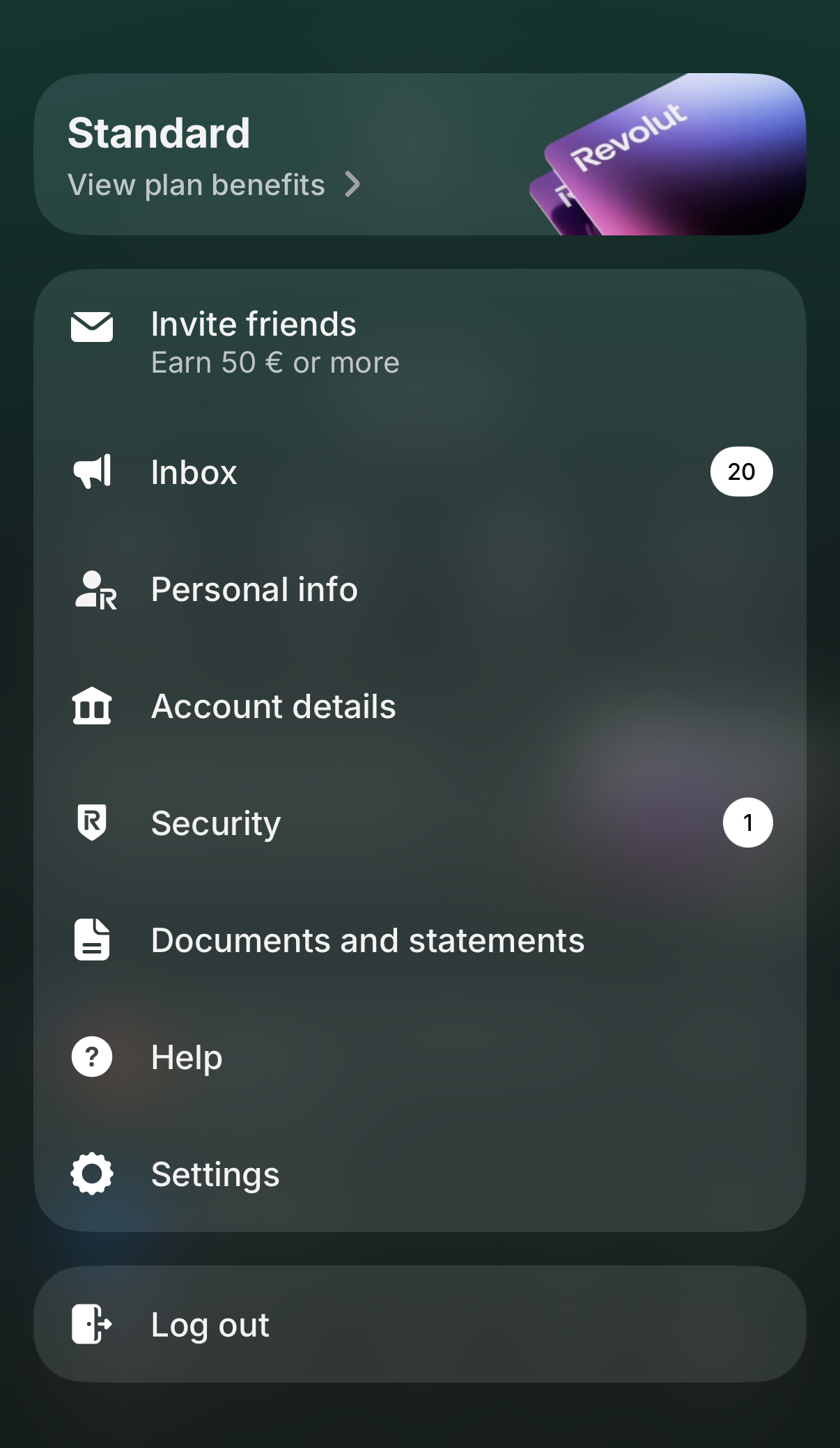
Revolut now lets you generate a single custom statement that can combine several of your accounts into one file. It's the fastest way to get everything Tax-wizard needs in a single download. Tap your profile picture in the top-left corner to open the menu, then select "Documents and statements".
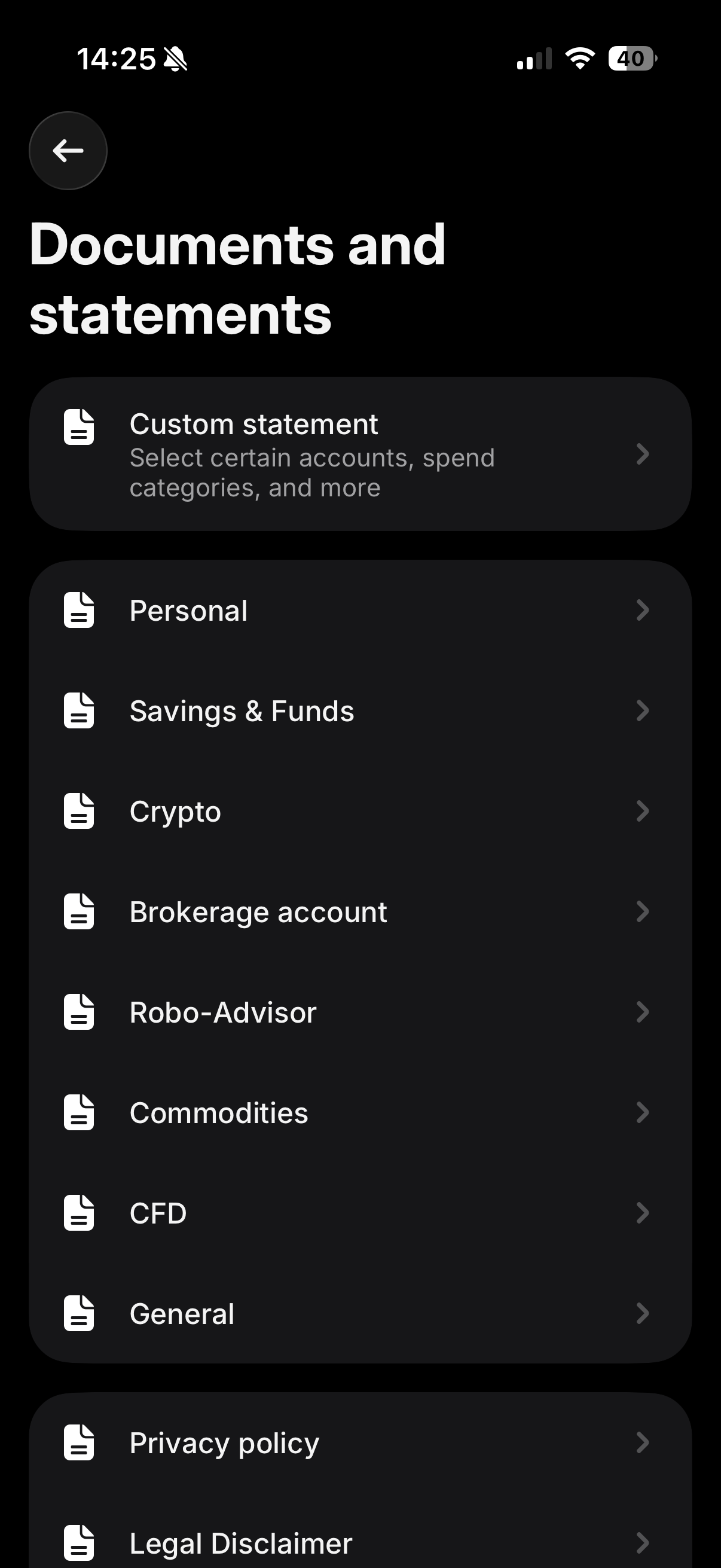
On the "Documents and statements" screen, tap "Custom statement" - it's the first option at the top, described as "Select certain accounts, spend categories, and more".
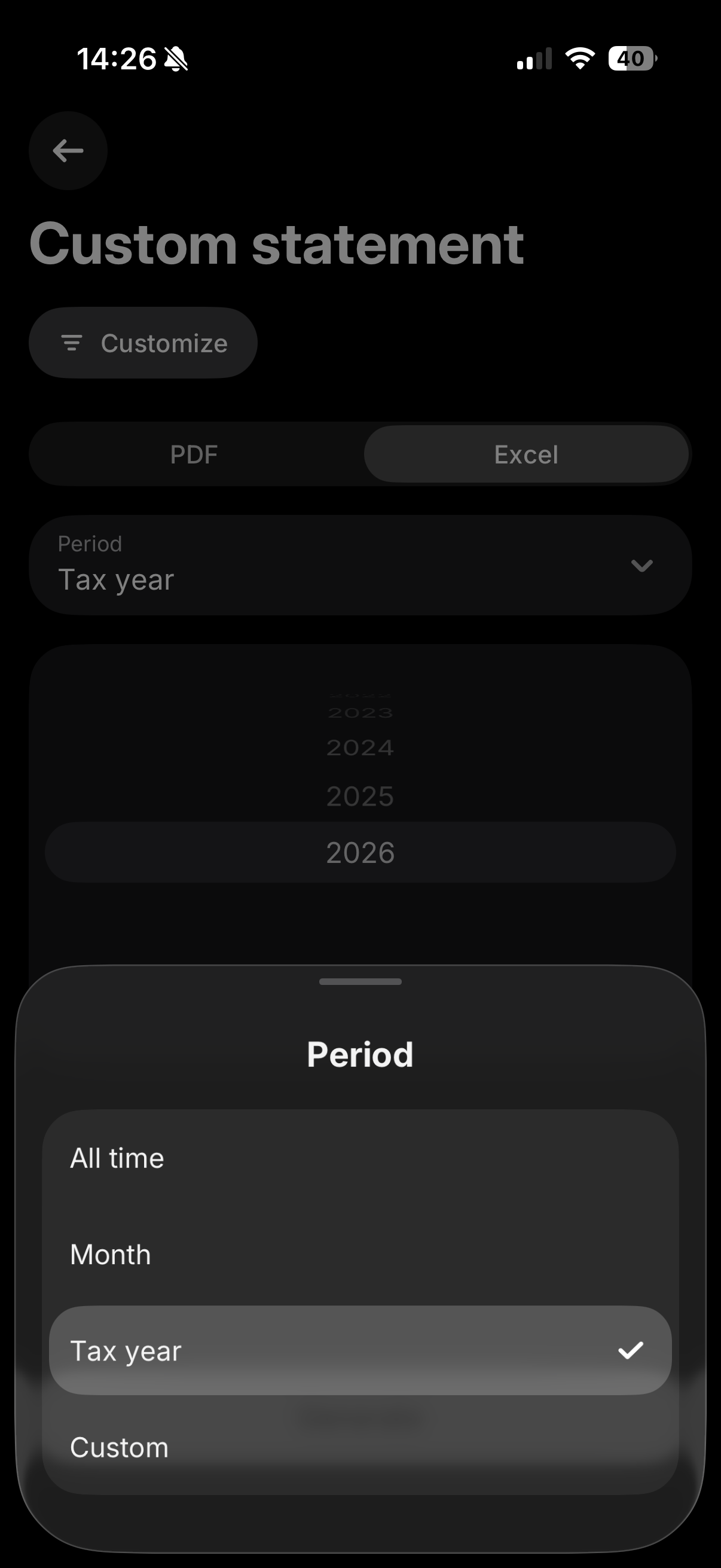
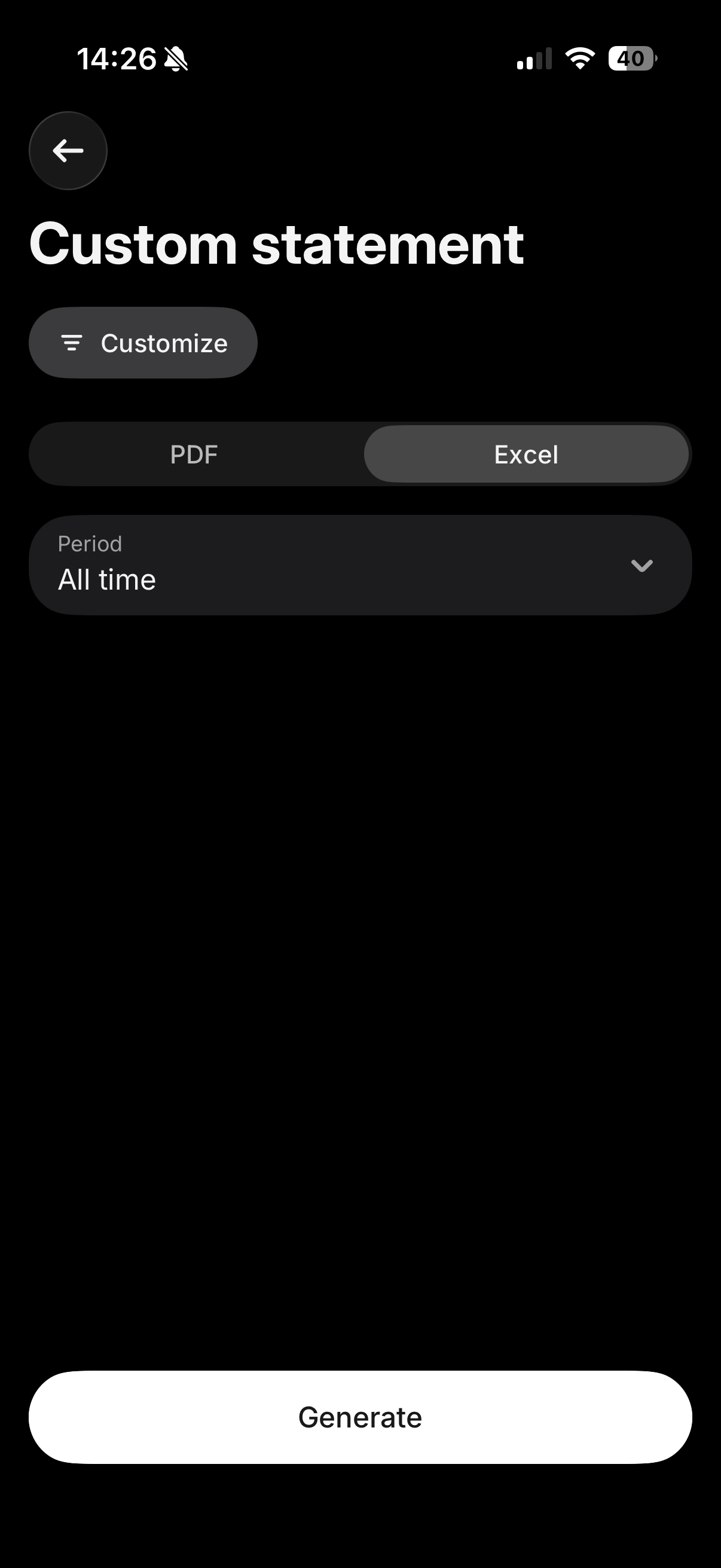
Tap "Customize" and make sure all your relevant accounts (Invest, Crypto, Flexible Cash Funds, Robo-Advisor, etc.) are selected, so everything is included in a single file. Then select the "Excel" tab, and for the period choose "All time" (or "Custom" if you only need a specific tax year) to make sure your full purchase history is included, which is required to calculate accurate cost basis. Finally, tap "Generate".
Where to upload this file
The "Excel" tab downloads a CSV file. Upload it exactly as downloaded, in the "Consolidated Account Statement (CSV)" box on the Tax-wizard dashboard - don't open and re-save it in Excel.
Leave the other Revolut boxes empty: the consolidated statement already covers Invest, Crypto, Flexible Cash Funds and Savings, so any other Revolut file uploaded alongside it is ignored to avoid double counting.
If the custom statement doesn't cover every account you need, or you'd rather export each product separately, you can still follow the individual steps below for Revolut Invest, Robo-Advisor, Crypto, and Flexible Cash Funds.
Revolut Invest (Brokerage Account)
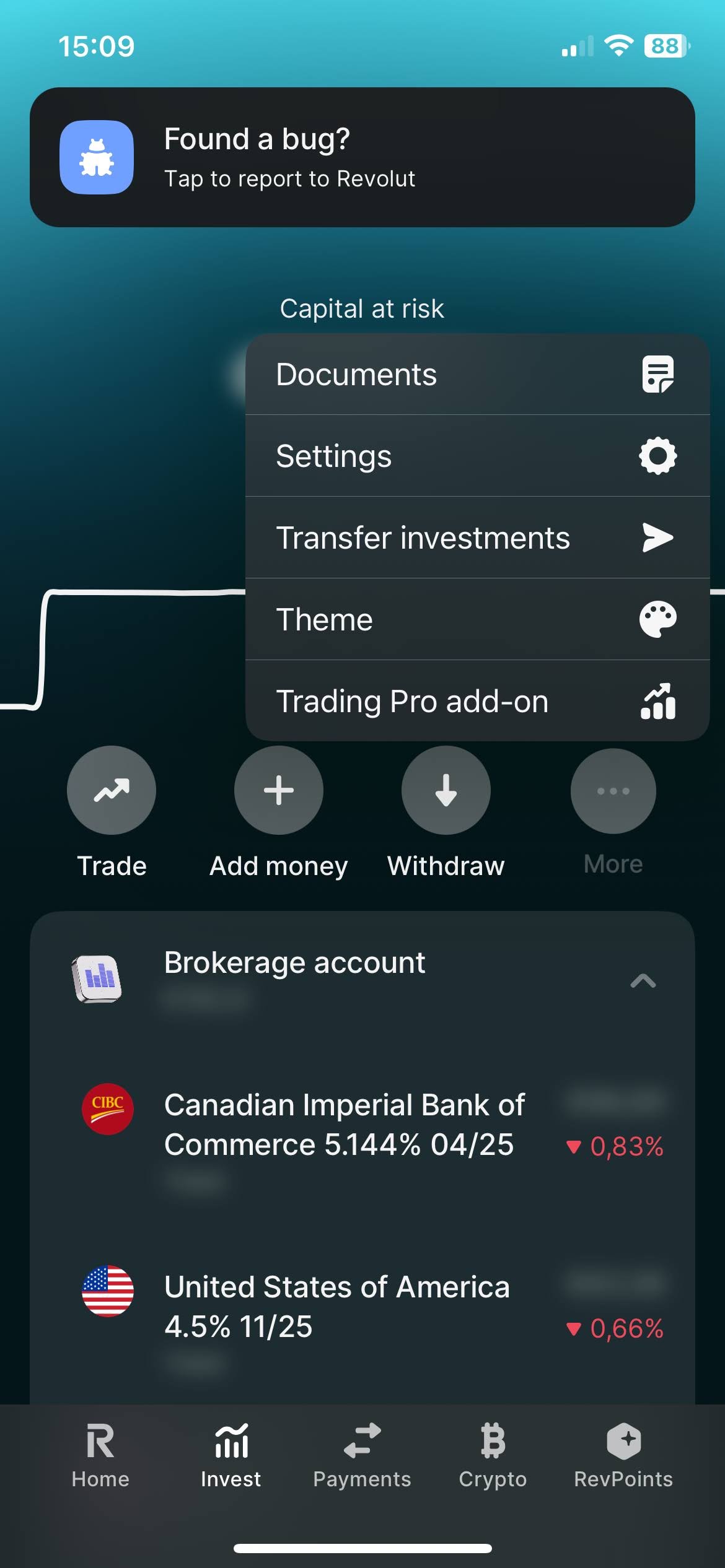
Select on your Revolut app the "Invest" tab. And open the menu by clicking on the three dots, there you'll find the "Documents" option. Select "Brokerage Account".
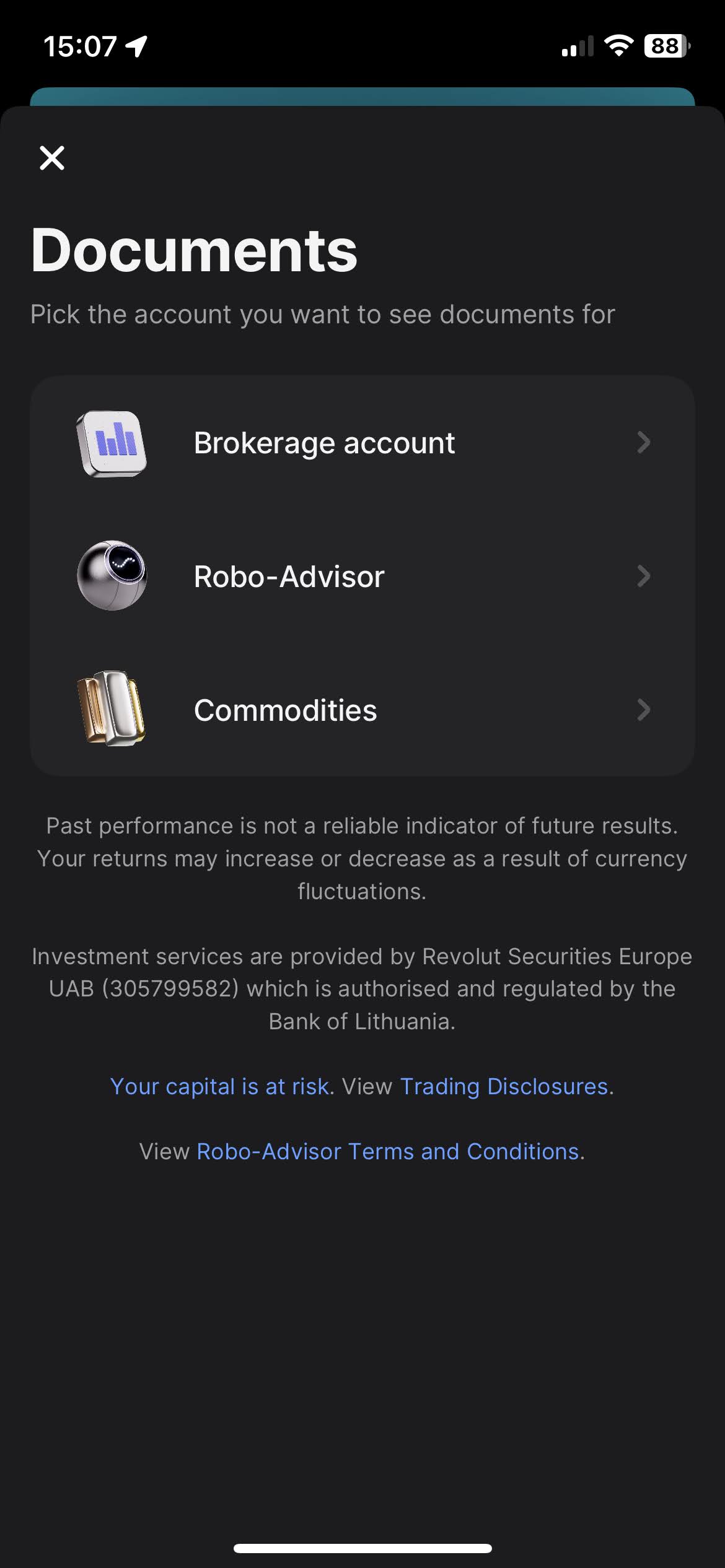
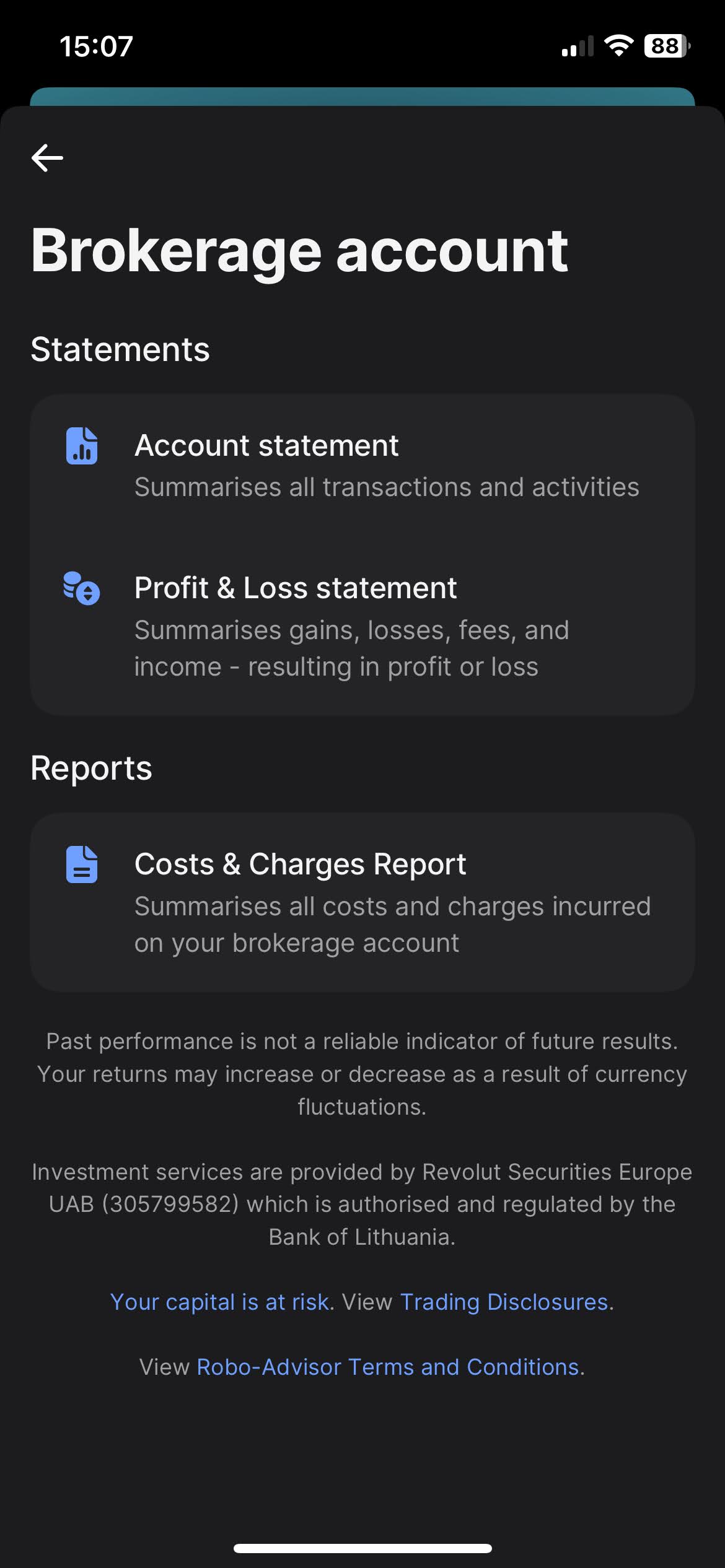
When you click on "Brokerage Account", you'll find the option to download your statements. Revolut offers a variety of types of statements, such as "Account Statement", "Profit & Loss Statements", and "Cost & Charges Report". The most complete one, and the one we're after is the "Account Statement".
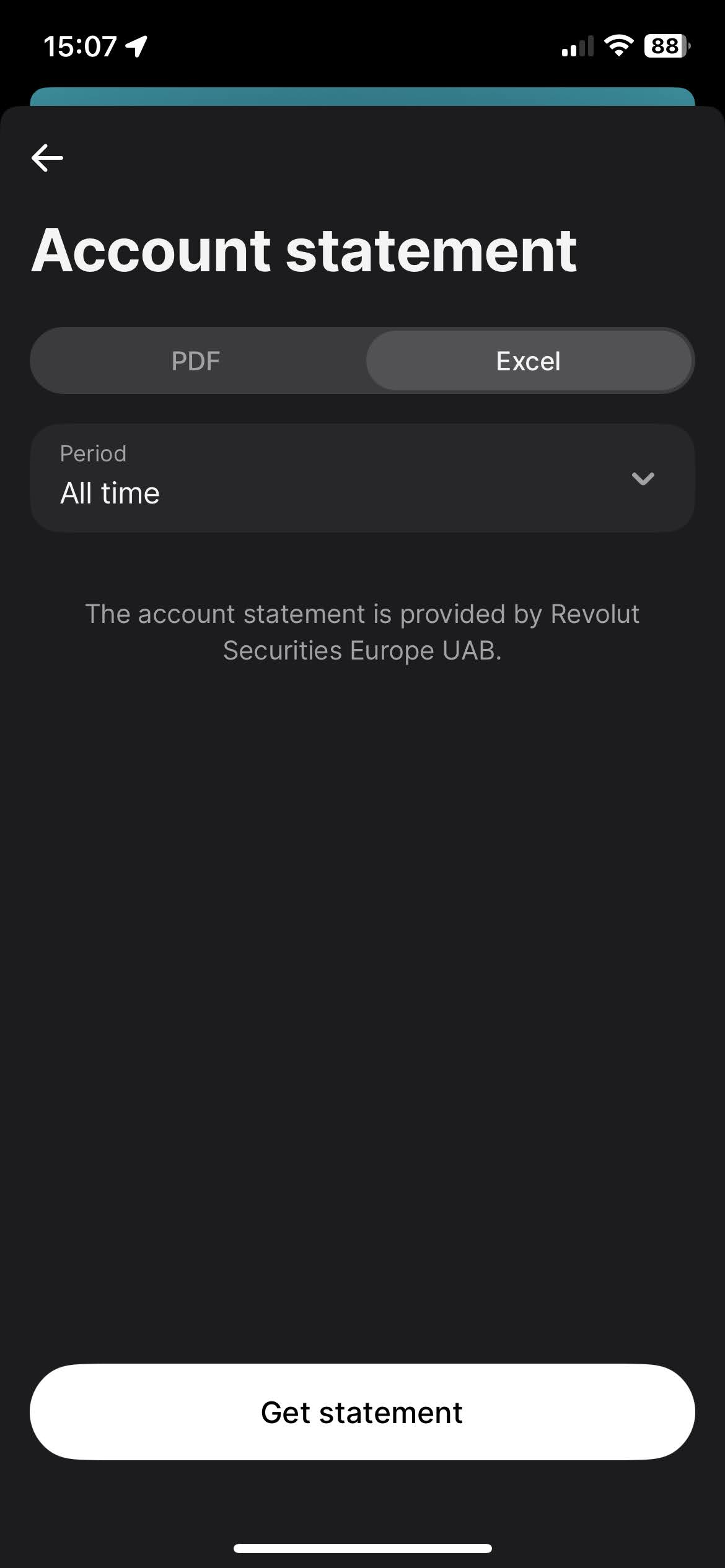
To download the Account Statement, select the "Excel" tab, for the period select "All time", and click on the "Get statement" button.
Revolut Robo-Advisor
The process for Robo-Advisor is very similar to the Revolut Invest (Brokerage Account).
Select on your Revolut app the "Invest" tab. And open the menu by clicking on
the
three dots, there you'll find the "Documents" option. Select "Robo-Advisor".
When you click on "Robo-Advisor", you'll find the option to download your statements. Revolut offers a variety of types of statements, such as "Account Statement" and "Profit & Loss Statements". The most complete one, and the one we're after is the "Account Statement".
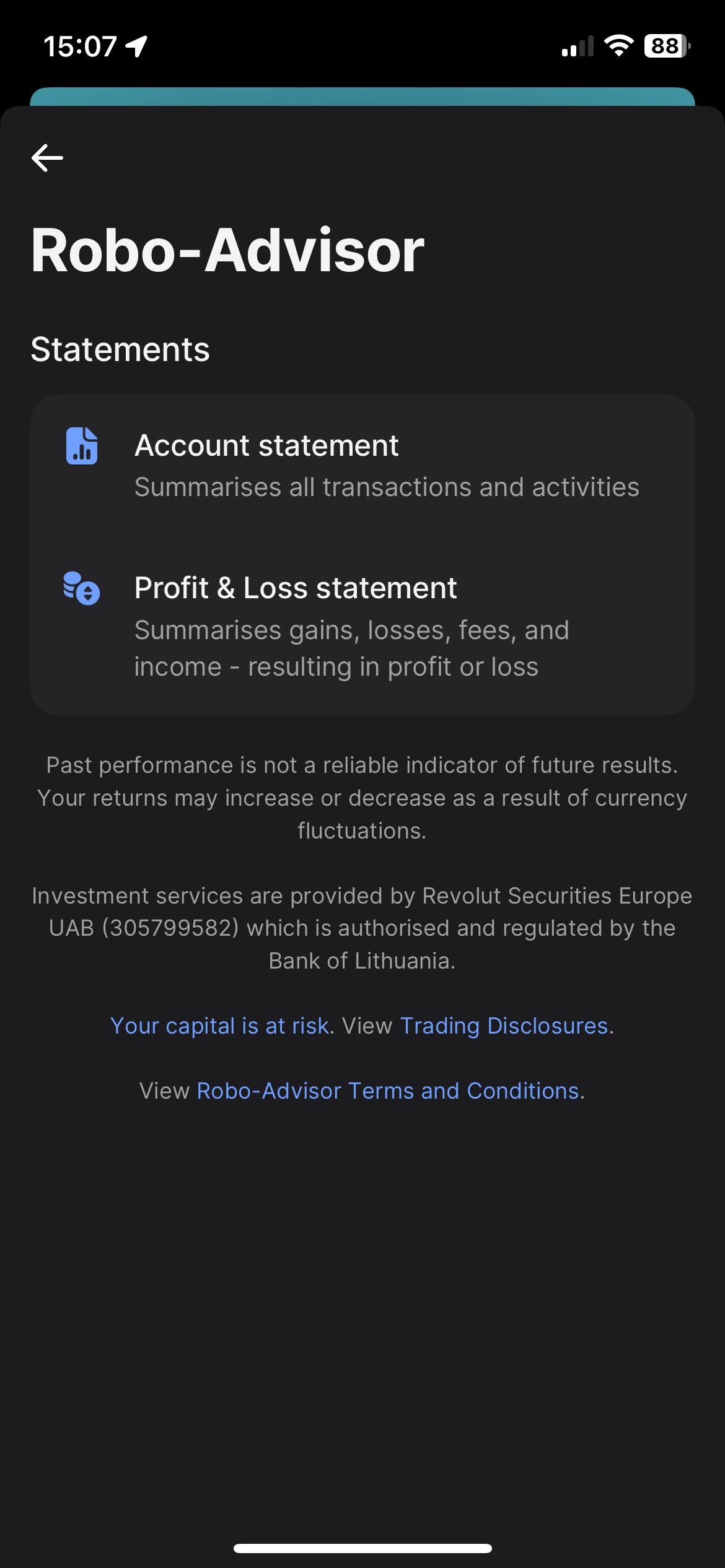
To download the Account Statement, select the "Excel" tab, for the period select "All time", and click on the "Get statement" button.
Revolut Crypto
Select on your Revolut app the "Crypto" tab. And open the menu by clicking on the three dots, there you'll find the "Documents" option.
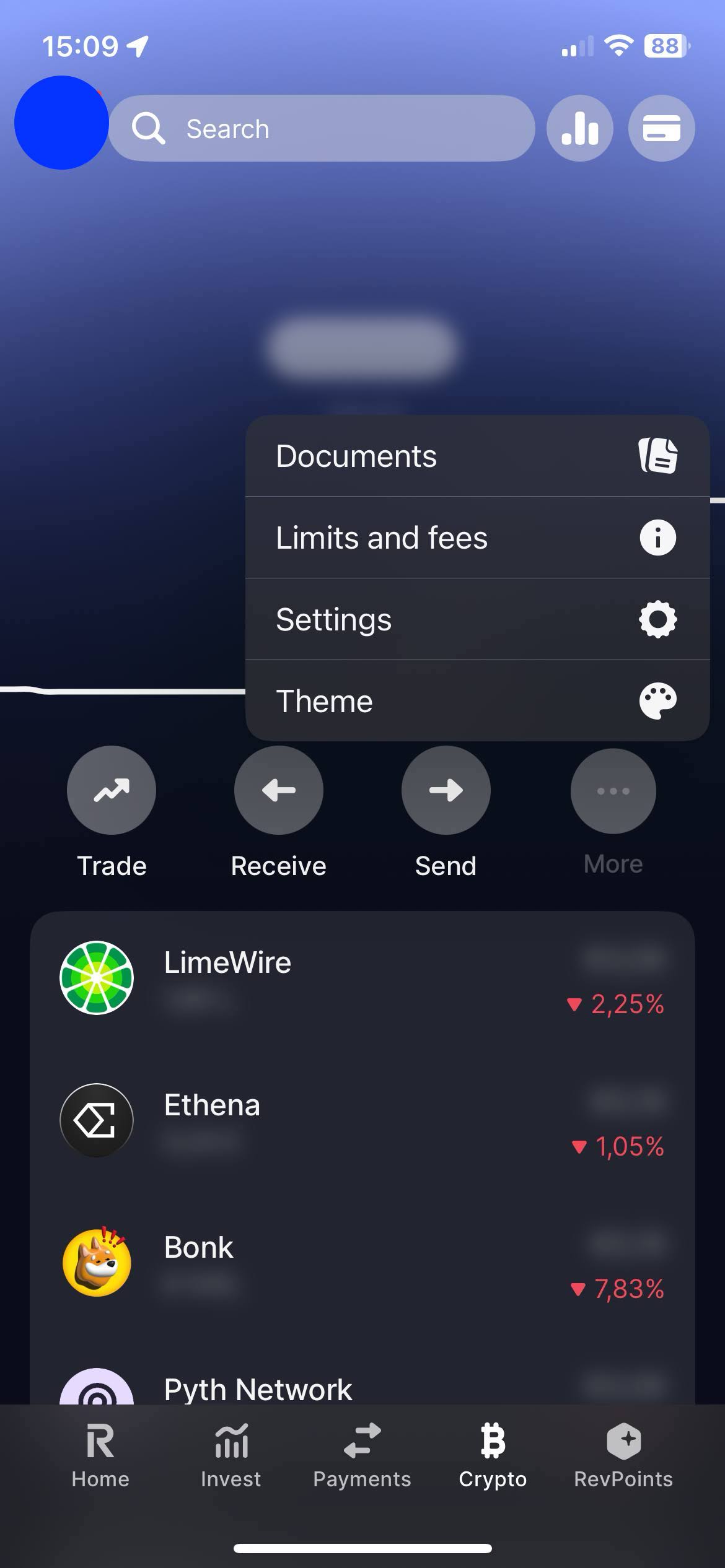
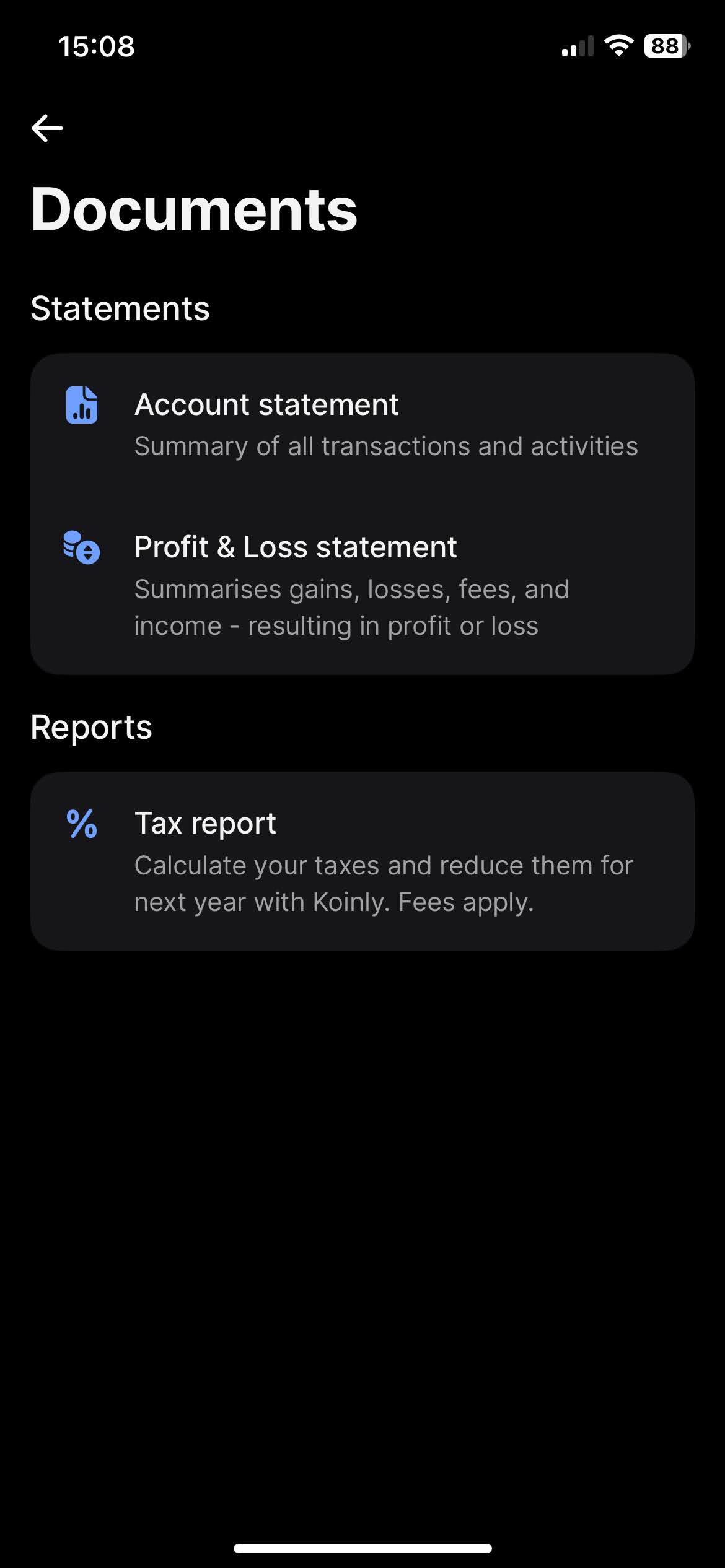
When you click on "Documents", you'll find the option to download your statements. Revolut offers a variety of types of statements, such as "Account Statement" and "Profit & Loss Statements". The most complete one, and the one we're after is the "Account Statement".
To download the "Account Statement", select the "Excel" tab, for the period select "All time", and click on the "Get statement" button.
Revolut Flexible Cash Funds
On your Revolut app on the "Home" tab slide your accounts until you find your "Flexible Cash Funds". Open the menu by clicking on the three dots, there you'll find the "Statement" option.
It is possible to have Flexible Cash Funds in different currencies. Revolut has the option to generate a statement containing all different Flexible Cash Funds. For that on the "Statement" page click on the top menu "Flexible Cash Funds" and select all accounts.
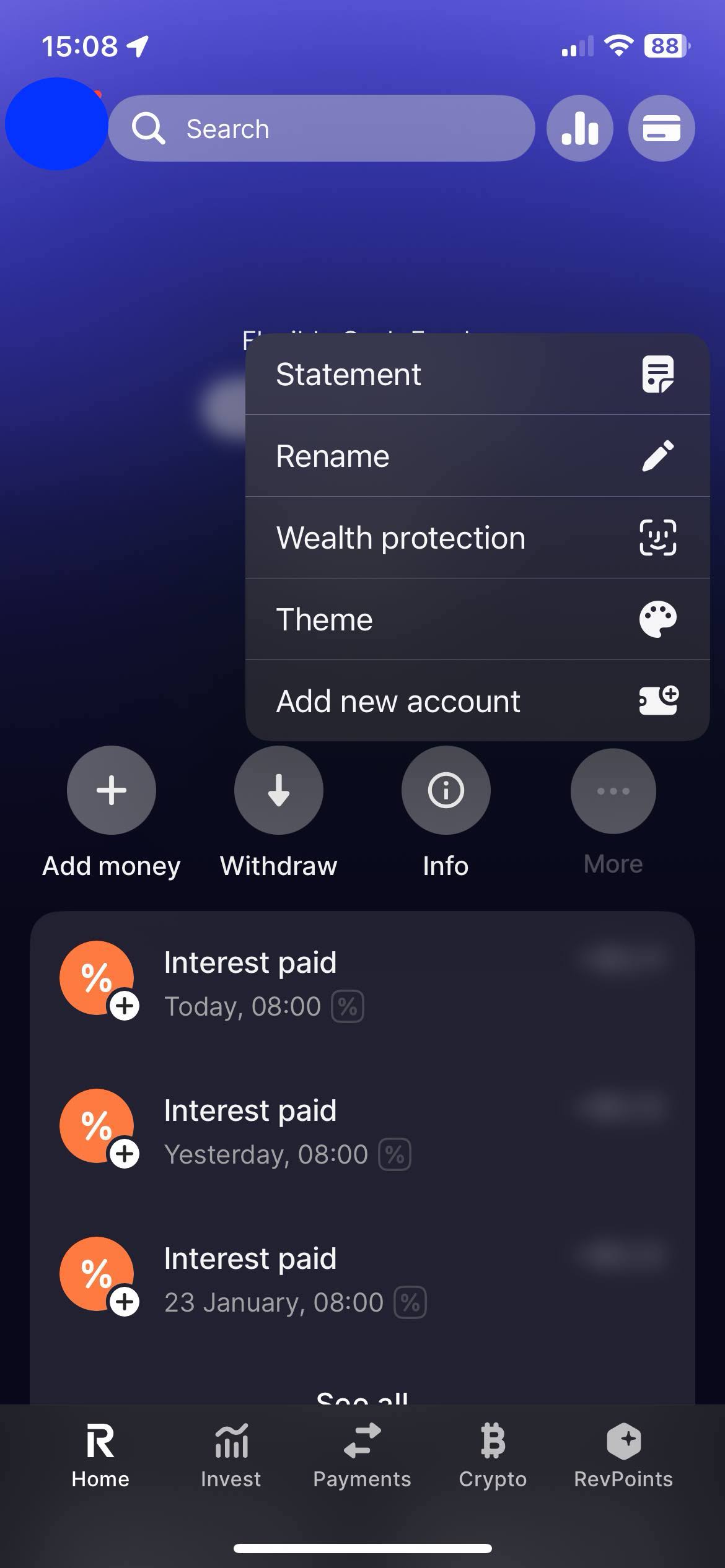
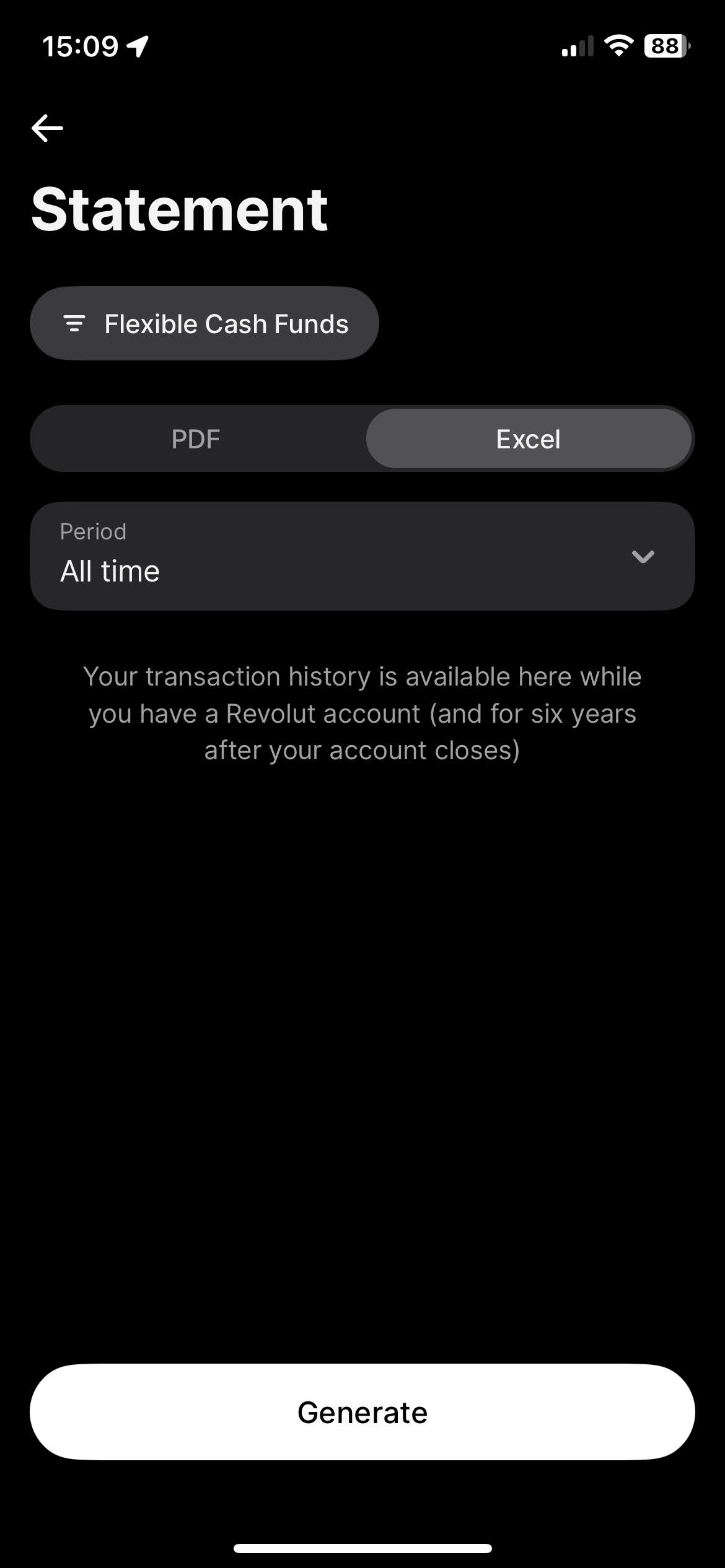
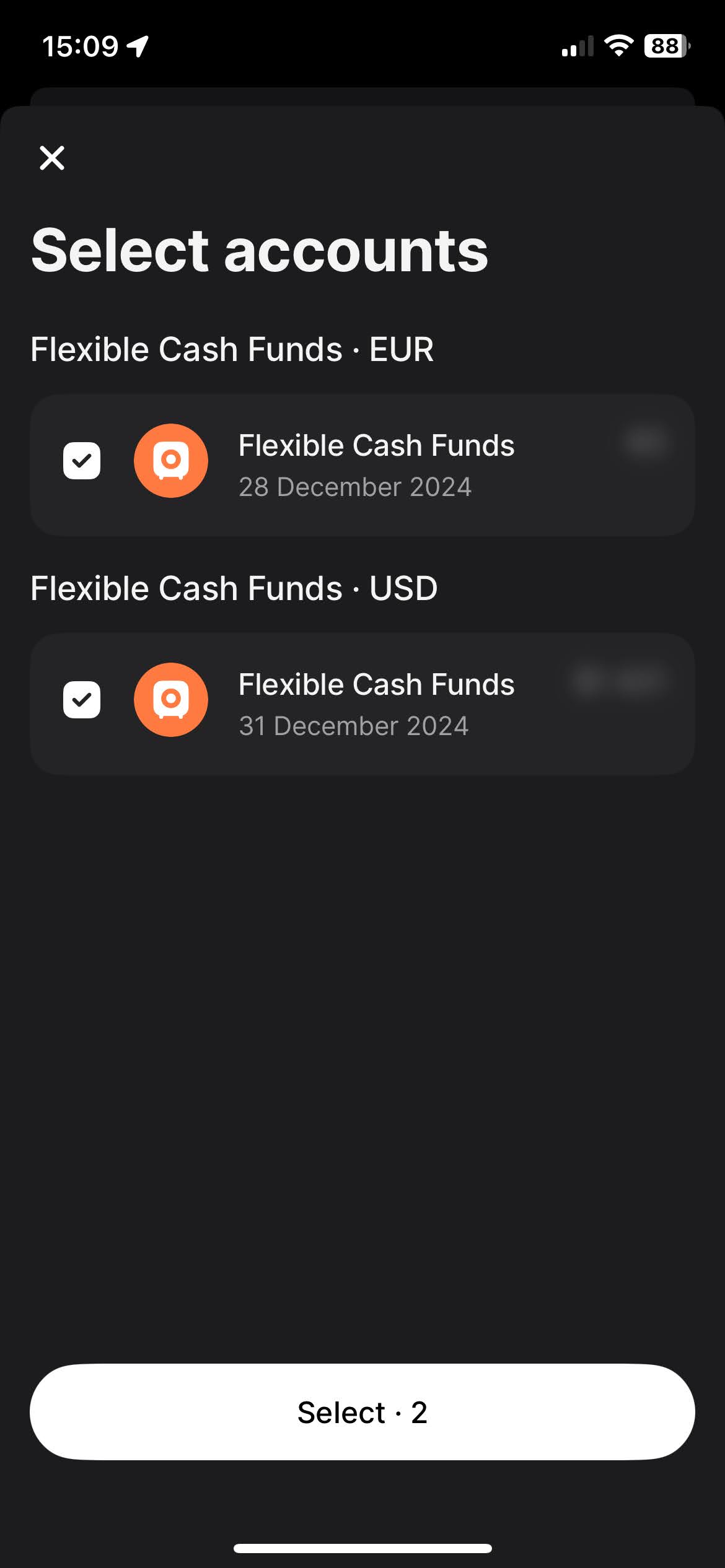
To download the "Account Statement", select the "Excel" tab, for the period select "All time", and click on the "Get statement" button.
By following these steps, you can ensure you have the correct files needed to use with Tax-wizard.
From here you can upload them to Tax-wizard and have your tax report ready in minutes.
Hur deklarerar jag mina Revolut-investeringar i Sverige?
Revolut är en utländsk aktör och lämnar ingen kontrolluppgift till Skatteverket - dina affärer finns alltså inte i den förifyllda deklarationen, utan du måste lägga till dem själv.
- Varje avyttring redovisas på bilaga K4: marknadsnoterade aktier i avsnitt A och övriga tillgångar, bland annat krypto, i avsnitt D.
- Kapitalvinster beskattas med 30 %.
- Belopp i utländsk valuta räknas om till kronor med Riksbankens kurs på affärsdagen; K4-beloppen anges i hela kronor.
- Skatteverket beviljar automatisk avräkning av utländsk källskatt upp till 500 kr - över det beloppet begär du avräkning särskilt.
Vilken metod ska jag använda för omkostnadsbeloppet?
Genomsnittsmetoden är huvudregel enligt IL 48 kap. 7 § : omkostnadsbeloppet poolas per värdepapper över alla dina innehav, inte per enskilt köp. För marknadsnoterade aktier får du i stället välja schablonmetoden och ta upp 20 % av försäljningspriset som omkostnadsbelopp (IL 48 kap. 15 §), vilket lönar sig när underlaget saknas eller när värdet mångdubblats.
Förluster på marknadsnoterade aktier kvittas fullt ut mot aktievinster; det som återstår är avdragsgillt till 70 %. Därför ska vinster och förluster redovisas som separata rader - nettar du ihop dem förlorar du skillnaden mellan full kvittning och 70-procentig kvotering.
Hur beskattas krypto från Revolut i Sverige?
Varje avyttring är skattepliktig - även byte krypto mot krypto och betalning med krypto - och redovisas rad för rad på K4 avsnitt D med 30 % skatt. Här gäller genomsnittsmetoden, medan schablonmetoden inte får användas, eftersom den bara omfattar marknadsnoterade aktier. Förluster på krypto är avdragsgilla till 70 %, så vinster och förluster måste redovisas separat och får inte nettas mot varandra.
Ersättning från staking och mining är inte en avyttring utan tas upp som inkomst vid mottagandet, till marknadsvärdet i kronor (INK1 punkt 7.2). Det värdet blir sedan omkostnadsbelopp när du säljer tillgången.
Mer om K4-avsnitten, kvittningsreglerna och avräkning av utländsk källskatt hittar du i den kompletta guiden till skatt på investeringar i Sverige. Med Tax-wizard laddar du upp Revolut-filerna du exporterade ovan och får på några minuter färdiga K4-rader - och en SRU-fil du kan importera i Skatteverkets e-tjänst.
Hur mycket är din tid egentligen värd?
Tänk på värdet av din tid och tryggheten i att ha ett pålitligt och noggrant verktyg som sköter din skatterapportering
(betalningen täcker årets deklaration för 2025 och tidigare år, manuell förnyelse nästa år)
Premium
Alla funktioner, för Revolut, Degiro, eToro, XTB, Trading212, Interactive Brokers, Freedom24, Lightyear, Trade Republic, Coinbase, Robinhood Crypto,...
- Stöd för alla mäklare och valutor
- Automatisk beräkning av kapitalvinster
- Rapport med förvärv, avyttringar, utdelningar och räntor
- Rapport och statistik över öppna positioner
- Transaktions- och utdelningsstatistik
- Exportera öppna positioner till Yahoo Finance
Business
Alla premiumfunktioner, för revisorer, finansiella rådgivare, skattekonsulter eller andra yrkesverksamma och företag som vill använda Tax-Wizard för flera klienter.
- Stöd för alla mäklare och valutor
- Automatisk beräkning av kapitalvinster
- Rapport med förvärv, avyttringar, utdelningar och räntor
- Rapport och statistik över öppna positioner
- Transaktions- och utdelningsstatistik
- Exportera öppna positioner till Yahoo Finance