- Home
- Tuetut välittäjät
- Revolut
Näin hoidat Revolut-verot vuonna 2026
Laske Revolut-sijoitustesi verot helposti Tax-Wizardilla. Automatisoi Revolutin veroraportointi ja säästä aikaa veroilmoituksen teossa.
Viimeksi päivitetty: · Tax-Wizard-tiimin tarkistama · Virallinen Revolut-tukikeskus ↗
This guide is designed to assist anyone who have investments on Revolut and is seeking clarity on how to pay taxes. The information provided here should be useful when calculating your Revolut taxes. However, it’s important to supplement this guide with the tax regulations specific to your country.
If you need to calculate taxes for your Revolut investments, either on their Brokerage Account, Crypto investments, Flexible Cash Funds, or Robo-Advisor, you’re in the right place! There are several ways to do this, such as calculating taxes manually in Excel, using an automated tax tool like Tax-wizard, or hiring a tax professional. Your choice will often depend on your budget and preferences.
How to export your Revolut history
- 1. Custom Statement (Recommended)
- 2. Revolut Invest (Brokerage Account)
- 3. Revolut Robo-Advisor
- 4. Revolut Crypto
- 5. Revolut Flexible Cash Funds
Start by Login on your Revolut mobile app.

Custom Statement (Recommended)
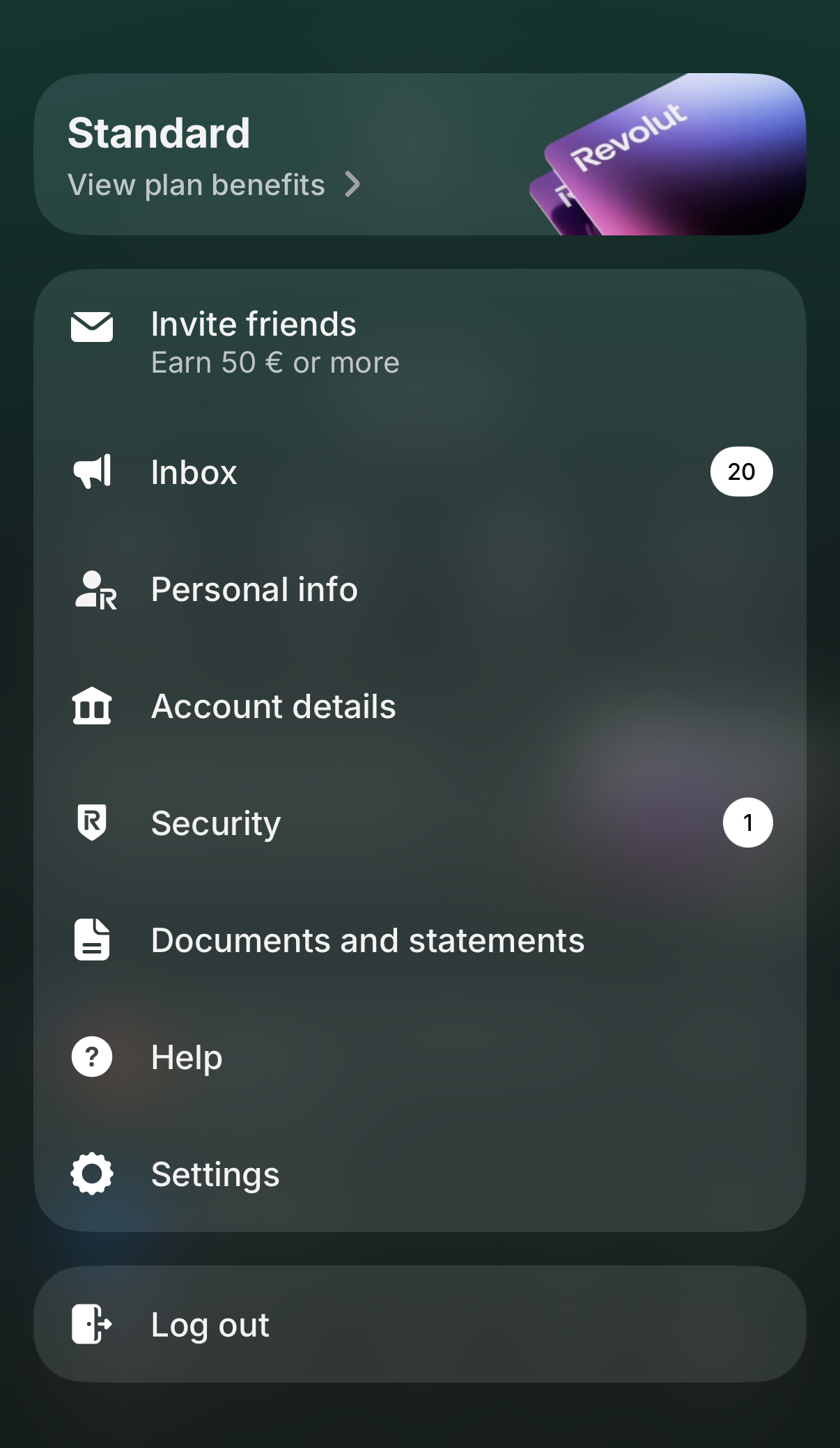
Revolut now lets you generate a single custom statement that can combine several of your accounts into one file. It's the fastest way to get everything Tax-wizard needs in a single download. Tap your profile picture in the top-left corner to open the menu, then select "Documents and statements".
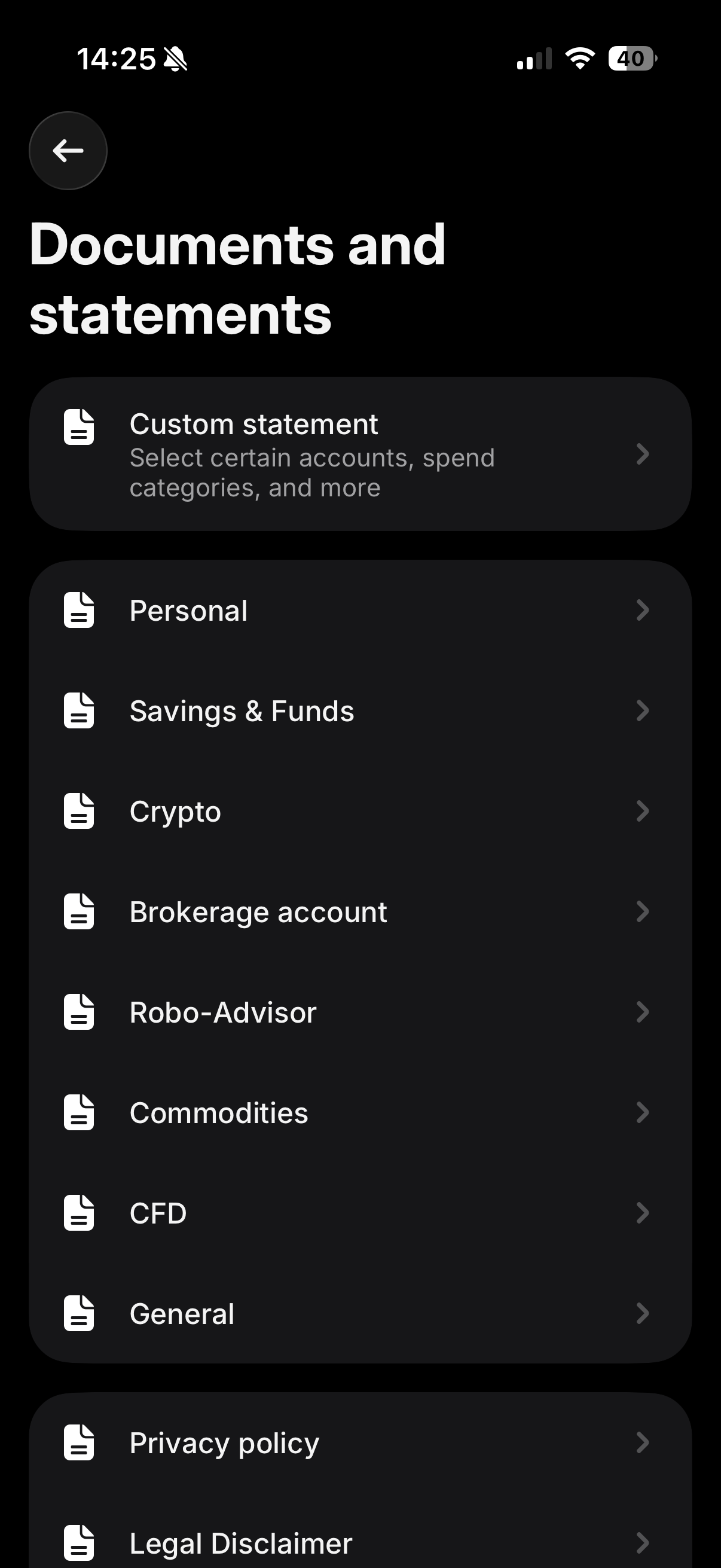
On the "Documents and statements" screen, tap "Custom statement" - it's the first option at the top, described as "Select certain accounts, spend categories, and more".
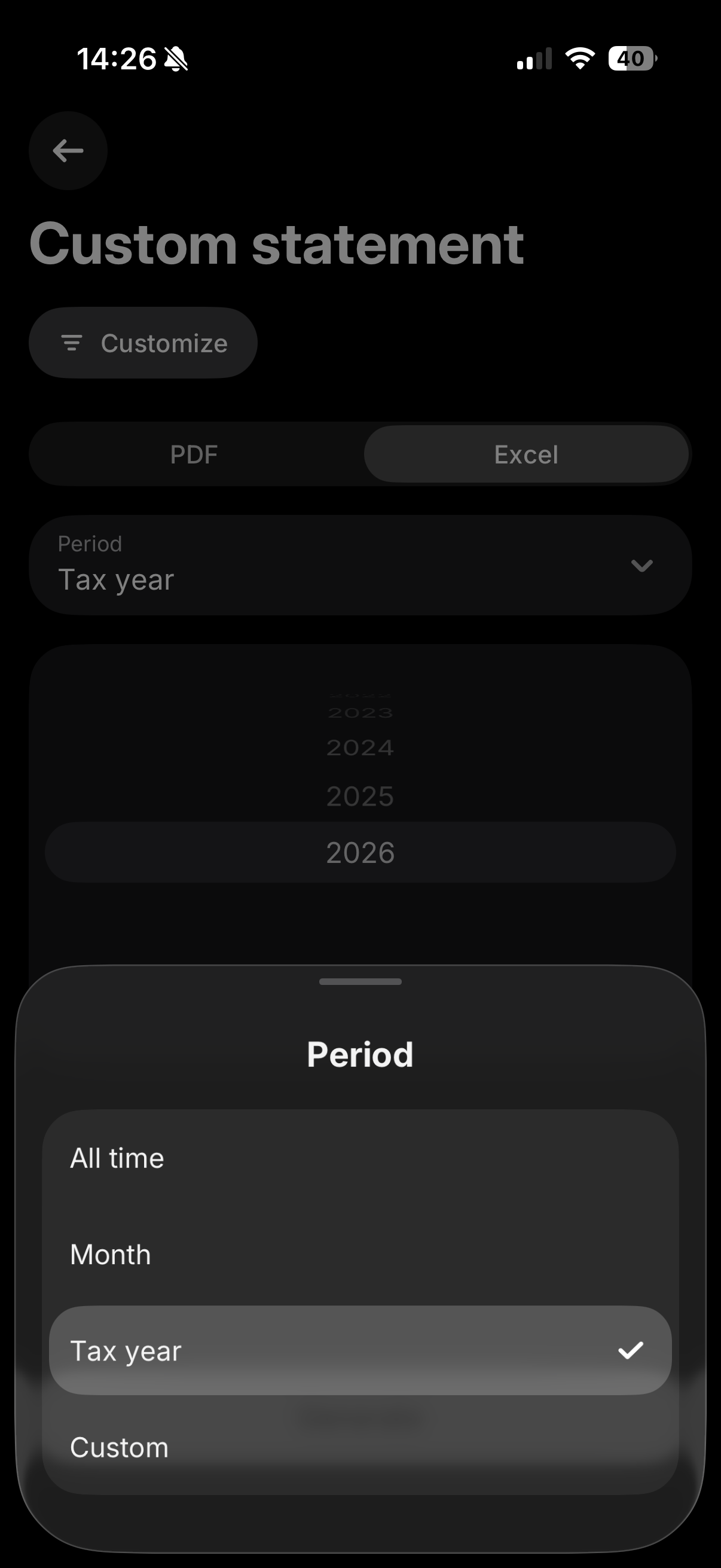
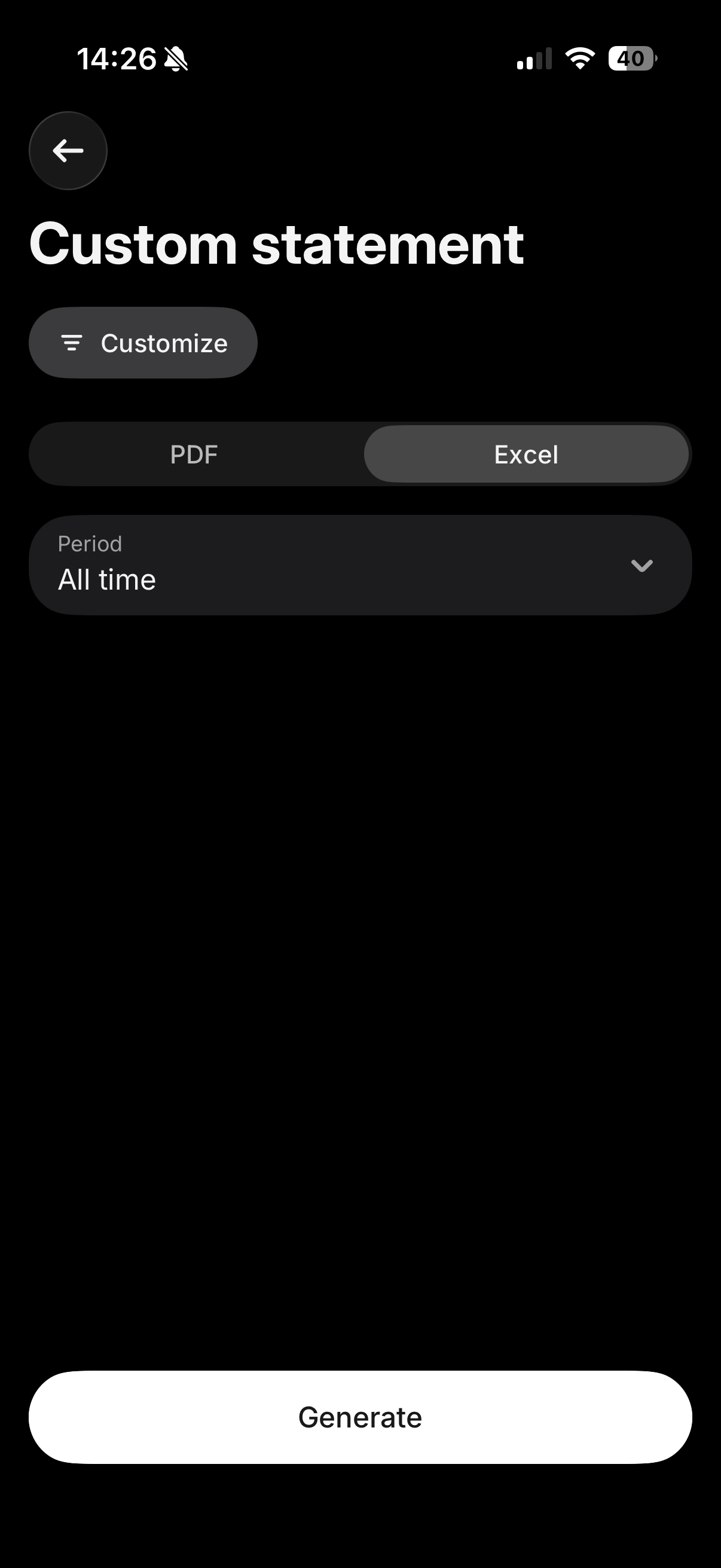
Tap "Customize" and make sure all your relevant accounts (Invest, Crypto, Flexible Cash Funds, Robo-Advisor, etc.) are selected, so everything is included in a single file. Then select the "Excel" tab, and for the period choose "All time" (or "Custom" if you only need a specific tax year) to make sure your full purchase history is included, which is required to calculate accurate cost basis. Finally, tap "Generate".
Where to upload this file
The "Excel" tab downloads a CSV file. Upload it exactly as downloaded, in the "Consolidated Account Statement (CSV)" box on the Tax-wizard dashboard - don't open and re-save it in Excel.
Leave the other Revolut boxes empty: the consolidated statement already covers Invest, Crypto, Flexible Cash Funds and Savings, so any other Revolut file uploaded alongside it is ignored to avoid double counting.
If the custom statement doesn't cover every account you need, or you'd rather export each product separately, you can still follow the individual steps below for Revolut Invest, Robo-Advisor, Crypto, and Flexible Cash Funds.
Revolut Invest (Brokerage Account)
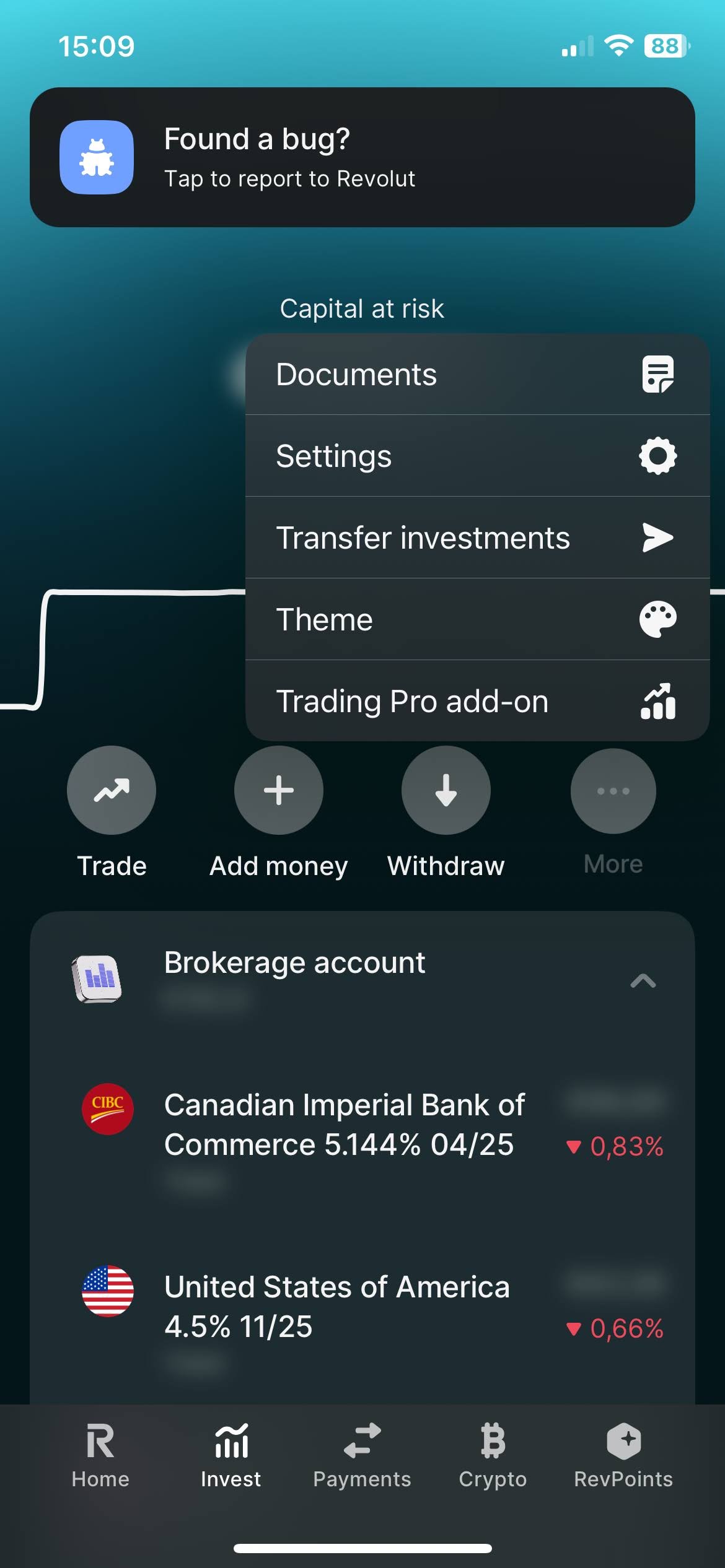
Select on your Revolut app the "Invest" tab. And open the menu by clicking on the three dots, there you'll find the "Documents" option. Select "Brokerage Account".
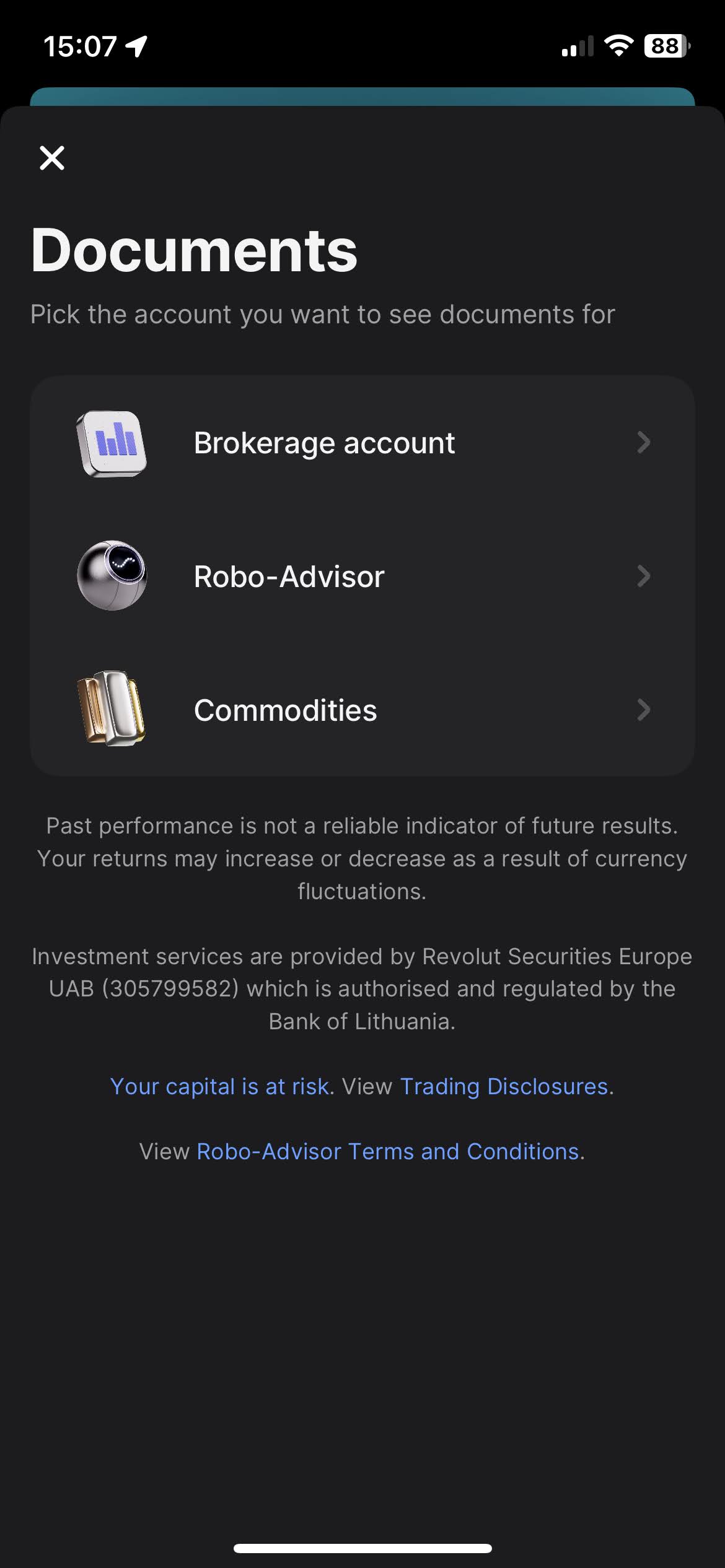
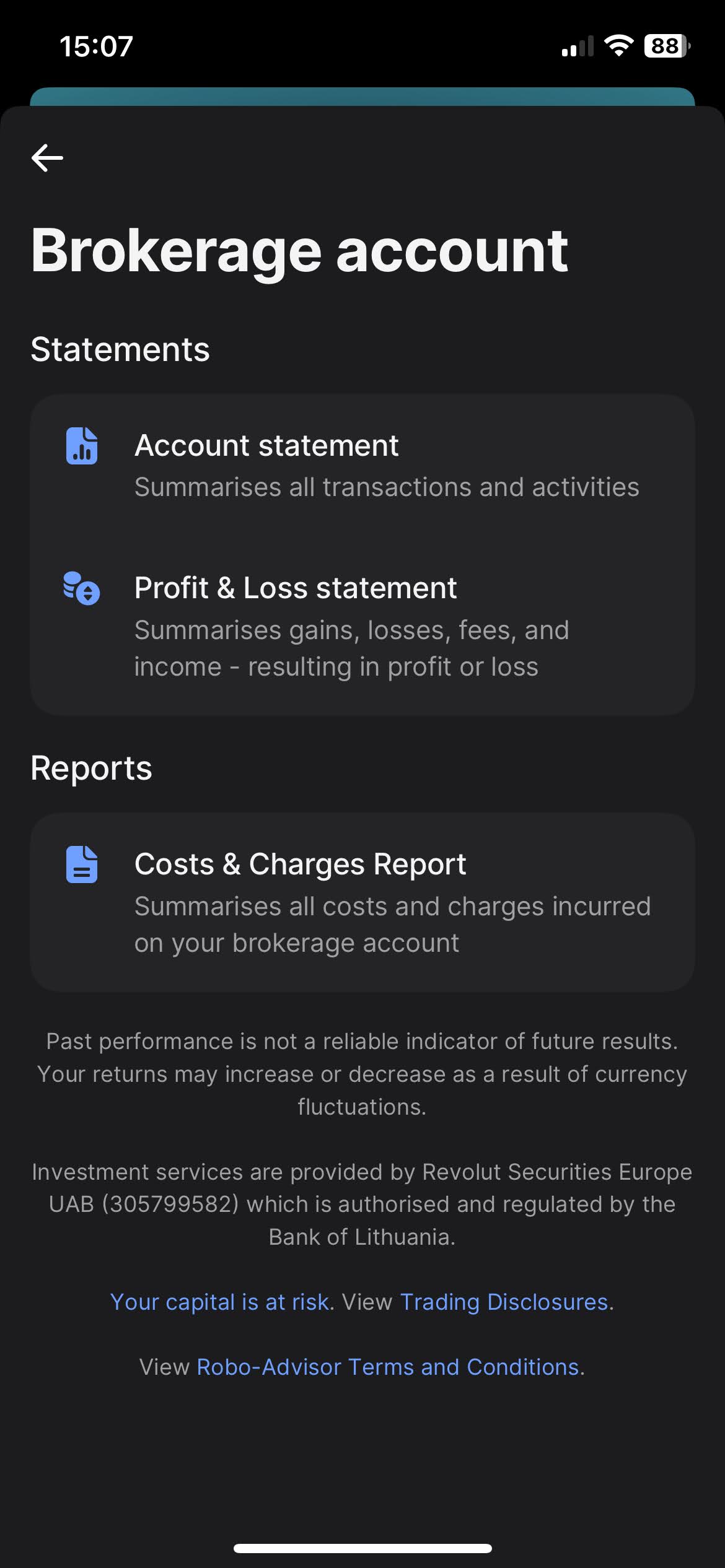
When you click on "Brokerage Account", you'll find the option to download your statements. Revolut offers a variety of types of statements, such as "Account Statement", "Profit & Loss Statements", and "Cost & Charges Report". The most complete one, and the one we're after is the "Account Statement".
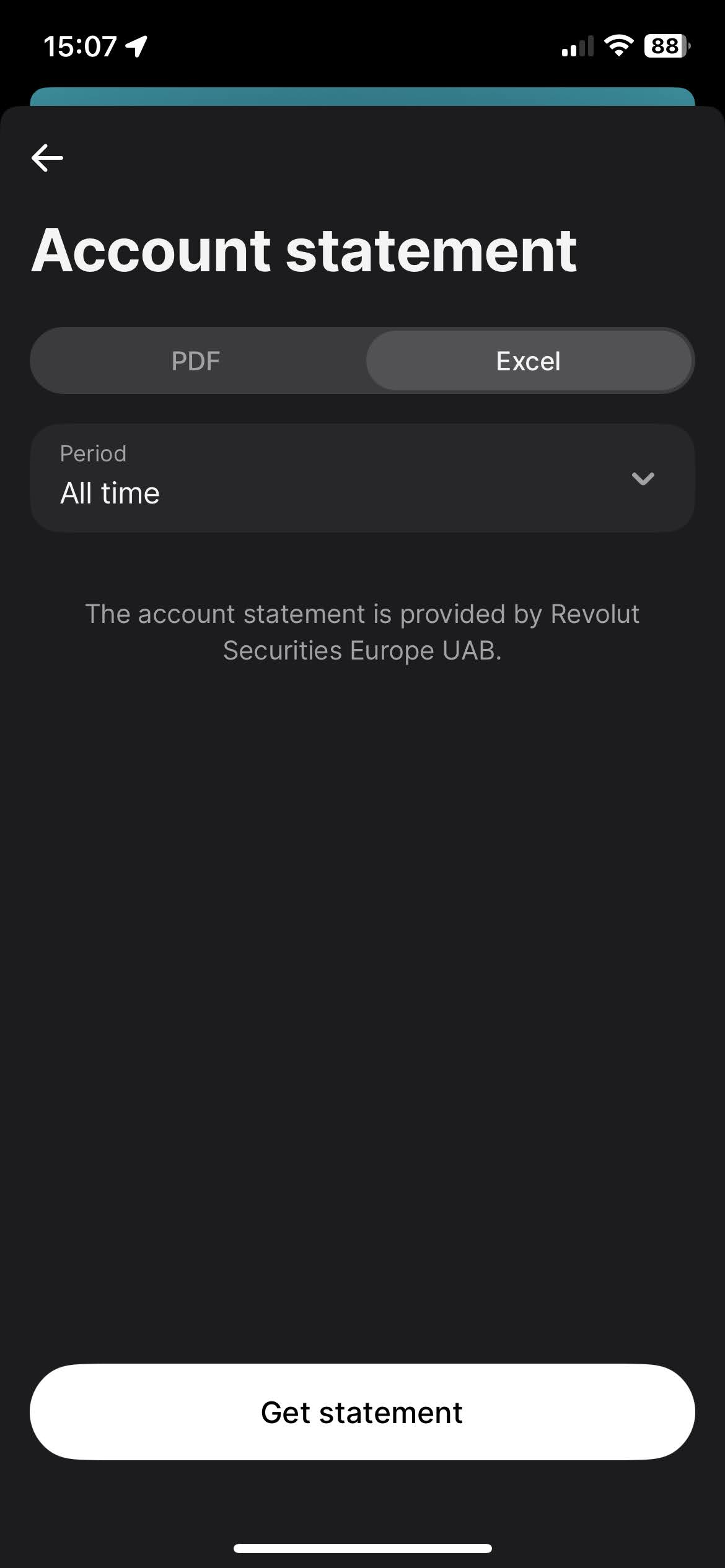
To download the Account Statement, select the "Excel" tab, for the period select "All time", and click on the "Get statement" button.
Revolut Robo-Advisor
The process for Robo-Advisor is very similar to the Revolut Invest (Brokerage Account).
Select on your Revolut app the "Invest" tab. And open the menu by clicking on
the
three dots, there you'll find the "Documents" option. Select "Robo-Advisor".
When you click on "Robo-Advisor", you'll find the option to download your statements. Revolut offers a variety of types of statements, such as "Account Statement" and "Profit & Loss Statements". The most complete one, and the one we're after is the "Account Statement".
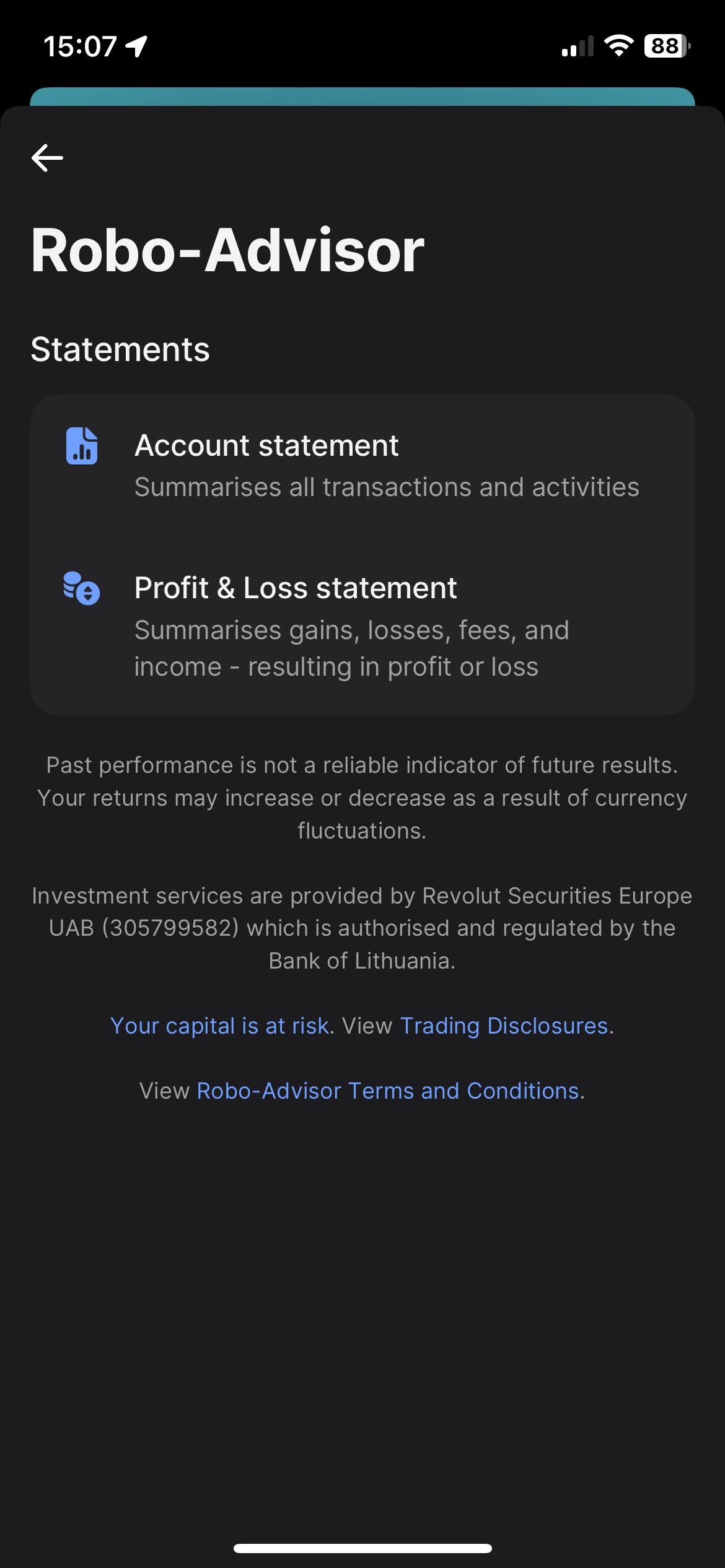
To download the Account Statement, select the "Excel" tab, for the period select "All time", and click on the "Get statement" button.
Revolut Crypto
Select on your Revolut app the "Crypto" tab. And open the menu by clicking on the three dots, there you'll find the "Documents" option.
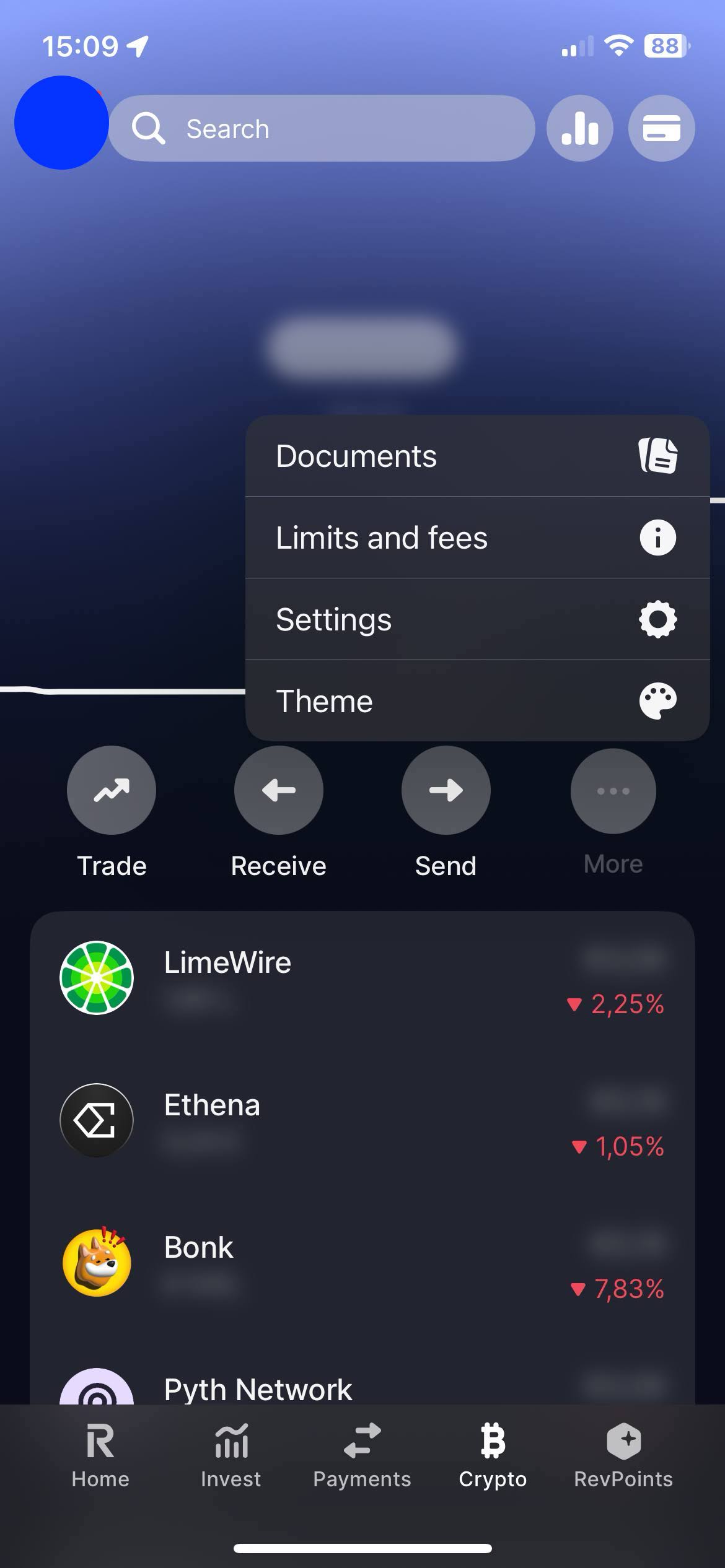
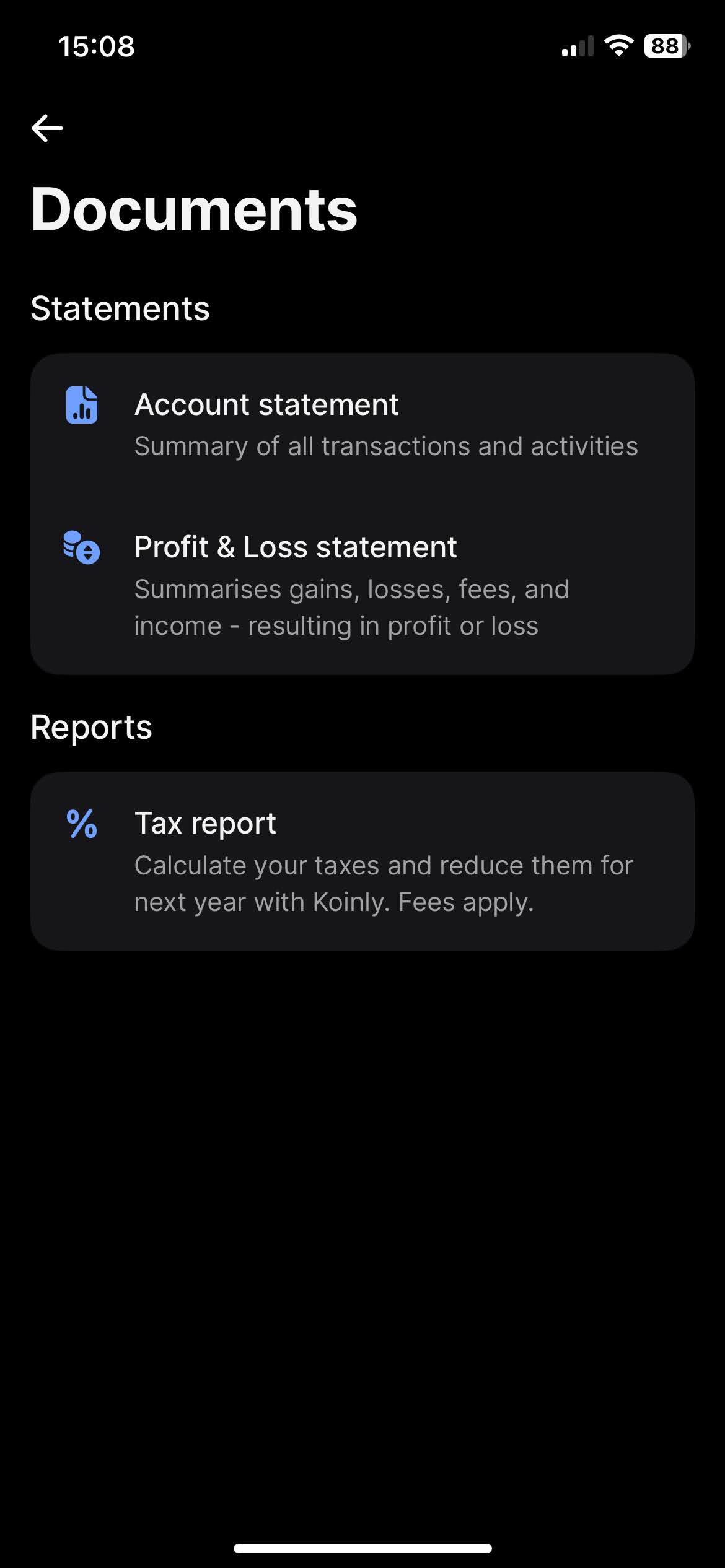
When you click on "Documents", you'll find the option to download your statements. Revolut offers a variety of types of statements, such as "Account Statement" and "Profit & Loss Statements". The most complete one, and the one we're after is the "Account Statement".
To download the "Account Statement", select the "Excel" tab, for the period select "All time", and click on the "Get statement" button.
Revolut Flexible Cash Funds
On your Revolut app on the "Home" tab slide your accounts until you find your "Flexible Cash Funds". Open the menu by clicking on the three dots, there you'll find the "Statement" option.
It is possible to have Flexible Cash Funds in different currencies. Revolut has the option to generate a statement containing all different Flexible Cash Funds. For that on the "Statement" page click on the top menu "Flexible Cash Funds" and select all accounts.
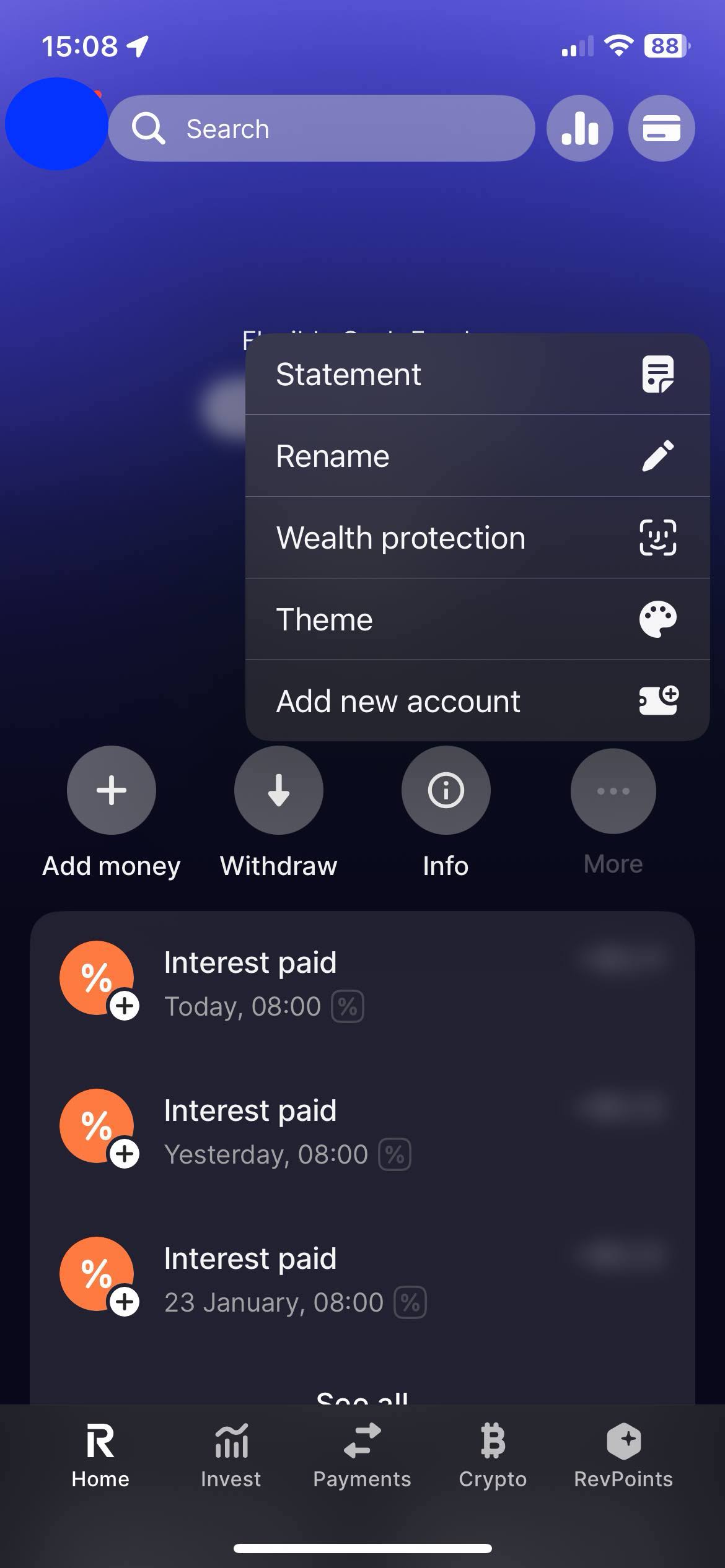
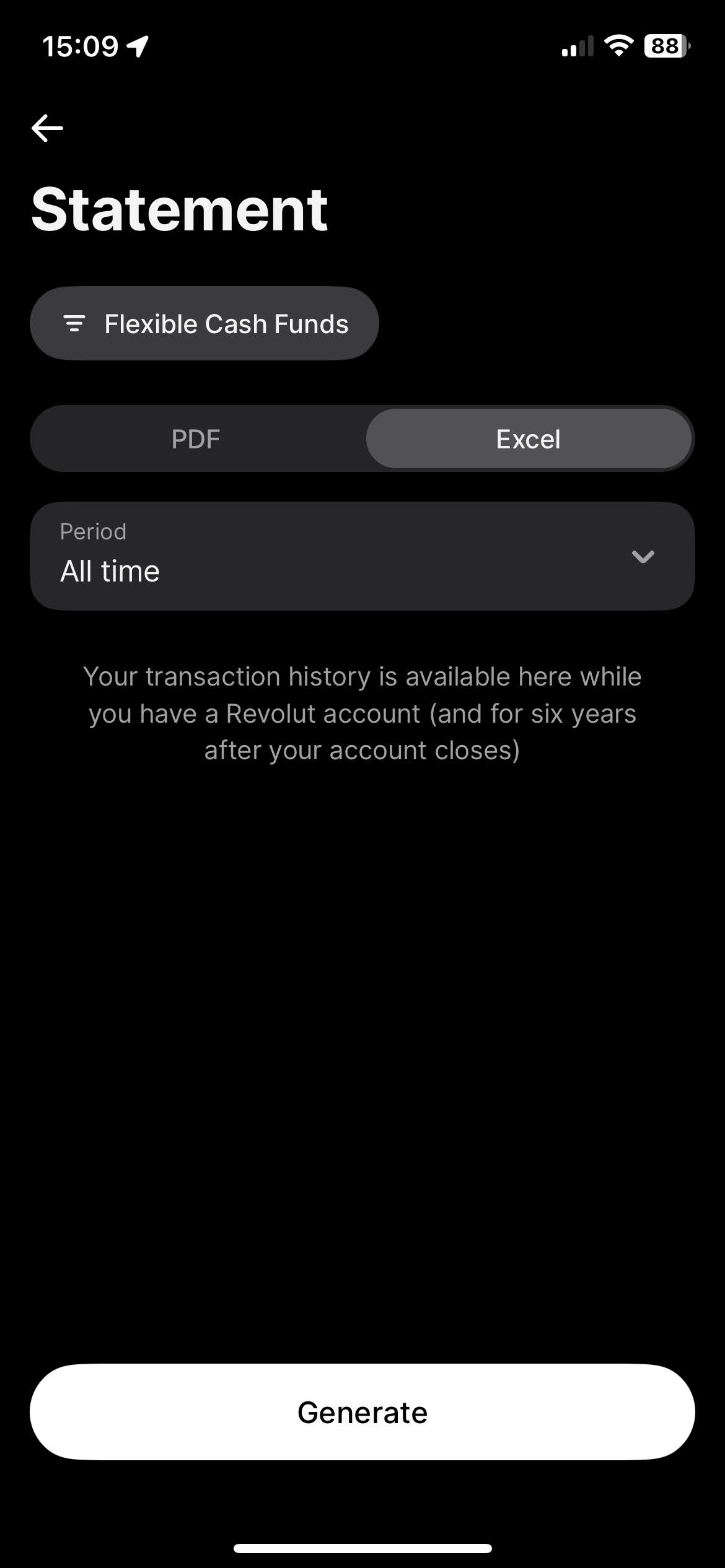
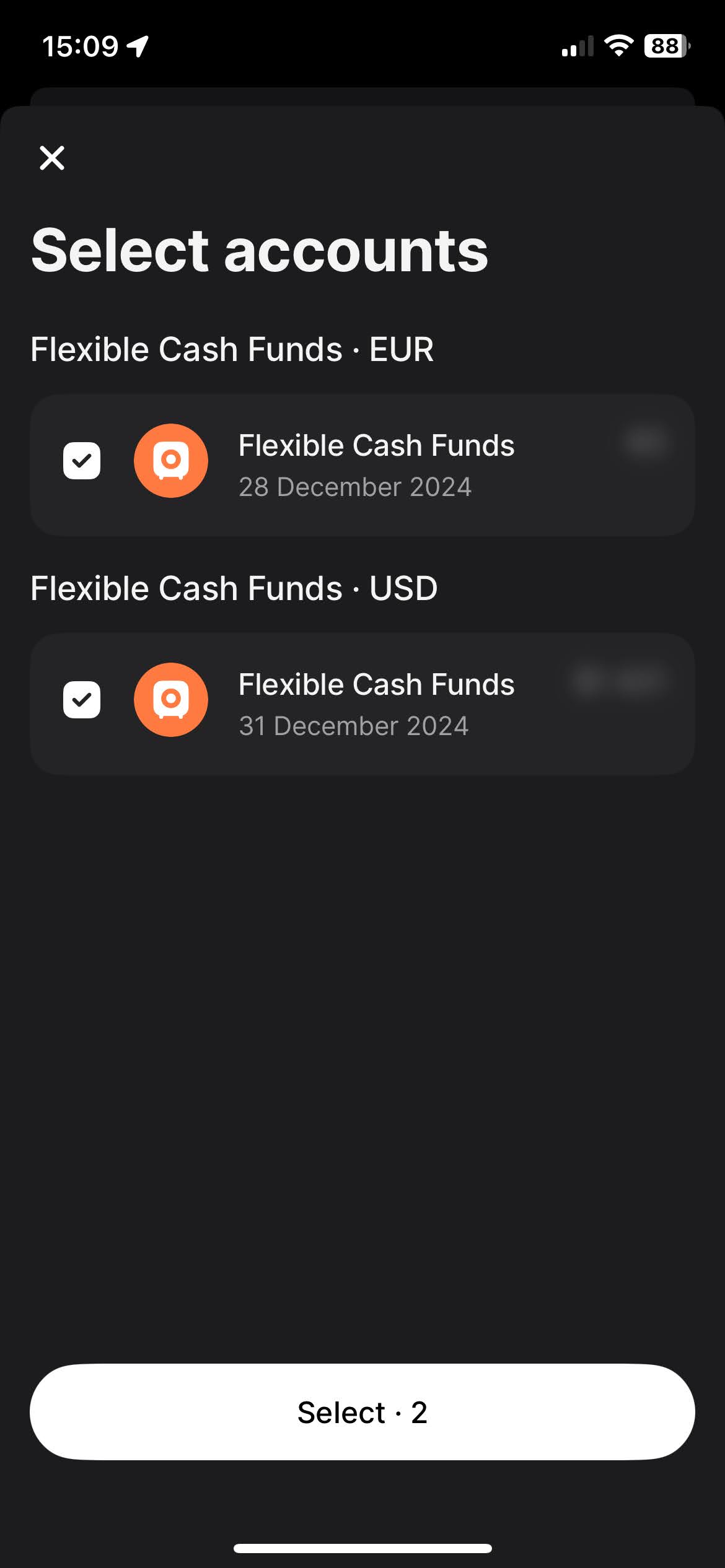
To download the "Account Statement", select the "Excel" tab, for the period select "All time", and click on the "Get statement" button.
By following these steps, you can ensure you have the correct files needed to use with Tax-wizard.
From here you can upload them to Tax-wizard and have your tax report ready in minutes.
Miten ilmoitan Revolut-sijoitukseni OmaVerossa?
Revolut on ulkomainen välittäjä: se ei raportoi tietojasi Verohallinnolle eivätkä tulot näy esitäytetyllä veroilmoituksella. Sinun on lisättävä ne itse OmaVerossa omaan henkilökohtaiseen määräpäivääsi mennessä (huhtikuussa). Veroilmoituksella:
- Luovutusvoitot ja -tappiot ilmoitetaan OmaVeron luovutusvoitto-osiossa hankintaerittäin (paperilla lomake 9A): myyntipäivä, hankintapäivä, myyntihinta, kulut ja hankintameno - tai hankintameno-olettama (20 % myyntihinnasta, 40 % kun omistus on kestänyt vähintään 10 vuotta), jos se on edullisempi (TVL 46.1 §).
- Ulkomaiset osingot ja korot ilmoitetaan maittain (lomake 16B): pörssiyhtiöiden osingoista veronalaista on 85 %, ja ulkomainen lähdevero hyvitetään enintään verosopimuksen mukaiseen määrään asti (yleensä 15 %) - ylimenevä osa on perittävä takaisin lähdevaltiolta.
- Laskentajärjestys on FIFO koko historiasta, myös aiempien vuosien ostoista (TVL 47.4 §, KHO 2024:123).
- Valuuttamääräiset summat muunnetaan euroiksi kunkin tapahtumapäivän kurssilla: hankintameno hankintapäivän ja myyntihinta myyntipäivän EKP-kurssilla.
- Jos vuoden kaikkien luovutusten myyntihinnat ovat yhteensä enintään 1 000 €, voitot ovat verovapaita (TVL 48.6 §) - raja on kynnys, ei vähennys.
Lähettääkö Revolut veroraportin Suomeen?
Revolut ei tuota suomalaista OmaVero-valmista veroraporttia. Vie koko historiasi yllä olevilla ohjeilla ja lataa tiedostot Tax-Wizardiin: luovutusvoitot lasketaan FIFO-menetelmällä, jokaiselle erälle valitaan edullisempi todellinen hankintameno tai hankintameno-olettama, summat muunnetaan euroiksi ja tulokseksi saat lomakkeiden 9A, 9 ja 16B mukaiset valmiit luvut sekä arvion 30 %/34 %:n pääomatuloverosta.
Miten Revolutin kryptovarat verotetaan Suomessa?
Jokainen kryptovarojen luovutus on veronalainen luovutusvoitto - myös krypto-krypto-vaihdot ja kryptolla maksaminen (KHO 2019:42). Laskentajärjestys on FIFO (KHO 2024:123) ja hankintameno-olettama (20 %/40 %) on käytettävissä. Staking- ja airdrop-palkkiot verotetaan muuna pääomatulona saantihetken käyvästä arvosta, ja verotettu arvo on kolikoiden hankintameno. Koko vuoden luovutukset voi ilmoittaa OmaVerossa yhteissummana, kun liität eritellyn voitto-tappiolaskelman PDF-muodossa (Excel-liitteitä OmaVero ei hyväksy) - Tax-Wizard tuottaa erittelyn puolestasi.
Täydelliset säännöt (tappioiden vähentäminen, 30 %/34 %:n verokannat, CFD-tappioiden vähennyskelvottomuus ja täyttöesimerkit) löydät Suomen sijoitusverotuksen oppaasta. Tax-Wizardilla lataat yllä viedyt Revolut-tiedostot ja saat minuuteissa valmiit luvut jokaiseen OmaVeron kohtaan.
Kuinka arvokasta aikasi todella on?
Mieti, mikä on aikasi arvo ja millainen mielenrauha syntyy siitä, että käytössäsi on luotettava ja tarkka työkalu veroraportointiin
(maksu kattaa tämän vuoden ilmoituksen vuodelle 2025 sekä aiemmat vuodet, uusinta ensi vuonna manuaalisesti)
Premium
Kaikki ominaisuudet Revolutille, Degirolle, eTorolle, XTB:lle, Trading212:lle, Interactive Brokersille, Freedom24:lle, Lightyearille, Trade Republicille, Coinbaselle, Robinhood Cryptolle,...
- Tuki kaikille välittäjille ja valuutoille
- Luovutusvoittojen automaattinen laskenta
- Raportti hankinnoista, luovutuksista, osingoista ja korkotuloista
- Avointen positioiden raportti ja tilastot
- Transaktio- ja osinkotilastot
- Avointen positioiden vienti Yahoo Financeen
Business
Kaikki premium-ominaisuudet kirjanpitäjille, talousneuvojille, verokonsulteille tai muille ammattilaisille ja yrityksille, jotka haluavat käyttää Tax-Wizardia useille asiakkaille.
- Tuki kaikille välittäjille ja valuutoille
- Luovutusvoittojen automaattinen laskenta
- Raportti hankinnoista, luovutuksista, osingoista ja korkotuloista
- Avointen positioiden raportti ja tilastot
- Transaktio- ja osinkotilastot
- Avointen positioiden vienti Yahoo Financeen