- Home
- Courtiers pris en charge
- Revolut
Impôts Revolut 2026 : actions, crypto et intérêts
Calculez vos impôts sur vos investissements Revolut avec Tax-Wizard. Exportez votre relevé consolidé et obtenez vos montants prêts pour la déclaration 2026.
Dernière mise à jour: · Vérifié par l'équipe Tax-Wizard · Centre d'aide officiel Revolut ↗
This guide is designed to assist anyone who have investments on Revolut and is seeking clarity on how to pay taxes. The information provided here should be useful when calculating your Revolut taxes. However, it’s important to supplement this guide with the tax regulations specific to your country.
If you need to calculate taxes for your Revolut investments, either on their Brokerage Account, Crypto investments, Flexible Cash Funds, or Robo-Advisor, you’re in the right place! There are several ways to do this, such as calculating taxes manually in Excel, using an automated tax tool like Tax-wizard, or hiring a tax professional. Your choice will often depend on your budget and preferences.
How to export your Revolut history
- 1. Custom Statement (Recommended)
- 2. Revolut Invest (Brokerage Account)
- 3. Revolut Robo-Advisor
- 4. Revolut Crypto
- 5. Revolut Flexible Cash Funds
Start by Login on your Revolut mobile app.

Custom Statement (Recommended)
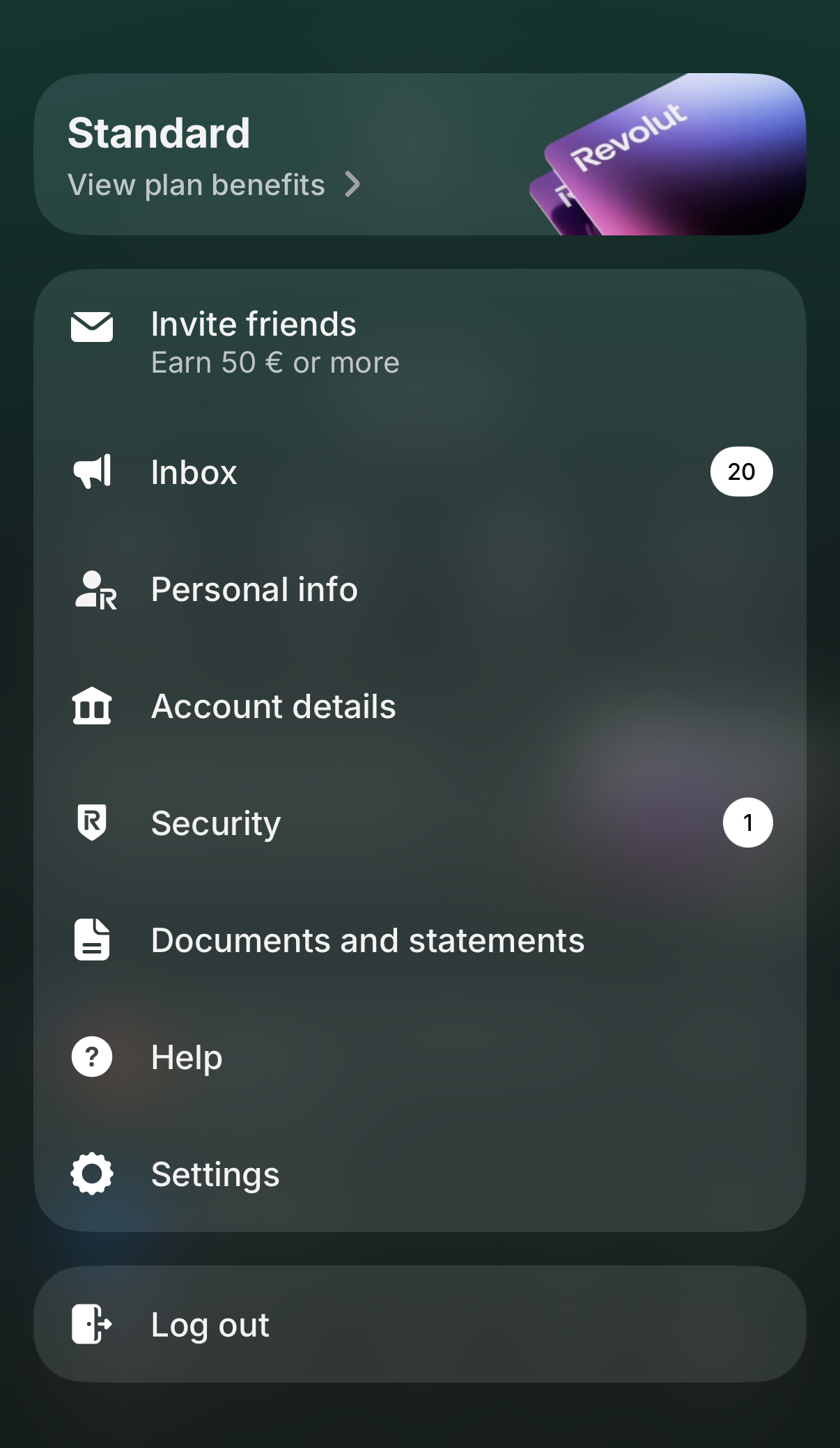
Revolut now lets you generate a single custom statement that can combine several of your accounts into one file. It's the fastest way to get everything Tax-wizard needs in a single download. Tap your profile picture in the top-left corner to open the menu, then select "Documents and statements".
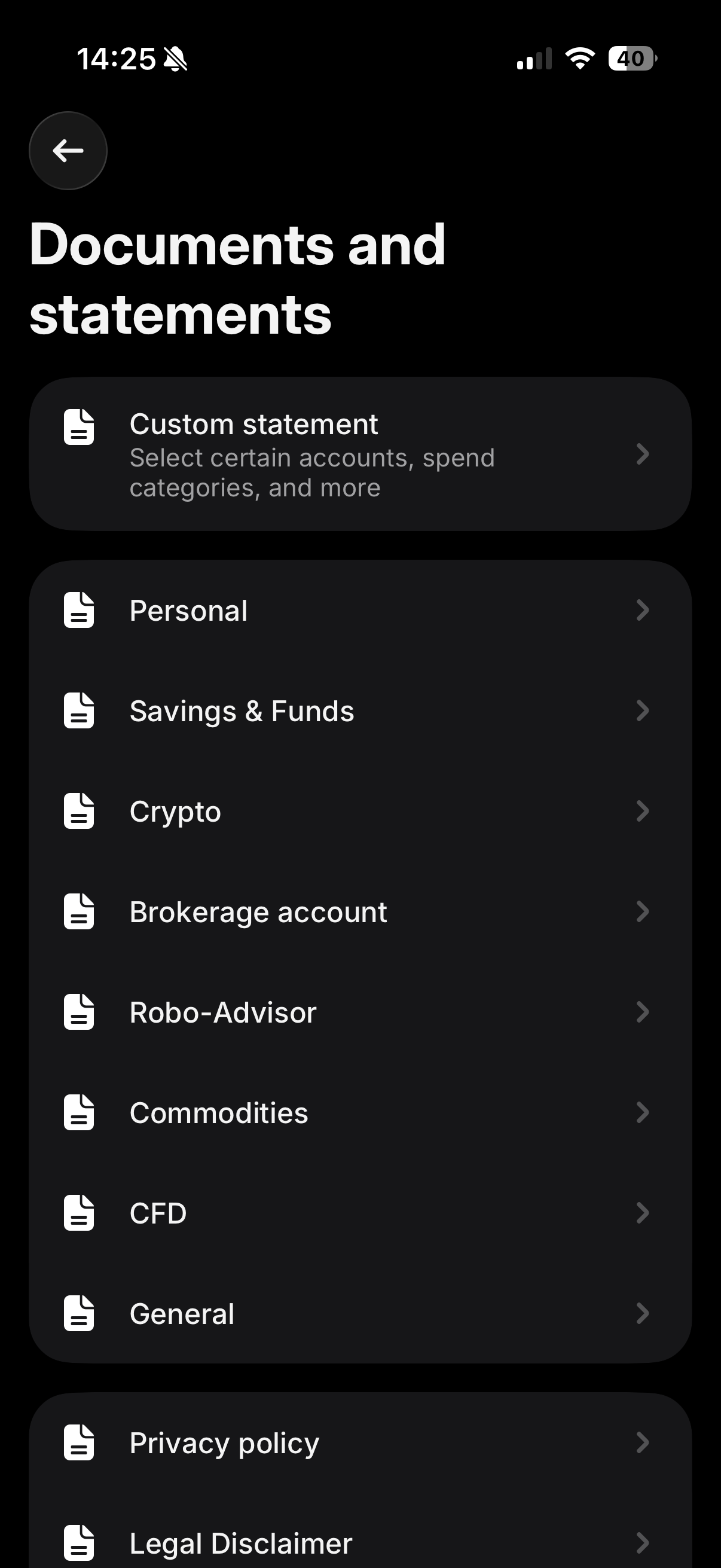
On the "Documents and statements" screen, tap "Custom statement" - it's the first option at the top, described as "Select certain accounts, spend categories, and more".
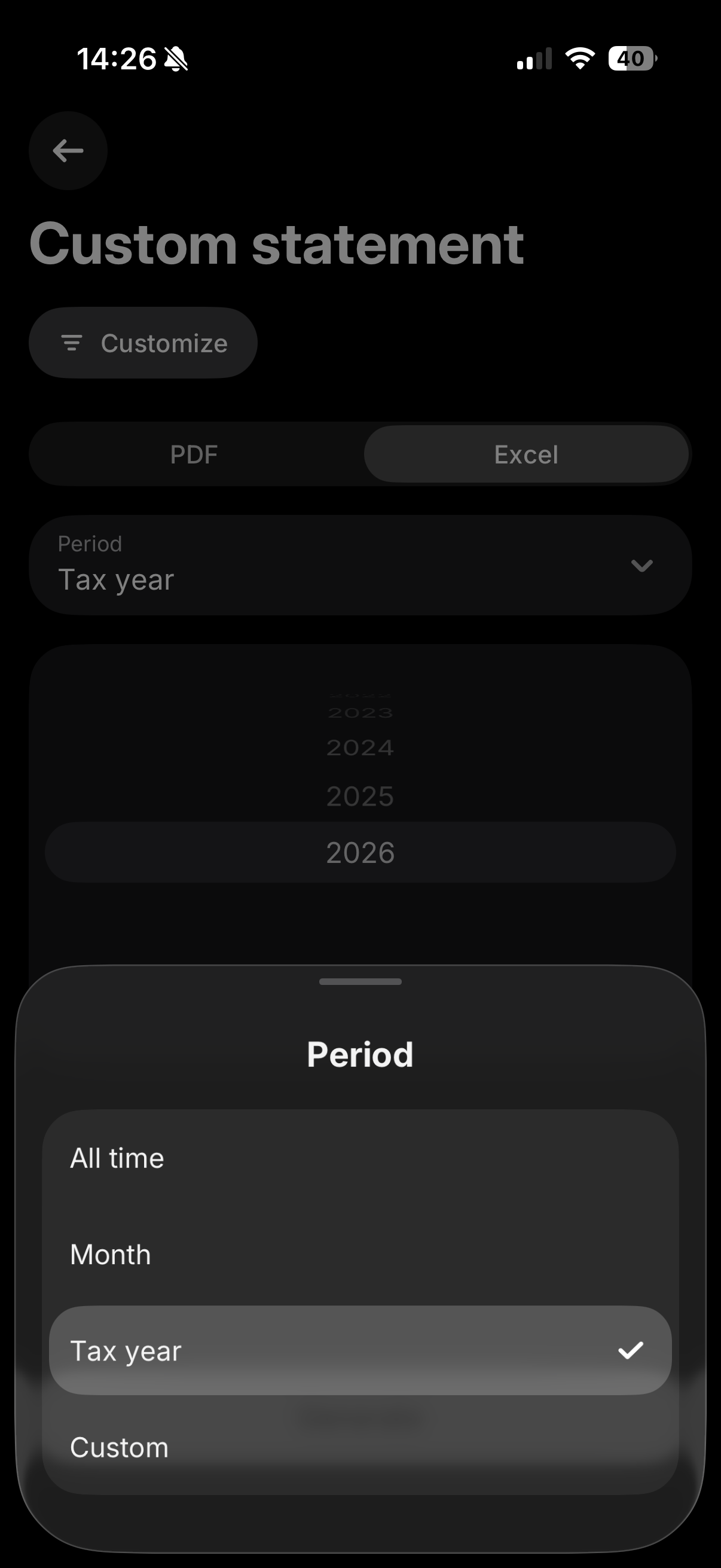
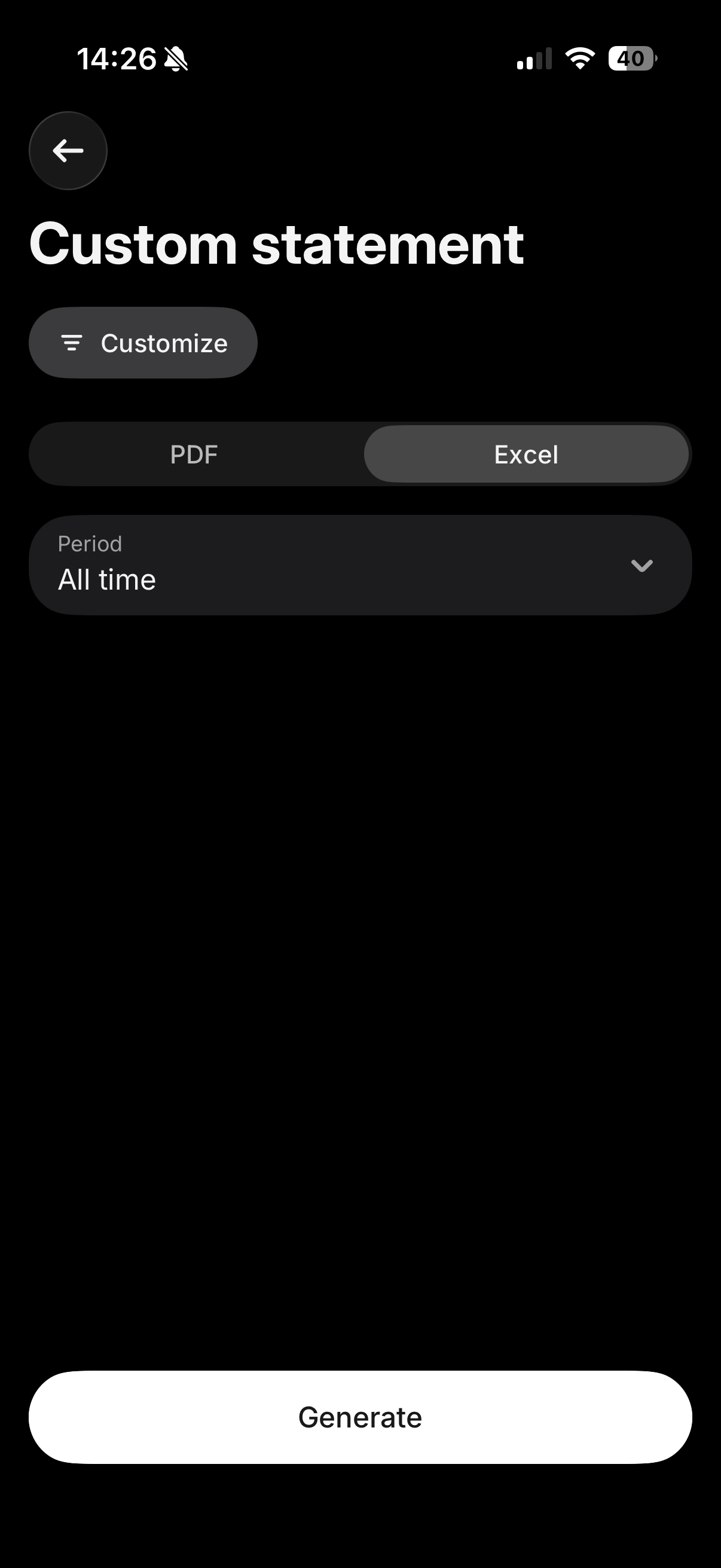
Tap "Customize" and make sure all your relevant accounts (Invest, Crypto, Flexible Cash Funds, Robo-Advisor, etc.) are selected, so everything is included in a single file. Then select the "Excel" tab, and for the period choose "All time" (or "Custom" if you only need a specific tax year) to make sure your full purchase history is included, which is required to calculate accurate cost basis. Finally, tap "Generate".
Where to upload this file
The "Excel" tab downloads a CSV file. Upload it exactly as downloaded, in the "Consolidated Account Statement (CSV)" box on the Tax-wizard dashboard - don't open and re-save it in Excel.
Leave the other Revolut boxes empty: the consolidated statement already covers Invest, Crypto, Flexible Cash Funds and Savings, so any other Revolut file uploaded alongside it is ignored to avoid double counting.
If the custom statement doesn't cover every account you need, or you'd rather export each product separately, you can still follow the individual steps below for Revolut Invest, Robo-Advisor, Crypto, and Flexible Cash Funds.
Revolut Invest (Brokerage Account)
Select on your Revolut app the "Invest" tab. And open the menu by clicking on the three dots, there you'll find the "Documents" option. Select "Brokerage Account".
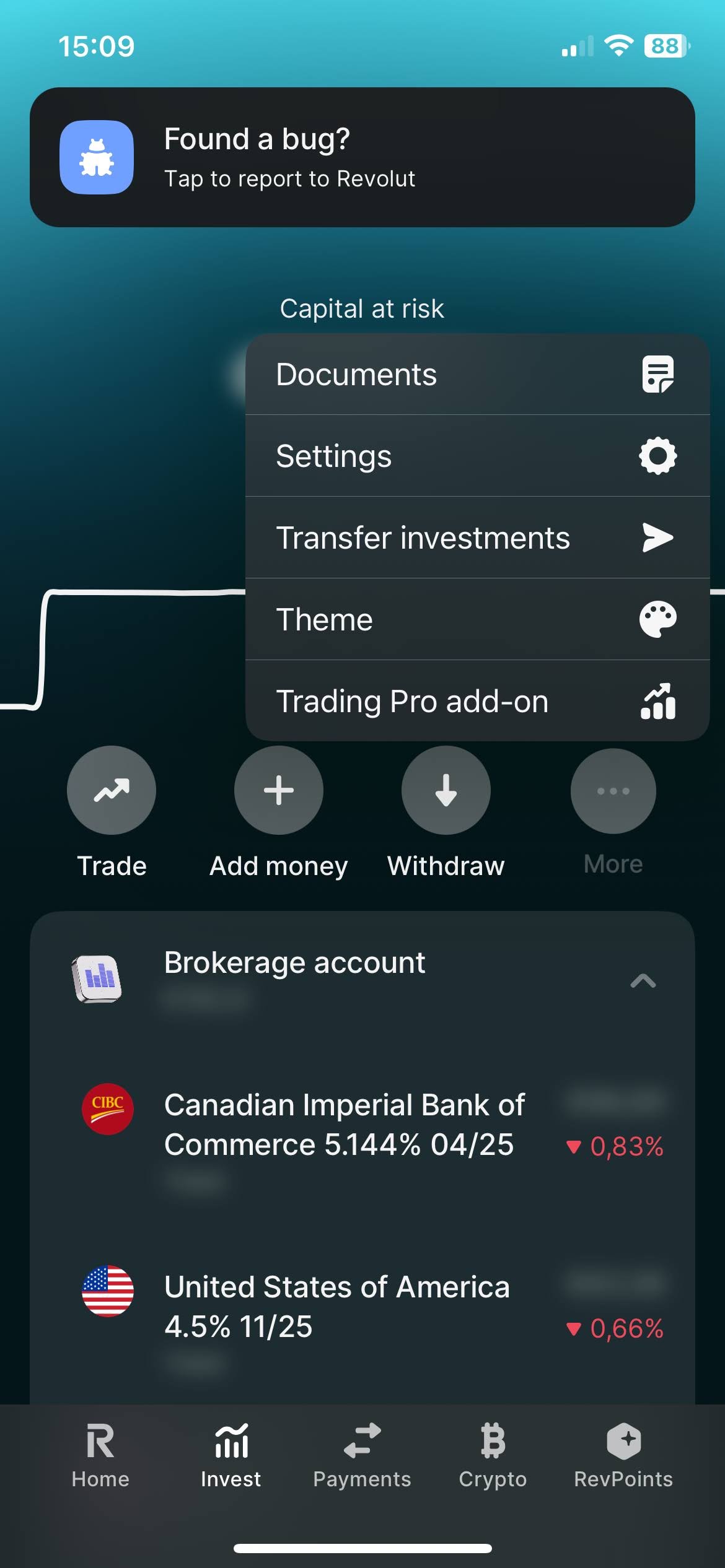
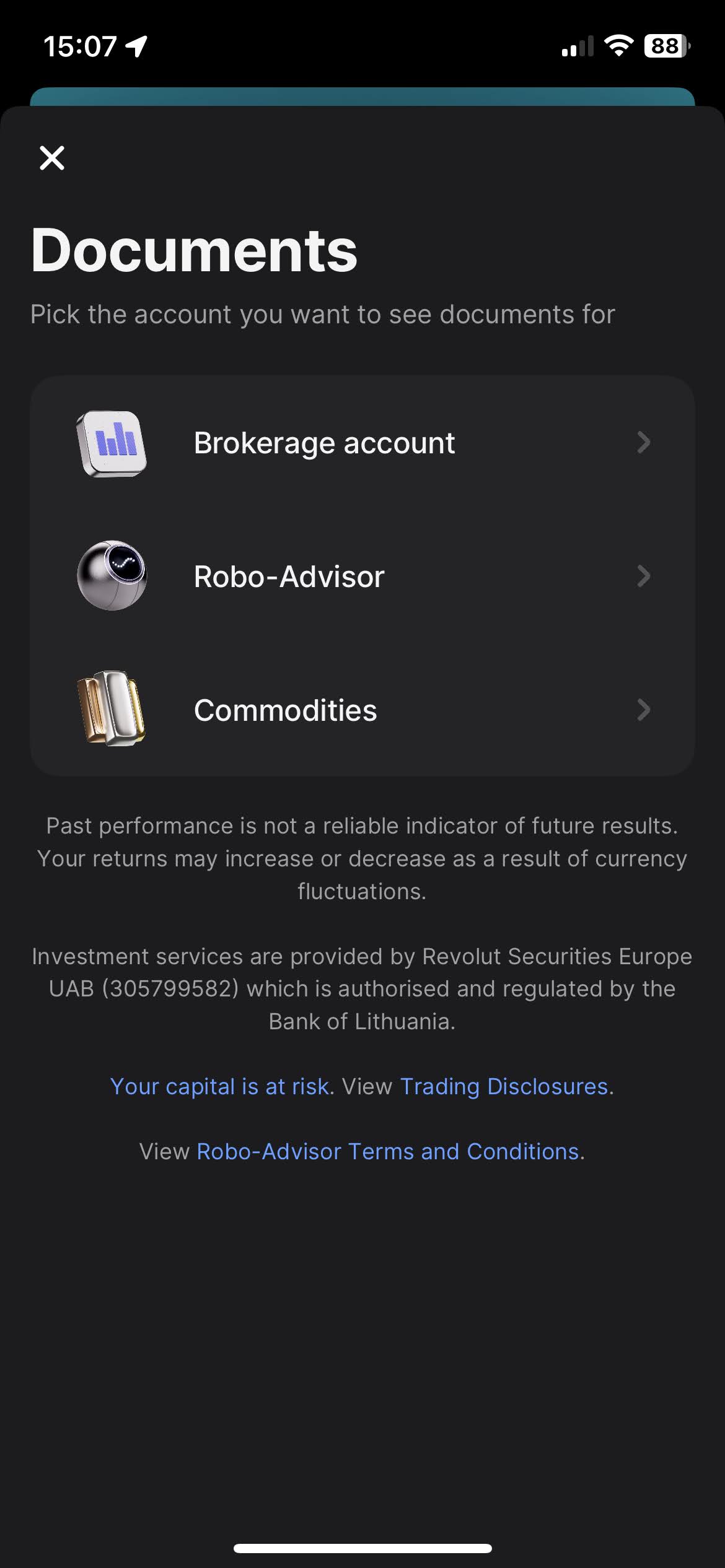
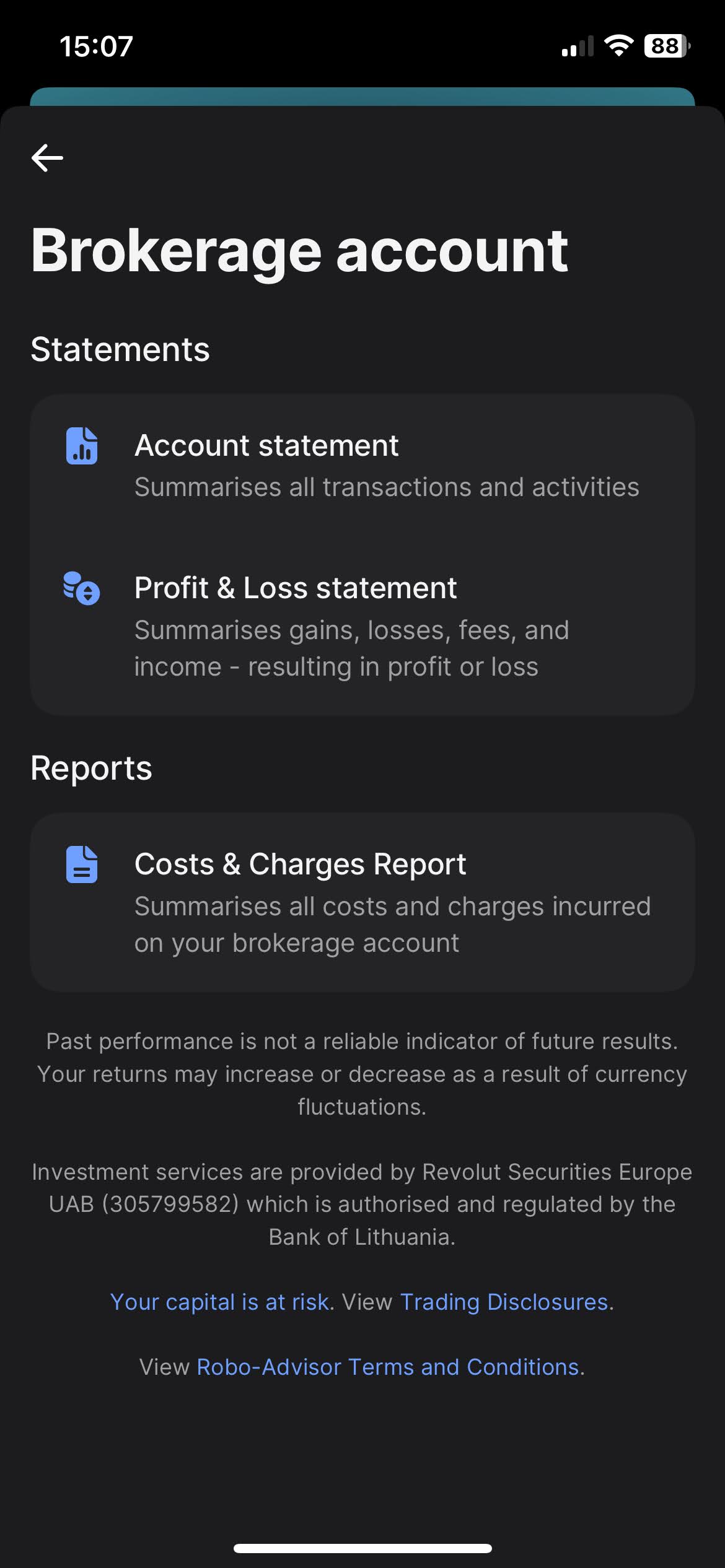
When you click on "Brokerage Account", you'll find the option to download your statements. Revolut offers a variety of types of statements, such as "Account Statement", "Profit & Loss Statements", and "Cost & Charges Report". The most complete one, and the one we're after is the "Account Statement".
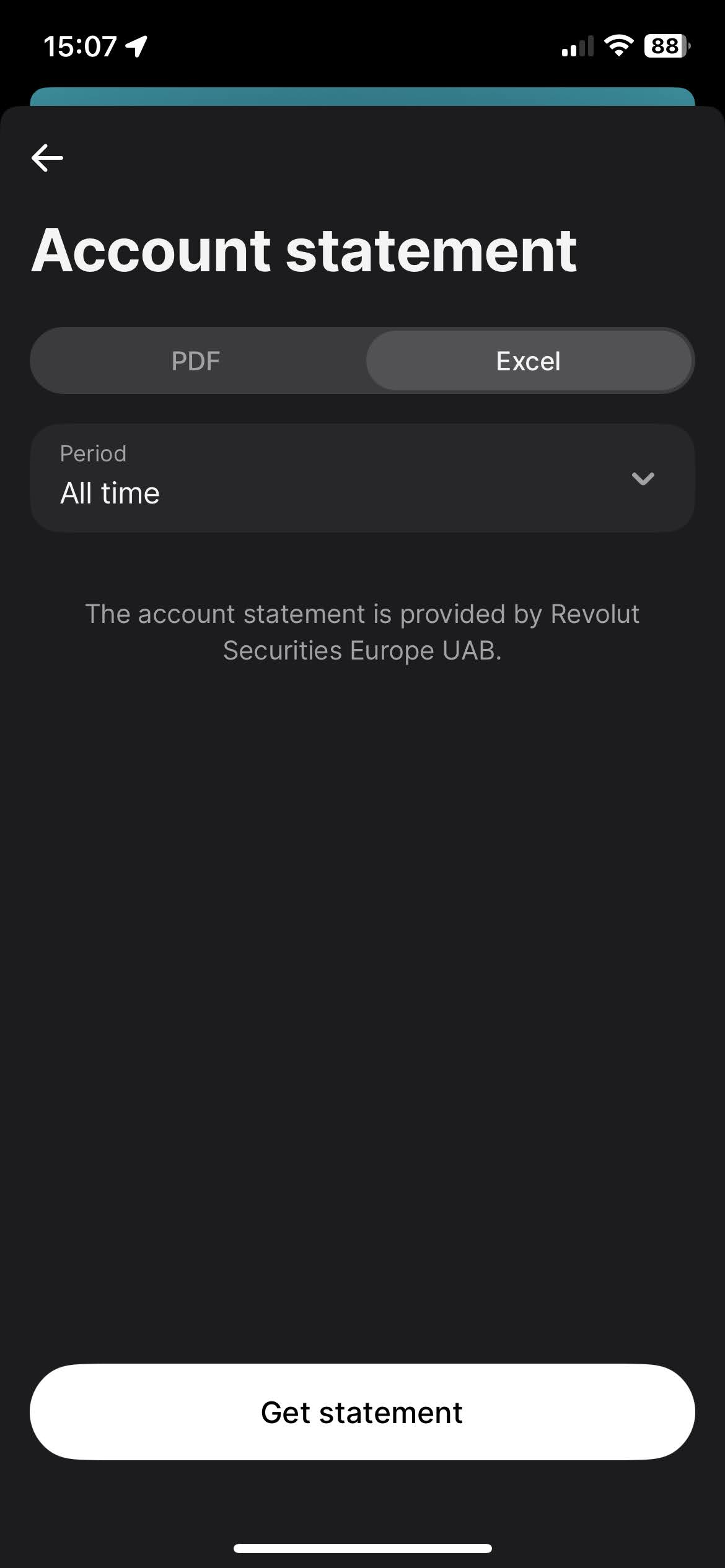
To download the Account Statement, select the "Excel" tab, for the period select "All time", and click on the "Get statement" button.
Revolut Robo-Advisor
The process for Robo-Advisor is very similar to the Revolut Invest (Brokerage Account).
Select on your Revolut app the "Invest" tab. And open the menu by clicking on
the
three dots, there you'll find the "Documents" option. Select "Robo-Advisor".
When you click on "Robo-Advisor", you'll find the option to download your statements. Revolut offers a variety of types of statements, such as "Account Statement" and "Profit & Loss Statements". The most complete one, and the one we're after is the "Account Statement".
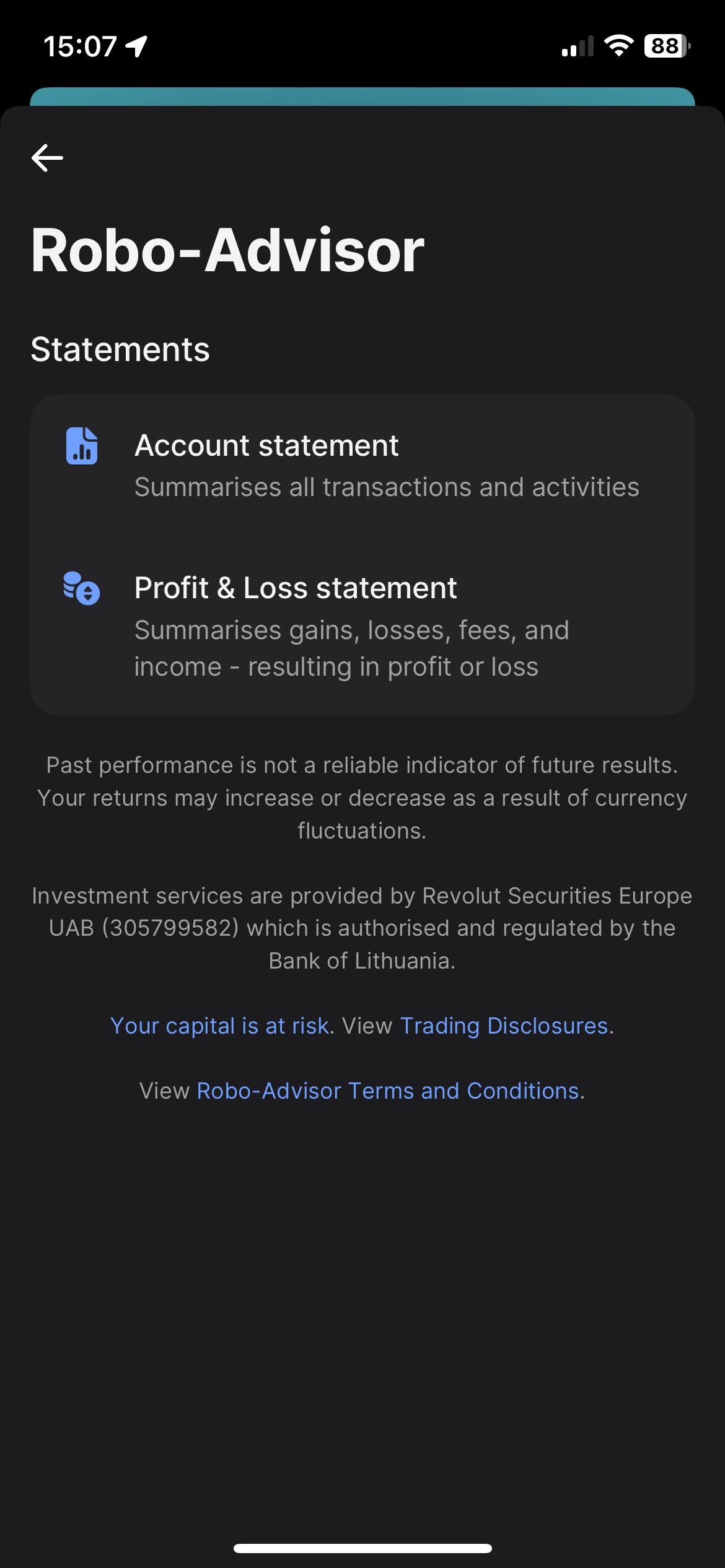
To download the Account Statement, select the "Excel" tab, for the period select "All time", and click on the "Get statement" button.
Revolut Crypto
Select on your Revolut app the "Crypto" tab. And open the menu by clicking on the three dots, there you'll find the "Documents" option.
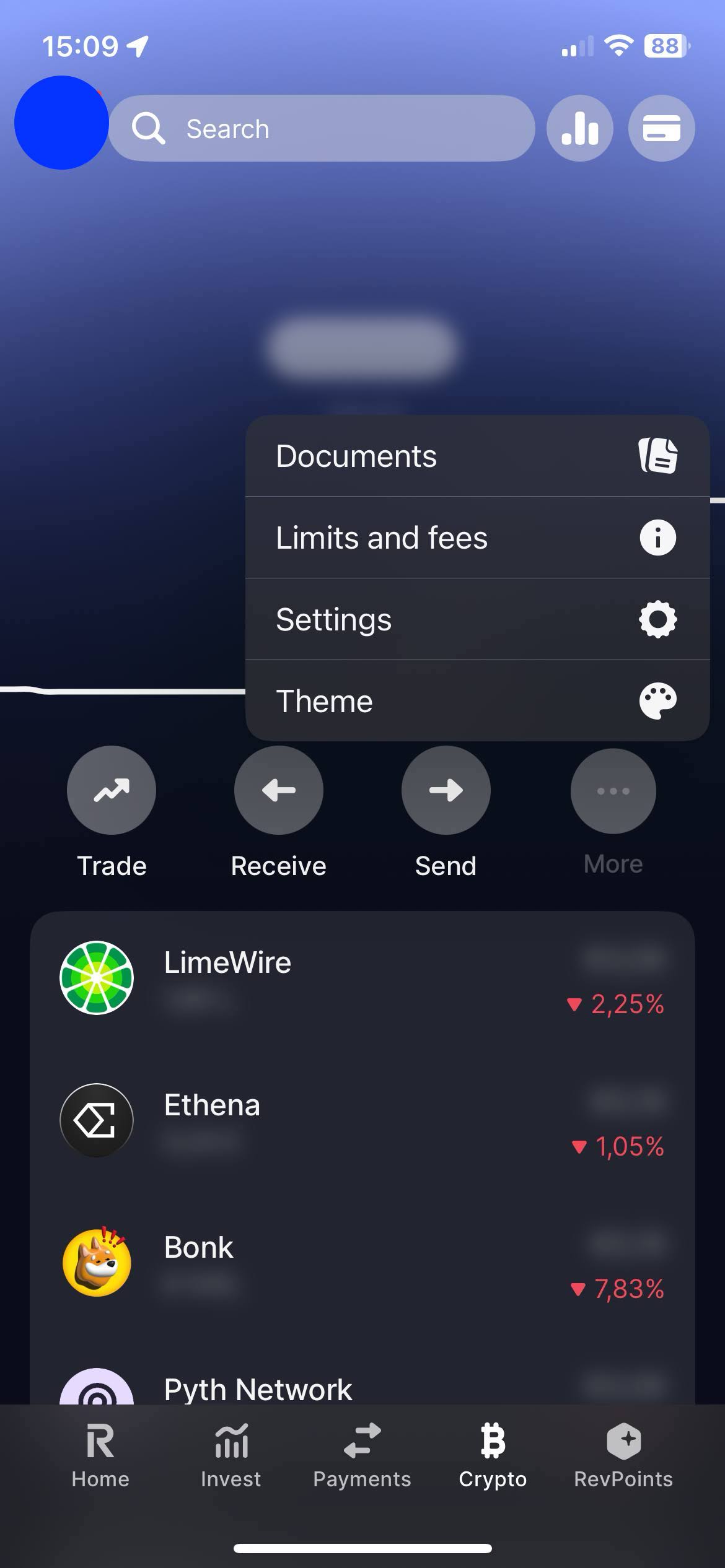
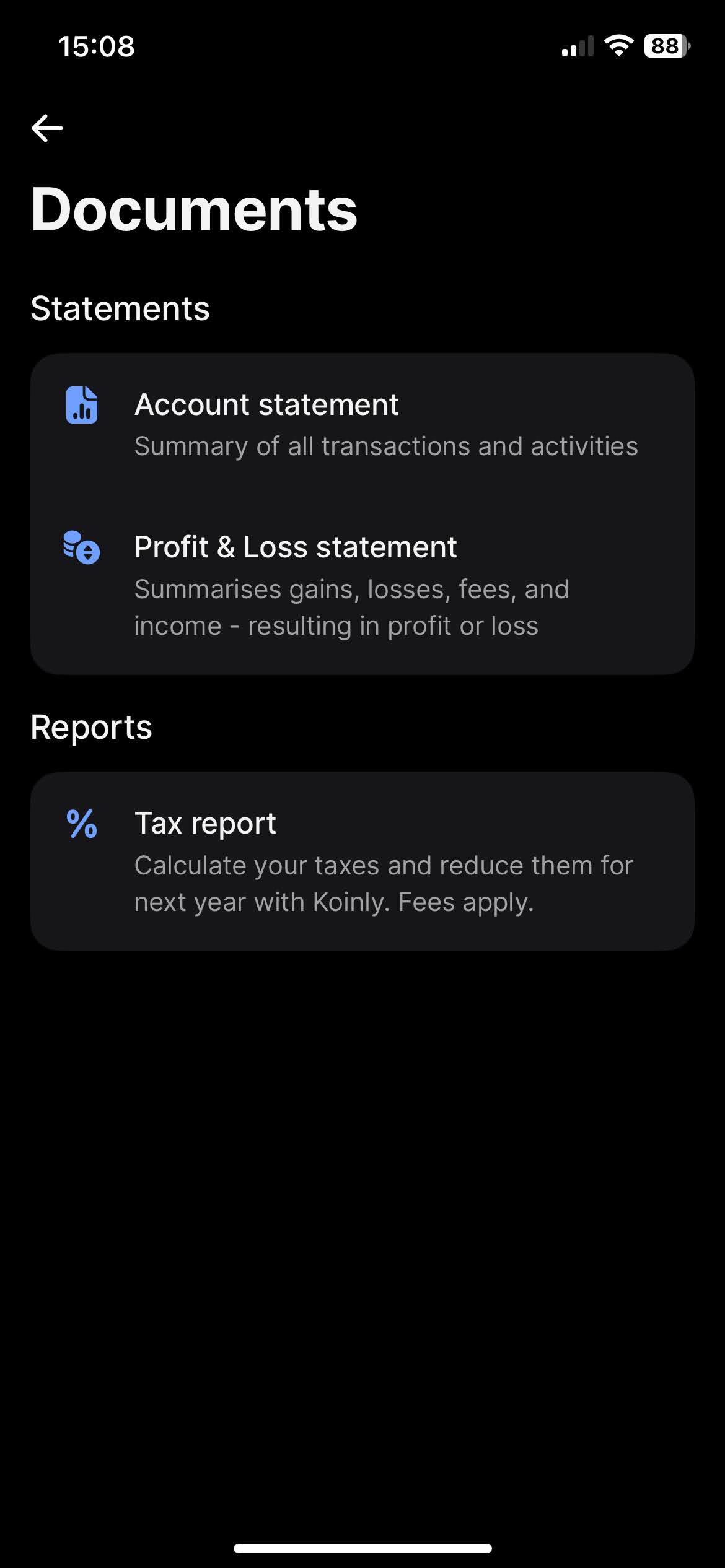
When you click on "Documents", you'll find the option to download your statements. Revolut offers a variety of types of statements, such as "Account Statement" and "Profit & Loss Statements". The most complete one, and the one we're after is the "Account Statement".
To download the "Account Statement", select the "Excel" tab, for the period select "All time", and click on the "Get statement" button.
Revolut Flexible Cash Funds
On your Revolut app on the "Home" tab slide your accounts until you find your "Flexible Cash Funds". Open the menu by clicking on the three dots, there you'll find the "Statement" option.
It is possible to have Flexible Cash Funds in different currencies. Revolut has the option to generate a statement containing all different Flexible Cash Funds. For that on the "Statement" page click on the top menu "Flexible Cash Funds" and select all accounts.
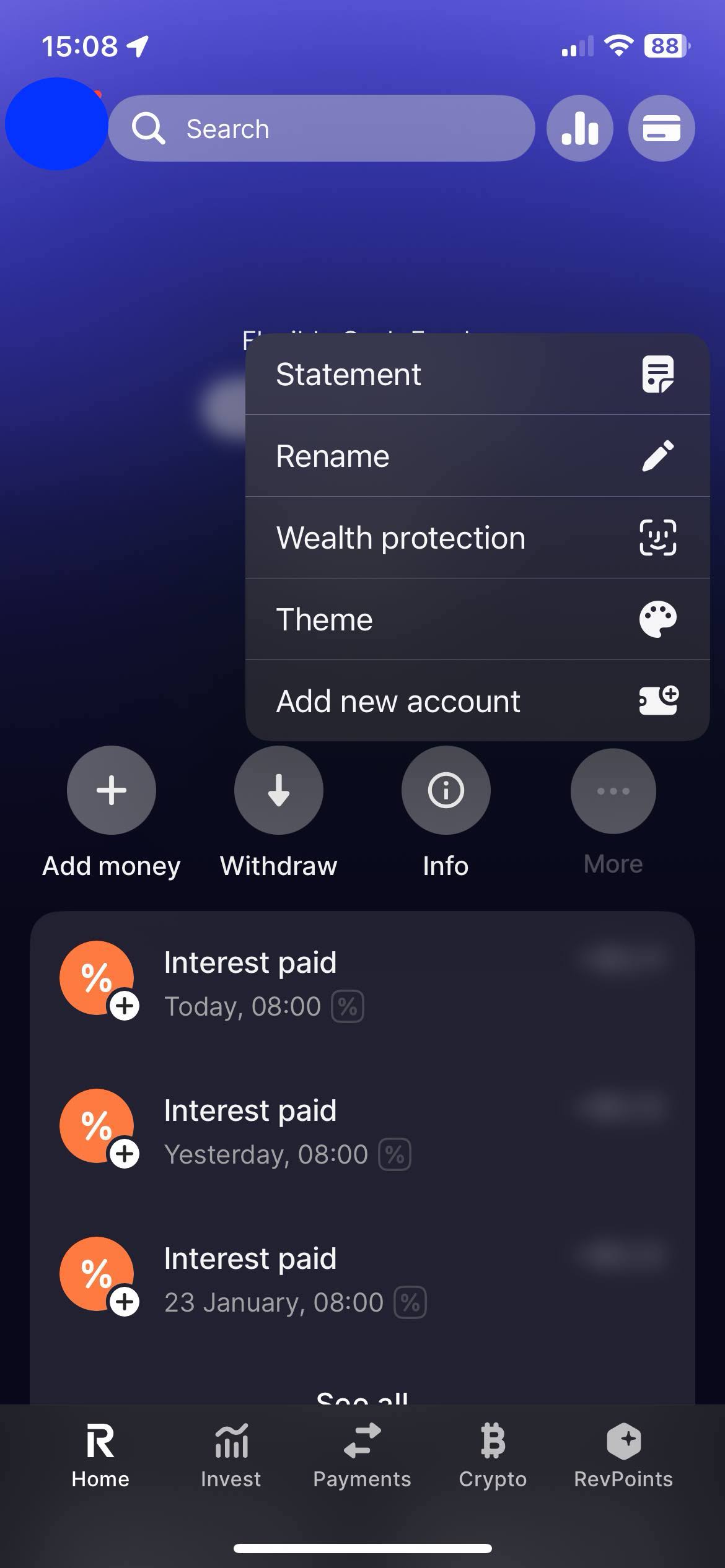
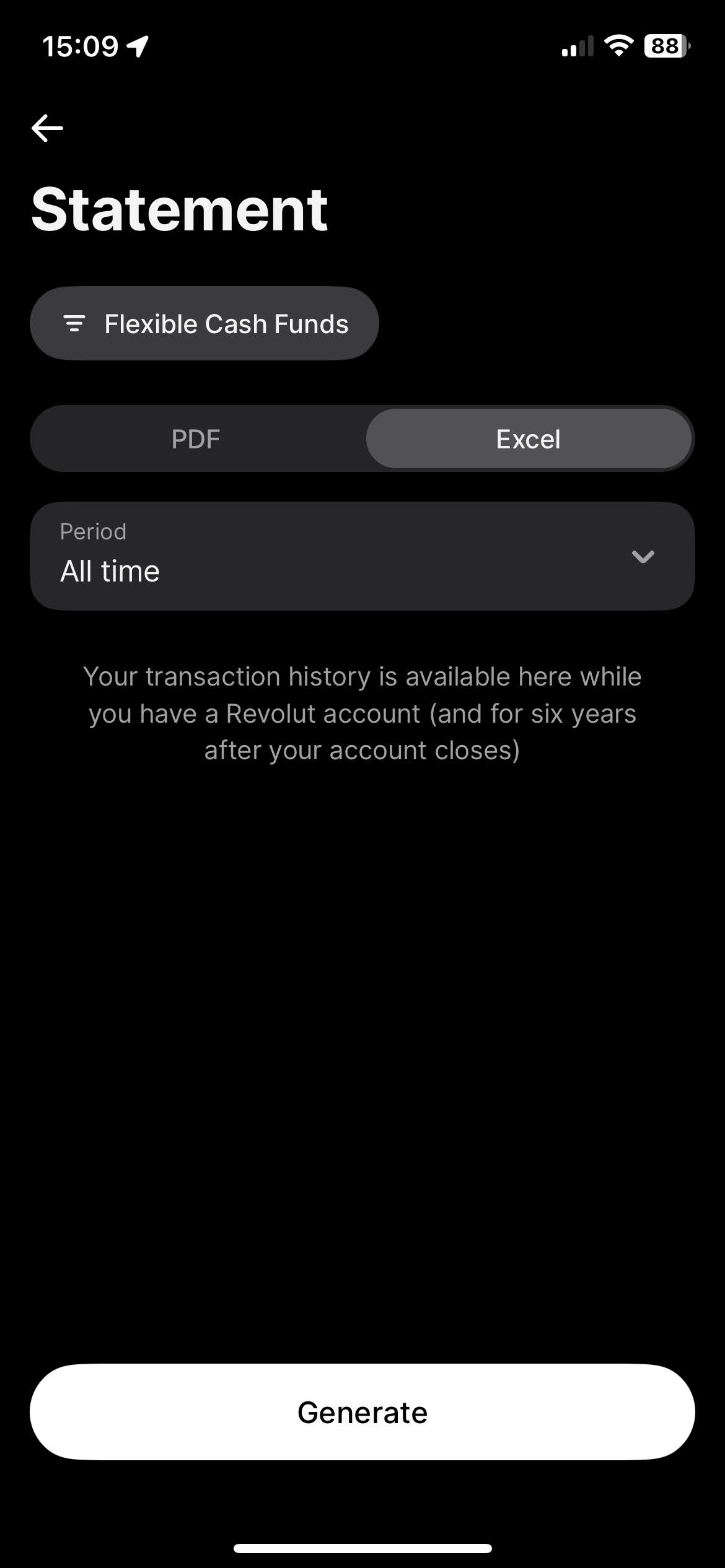
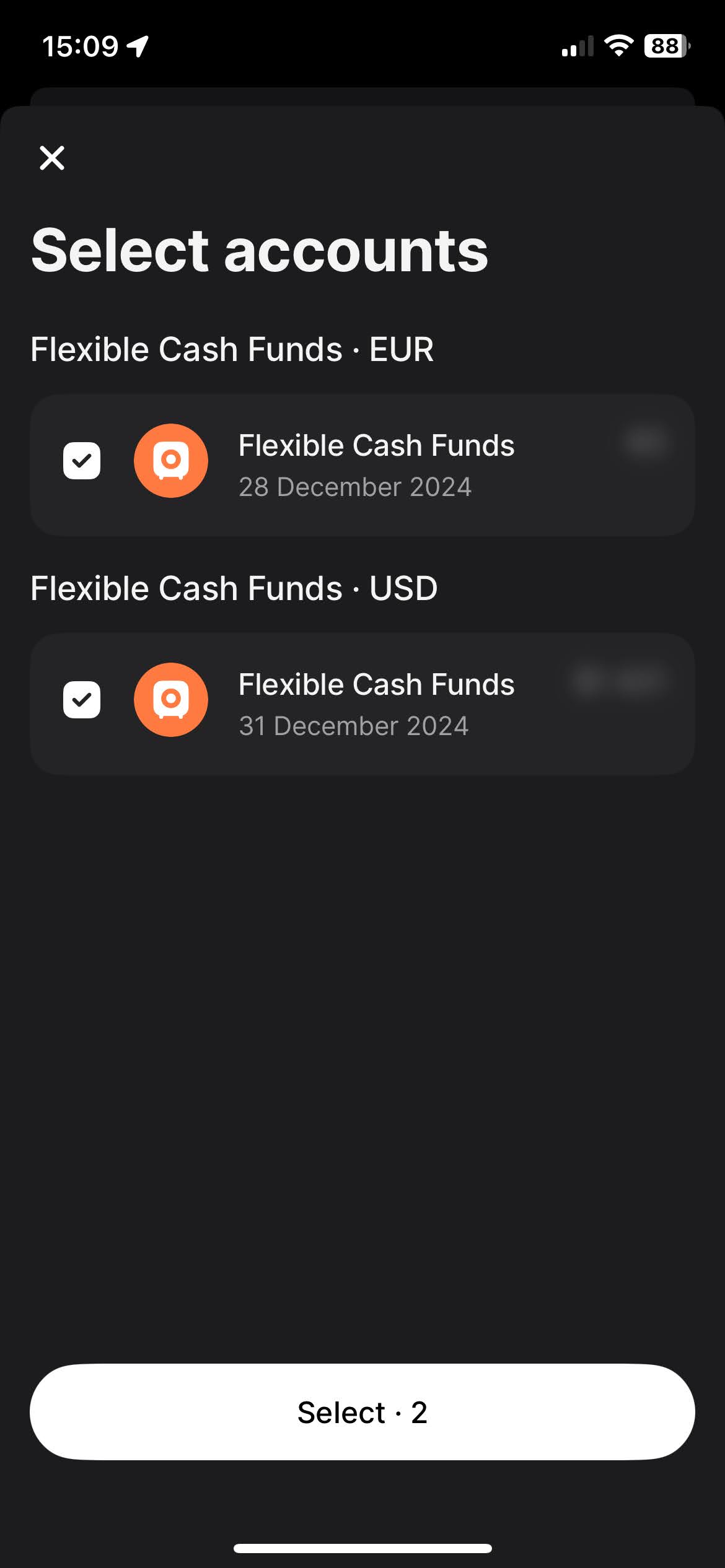
To download the "Account Statement", select the "Excel" tab, for the period select "All time", and click on the "Get statement" button.
By following these steps, you can ensure you have the correct files needed to use with Tax-wizard.
From here you can upload them to Tax-wizard and have your tax report ready in minutes.
Comment déclarer mes investissements Revolut en France ?
Revolut est un courtier étranger : il n'établit pas d'IFU (imprimé fiscal unique), donc rien n'est prérempli sur votre déclaration et c'est à vous de tout reporter.
- Les plus-values de cession de titres se détaillent sur la 2074, puis le résultat est reporté sur la 2042 C.
- Les revenus étrangers (dividendes, intérêts) et les crédits d'impôt conventionnels se déclarent sur la 2047.
- Chaque compte détenu à l'étranger exige une déclaration 3916 / 3916-bis et la case 8UU cochée - l'amende est de 1 500 € par compte bancaire non déclaré et de 750 € à 1 500 € par compte d'actifs numériques.
- Les montants en devises doivent être convertis en euros au cours de chaque opération.
Quel taux s'applique aux plus-values Revolut ?
Le PFU (« flat tax », CGI art. 200 A) s'applique par défaut : 12,8 % d'impôt sur le revenu plus les prélèvements sociaux. La LFSS 2026 a porté la CSG sur les revenus du capital de 9,2 % à 10,6 %, ce qui fait passer les prélèvements sociaux de 17,2 % à 18,6 % - soit 31,4 % au total pour les plus-values sur titres des revenus 2025, contre 30 % pour 2024.
Vous pouvez renoncer au PFU et opter pour le barème progressif en cochant la case 2OP, mais cette option est annuelle, globale (elle couvre tous vos revenus soumis au PFU, sans panachage possible) et irrévocable pour l'année concernée.
Comment sont imposées les cryptomonnaies Revolut en France ?
Les cessions d'actifs numériques relèvent de l'article 150 VH bis et se déclarent sur la 2086, au même taux que les titres (31,4 % pour les revenus 2025). Les échanges crypto-crypto, stablecoins compris, bénéficient du sursis d'imposition : ils ne sont pas imposés et n'ont pas à figurer sur la 2086 - seules les cessions contre euros, ou contre un bien ou un service, sont imposables.
La plus-value se calcule sur le portefeuille global : prix de cession moins (prix total d'acquisition × prix de cession ÷ valeur globale du portefeuille). Si le total de vos cessions de l'année ne dépasse pas 305 €, les plus-values sont exonérées, mais la 2086 reste à joindre. N'oubliez pas la 3916-bis pour chaque plateforme d'actifs numériques détenue à l'étranger.
Pour le détail des cases, l'imputation des moins-values et la liste des comptes à déclarer, lisez le guide complet de la fiscalité des investissements en France. Avec Tax-wizard, vous chargez les fichiers Revolut exportés ci-dessus et obtenez en quelques minutes les montants prêts à recopier sur impots.gouv.fr.
Combien vaut vraiment votre temps ?
Pensez à la valeur de votre temps et à la tranquillité d'esprit qu'apporte un outil fiable et précis pour gérer votre déclaration fiscale
(le paiement couvre la déclaration de cette année pour 2025 et les années précédentes, renouvellement manuel l'année prochaine)
Premium
Toutes les fonctionnalités, pour Revolut, Degiro, eToro, XTB, Trading212, Interactive Brokers, Freedom24, Lightyear, Trade Republic, Coinbase, Robinhood Crypto,...
- Prise en charge de tous les courtiers et devises
- Calcul automatique des plus-values
- Rapport avec acquisitions, réalisations, dividendes et intérêts
- Rapport et statistiques des positions ouvertes
- Statistiques des transactions et des dividendes
- Export des positions ouvertes vers Yahoo Finance
Business
Toutes les fonctionnalités Premium, pour les comptables, conseillers financiers, consultants fiscaux ou autres professionnels et entreprises souhaitant utiliser Tax-Wizard pour plusieurs clients.
- Prise en charge de tous les courtiers et devises
- Calcul automatique des plus-values
- Rapport avec acquisitions, réalisations, dividendes et intérêts
- Rapport et statistiques des positions ouvertes
- Statistiques des transactions et des dividendes
- Export des positions ouvertes vers Yahoo Finance