- Home
- Podprti posredniki
- Degiro
Kako Izpolniti Davke Degiro 2026
Enostavno izračunaj svoje davke Degiro s Tax-Wizard. Avtomatiziraj davčno poročanje Degiro in poenostavi postopek napovedi za 2026.
Zadnja posodobitev: · Pregledala ekipa Tax-Wizard · Uradni center za pomoč Degiro ↗
Za nemoteno integracijo s Tax-wizard morate iz svojega računa Degiro prenesti nekaj specifičnih datotek. V tem vodniku vam bomo pokazali:
- - Kako prenesti izpisek računa Degiro (Account Statement), ki vsebuje podrobnosti o vaših transakcijah, dividendah in korporativnih dejanjih;
- - Kako izvoziti seznam transakcij Degiro (Transactions List), ki vsebuje vse nakupe in prodaje, ki ste jih izvedli;
- - Kako prenesti letno poročilo Degiro (Annual Report), ki vsebuje podatke o stanju vašega računa in skupni vrednosti vaših naložb.
Letno poročilo Degiro za posamezno davčno leto je poslano na začetku naslednjega leta. Potrebne datoteke so torej:
- - Izpisek računa (format CSV)
- - Seznam transakcij (format CSV)
- - Letno poročilo (format PDF)
S pomočjo teh datotek lahko Tax-wizard samodejno pripravi vse podatke, ki jih potrebujete za izpolnitev svoje davčne napovedi.
Koraki za prenos zahtevanih datotek iz Degiro
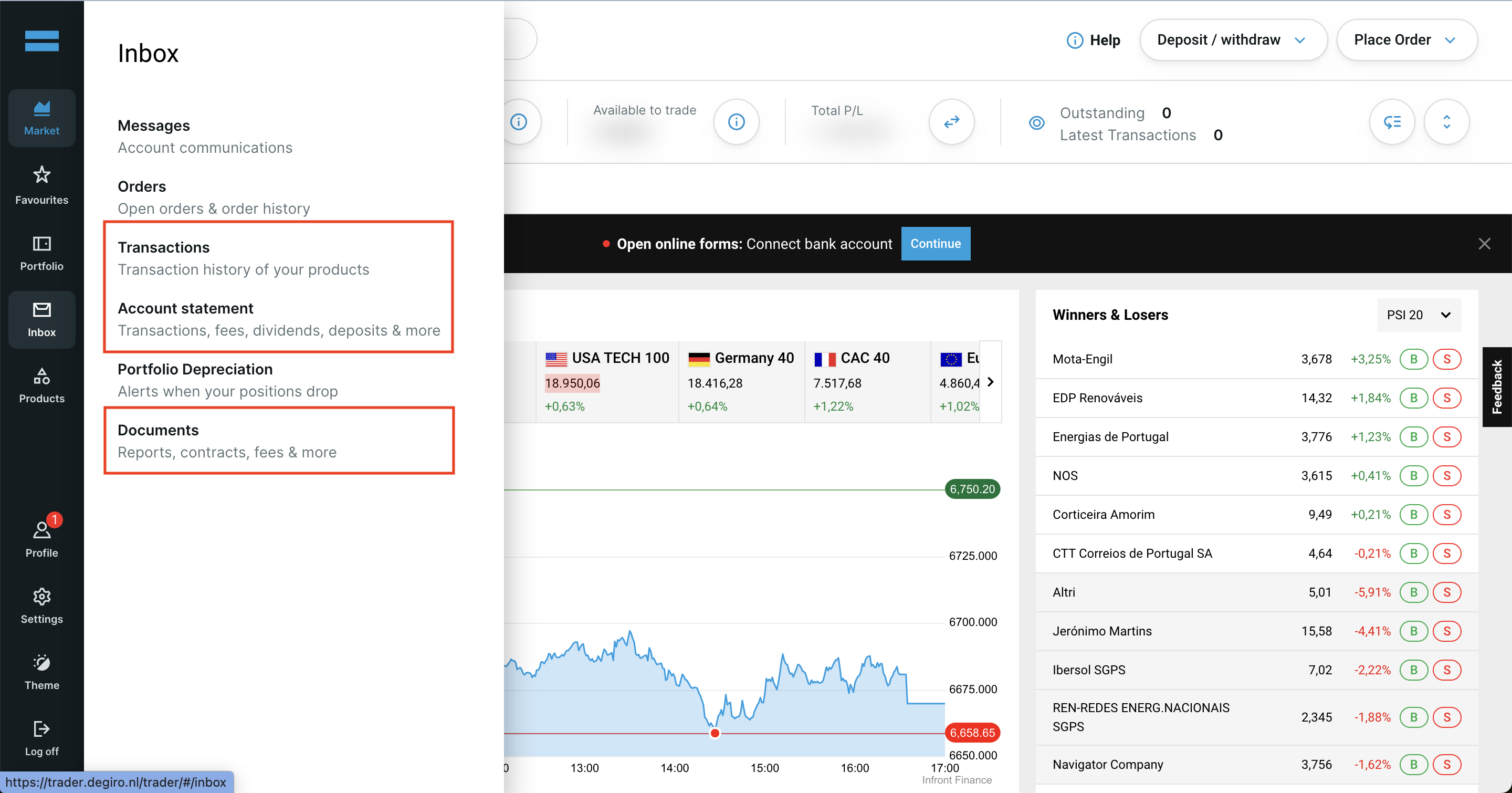
V stranskem meniju svojega računa Degiro poiščite razdelke Transactions, Account Statement in Documents.
Pomembno: Za izpisek računa in seznam transakcij izberite isto obdobje, ki se začne z datumom odprtja vašega računa.
Najprej se prijavite v svoj račun Degiro in odprite nadzorno ploščo (dashboard) Degiro.
Prenos izpiska računa (CSV) iz Degiro:
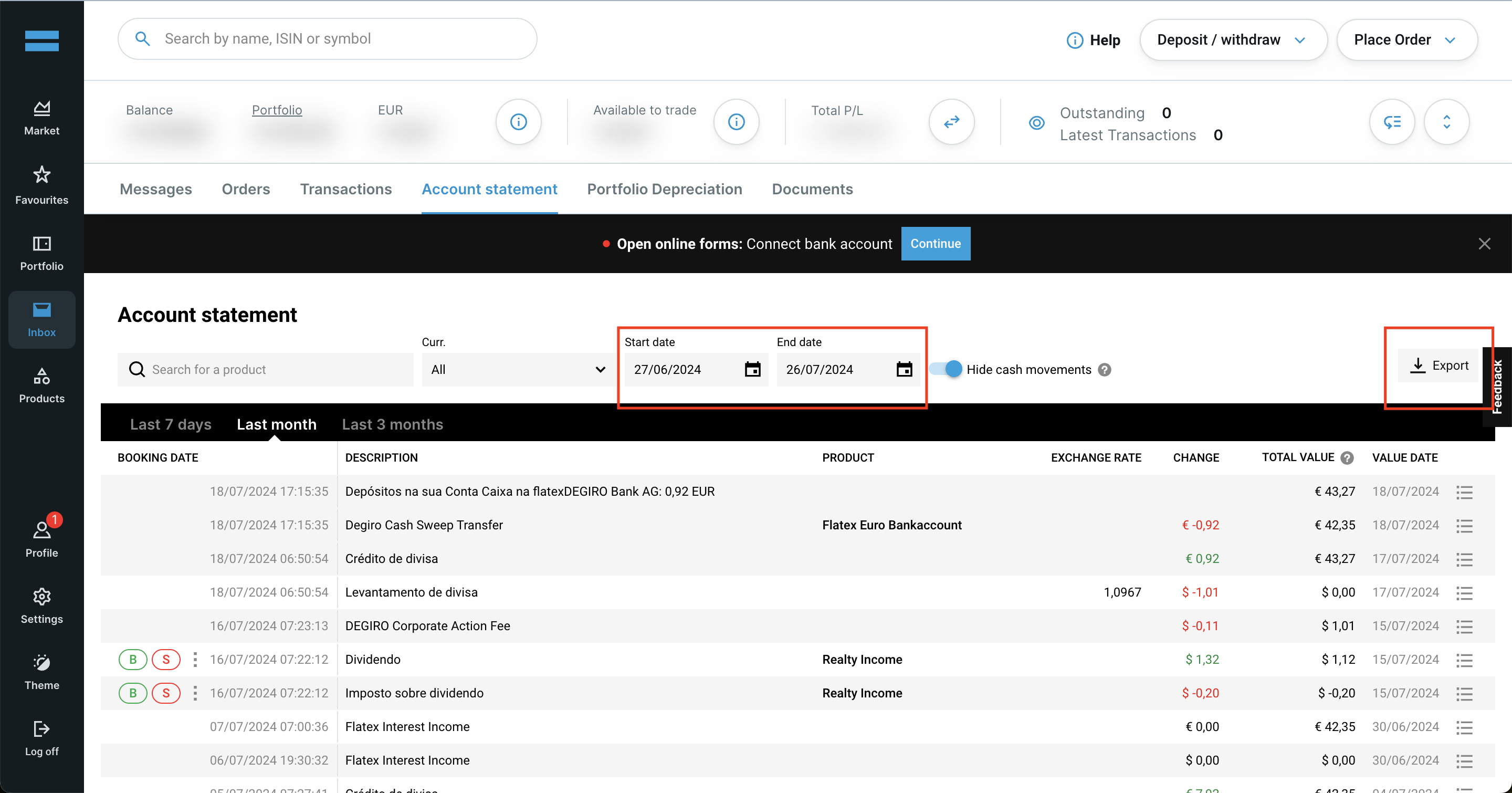
- 1. Pojdite v razdelek Account Statement v svojem računu Degiro.
- 2. Za začetni datum izberite datum odprtja vašega računa Degiro, za končni datum pa današnji dan.
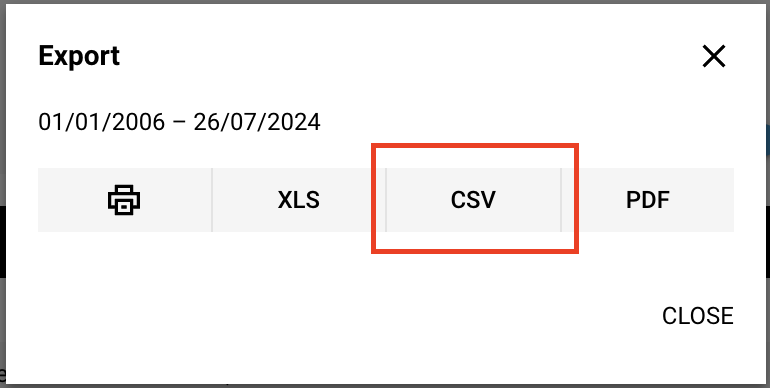
- 3. Kliknite gumb Export in izberite format CSV.
Prenos seznama transakcij (CSV) iz Degiro
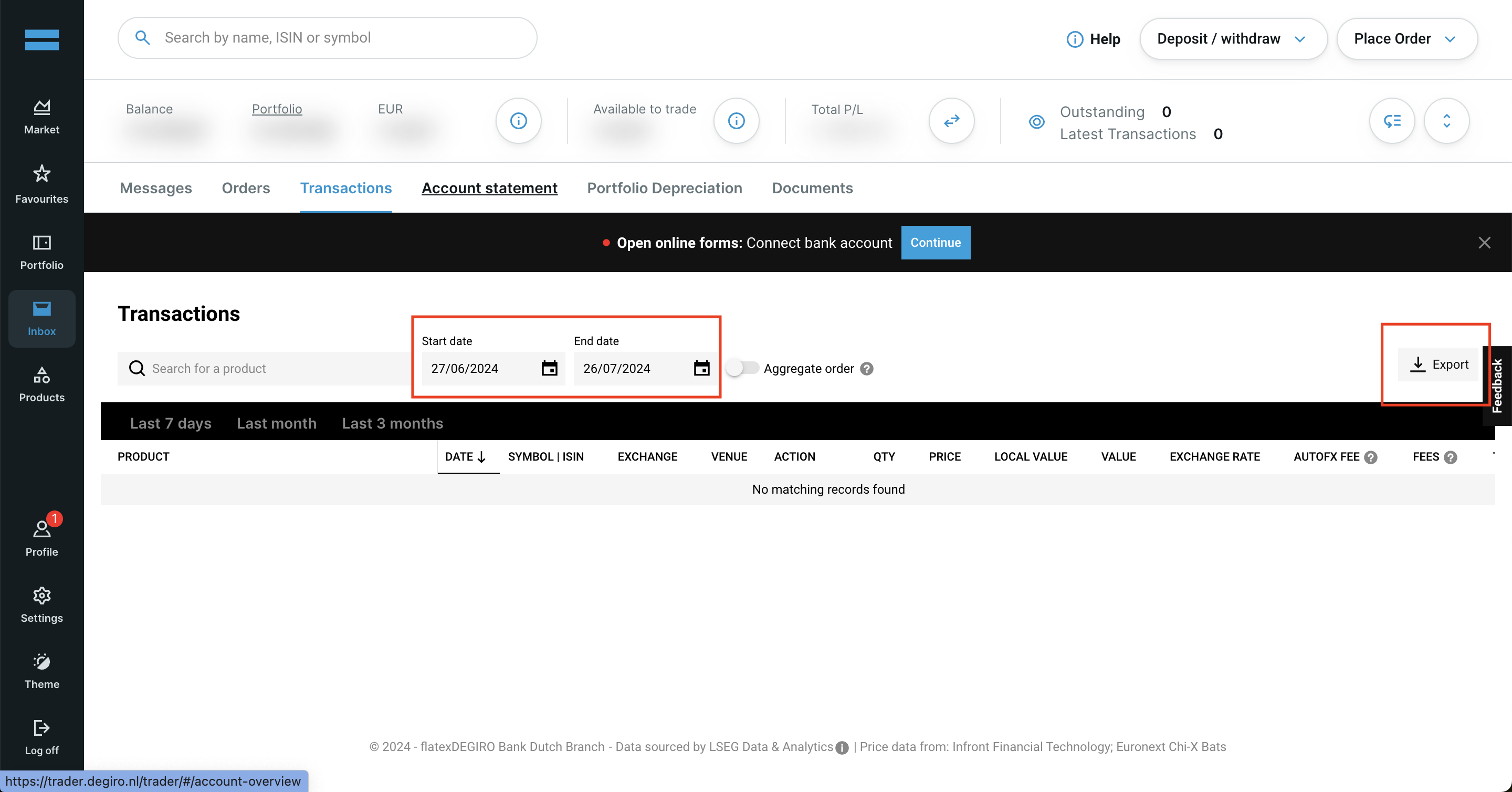
- 1. Pojdite v razdelek Transactions v svojem računu Degiro.
- 2. Za začetni datum izberite datum odprtja vašega računa Degiro, za končni datum pa današnji dan.
- 3. Kliknite gumb Export in izberite format CSV.
Letno poročilo Degiro
- 1. Pojdite v razdelek Documents.
- 2. Poiščite Annual Report 2025.
- 3. Kliknite gumb Download poleg njega.
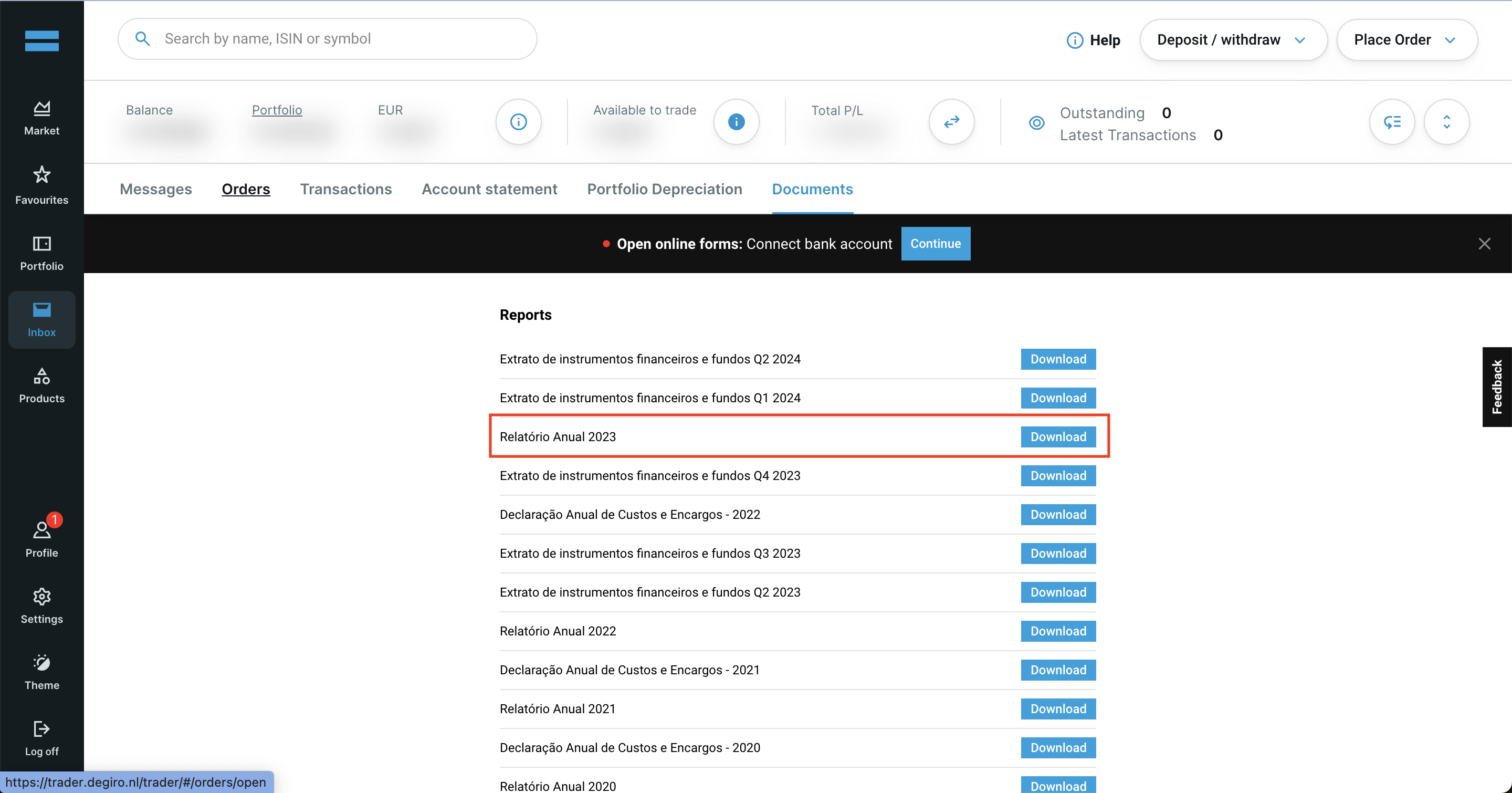
Če sledite tem korakom, boste zagotovo imeli prave datoteke, ki jih potrebujete za uporabo s Tax-wizard.
Od tu jih lahko naložite v Tax-wizard in v nekaj minutah boste imeli pripravljeno svoje davčno poročilo.
Kako prijavim naložbe pri DEGIRO v Sloveniji?
DEGIRO je tuji posrednik in ne odvede slovenskega davka namesto vas - napoved oddate sami prek eDavkov. Rok za oddajo je 28. februar za preteklo leto.
- Kapitalski dobički iz vrednostnih papirjev gredo na obrazec Doh-KDVP, dividende na Doh-Div, izvedeni finančni instrumenti pa na D-IFI.
- Ob nakupu in ob prodaji se prizna 1 % normiranih stroškov, ki zniža davčno osnovo.
- Zneske v tujih valutah je treba preračunati v evre po tečaju na dan posamezne transakcije.
- Za vsak vrednostni papir je treba navesti vsak posamezen nakup - tudi tiste iz prejšnjih let, saj je od datuma nakupa odvisna davčna stopnja.
Koliko znaša davek na kapitalski dobiček v Sloveniji?
Stopnja je odvisna od obdobja imetništva: 25 % do 5 let, 20 % od 5 do 10 let, 15 % od 10 do 15 let in 0 % po 15 letih imetništva. Izvedeni finančni instrumenti so od 1. januarja 2026 obdavčeni po enotni 25-odstotni stopnji, ne glede na obdobje imetništva (Uradni list RS 85/2025).
Dividende in obresti so obdavčene po 25 %. Obresti na depozite v Sloveniji in EU so oproščene do 1.000 EUR letno, tuji davek pa se prizna kot odbitek do višine slovenskega davka.
Za podrobnosti o obrazcih, prenosu izgube in oddaji prek eDavkov preberite celoten vodnik po obdavčitvi naložb v Sloveniji. S Tax-wizardom naložite zgoraj izvožene datoteke DEGIRO in v nekaj minutah dobite izračun ter XML za uvoz v eDavke.
Koliko je res vreden vaš čas?
Upoštevajte vrednost svojega časa in mir, ki ga prinaša zanesljivo in natančno orodje za davčno poročanje
(plačilo pokriva letošnjo oddajo za davčno leto 2025 in prejšnja leta, ročno podaljšanje prihodnje leto)
Premium
Vse funkcije za Revolut, Degiro, eToro, XTB, Trading212, Interactive Brokers, Freedom24, Lightyear, Trade Republic, Coinbase, Robinhood Crypto,...
- Podpora za vse posrednike in valute
- Samodejni izračun kapitalskih dobičkov
- Poročilo s pridobitvami, realizacijami, dividendami in obrestmi
- Poročilo o odprtih pozicijah in statistika
- Statistika transakcij in dividend
- Izvoz odprtih pozicij v Yahoo Finance
Poslovni
Vse premium funkcije za računovodje, finančne svetovalce, davčne svetovalce ali druge strokovnjake in podjetja, ki želijo uporabljati Tax-Wizard za več strank.
- Podpora za vse posrednike in valute
- Samodejni izračun kapitalskih dobičkov
- Poročilo s pridobitvami, realizacijami, dividendami in obrestmi
- Poročilo o odprtih pozicijah in statistika
- Statistika transakcij in dividend
- Izvoz odprtih pozicij v Yahoo Finance