- Home
- Courtiers pris en charge
- Degiro
Impôts DEGIRO 2026 : déclarer ses plus-values
Calculez facilement vos impôts DEGIRO avec Tax-Wizard. Exportez votre historique et obtenez vos montants prêts pour la déclaration 2026 (2074, 2042 C, 2047).
Dernière mise à jour: · Vérifié par l'équipe Tax-Wizard · Centre d'aide officiel Degiro ↗
For seamless integration with Tax-wizard, you need to download specific files from your Degiro account. On this guide we'll show you:
- - How to download Degiro Account Statement, which contains the details about your transactions, dividends, and corporate actions;
- - How to export Degiro Transactions List, which contains all purchases and sales you made;
- - How to download Degiro Annual Report, which contains the information about your account balance and the total value of your investments.
The Degiro Annual Report for each fiscal year is sent at the beggining of the following year. The required files are then:
- - Account Statement (CSV format)
- - Transactions List (CSV format)
- - Annual Report (PDF format)
Using these files, Tax-wizard can automatically prepare all the details for you to fill your tax report.
Steps to Download the Required Files
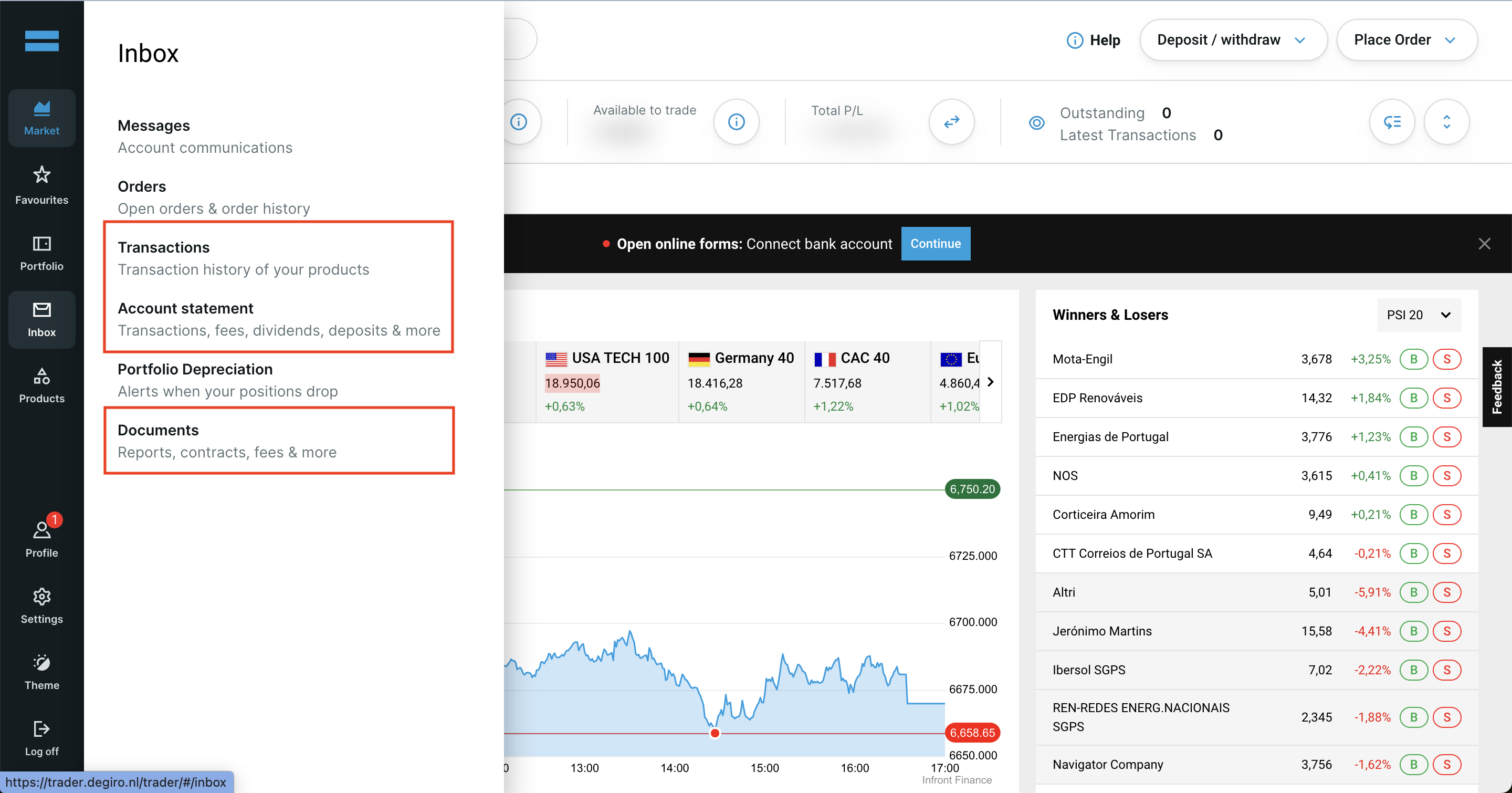
Use the side menu in your Degiro account to access Transactions, Account Statement, and Documents.
Important: Make sure to select the same period for the Account Statement and Transactions List, starting from the date your account was opened.
Start by logging in to your Degiro account and to navigate to your Degiro dashboard.
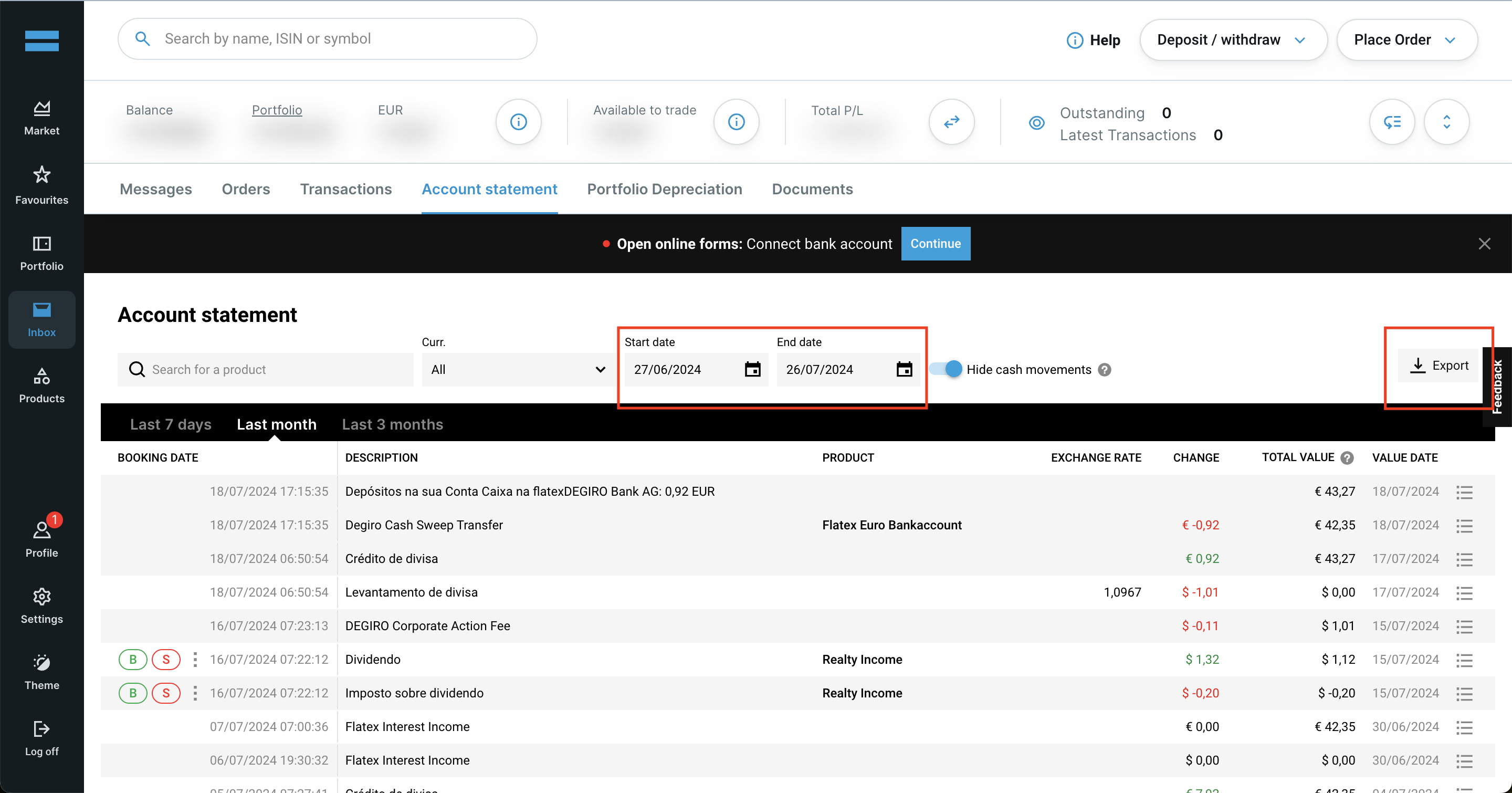
Download the Account Statement (CSV) from Degiro:
- 1. Go to the Account Statement section in your Degiro account.
- 2. Select the start date as the date your Degiro account was opened and the end date as today.
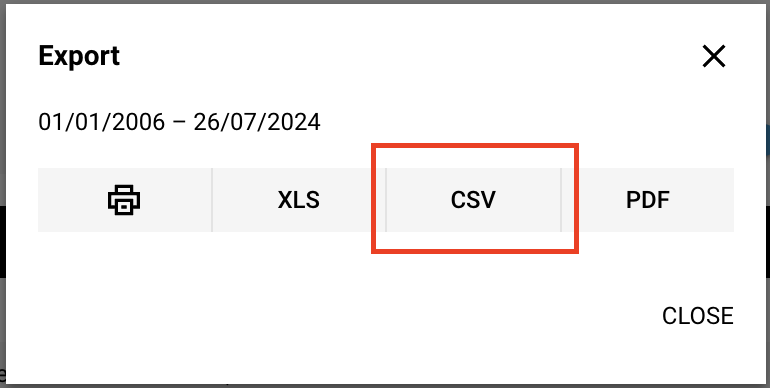
- 3. Click on the Export button and choose CSV format.
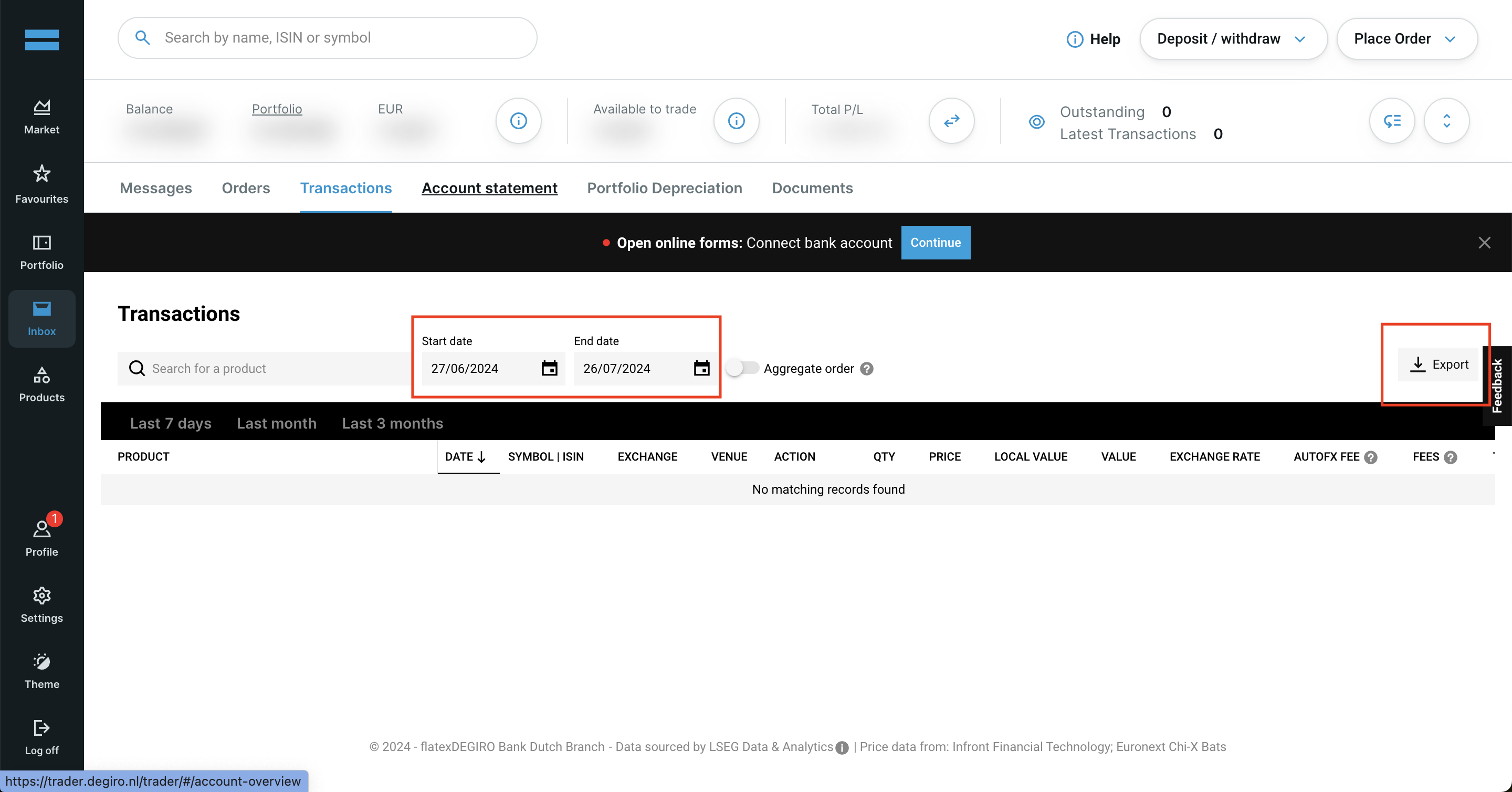
Download the Transactions List (CSV) from Degiro
- 1. Go to the Transactions section in your Degiro account.
- 2. Select the start date as the date your Degiro account was opened and the end date as today.
- 3. Click on the Export button and choose CSV format.
Degiro Annual Report
- 1. Go to the Documents section.
- 2. Look for Annual Report 2025.
- 3. Click on the Download button next to it.
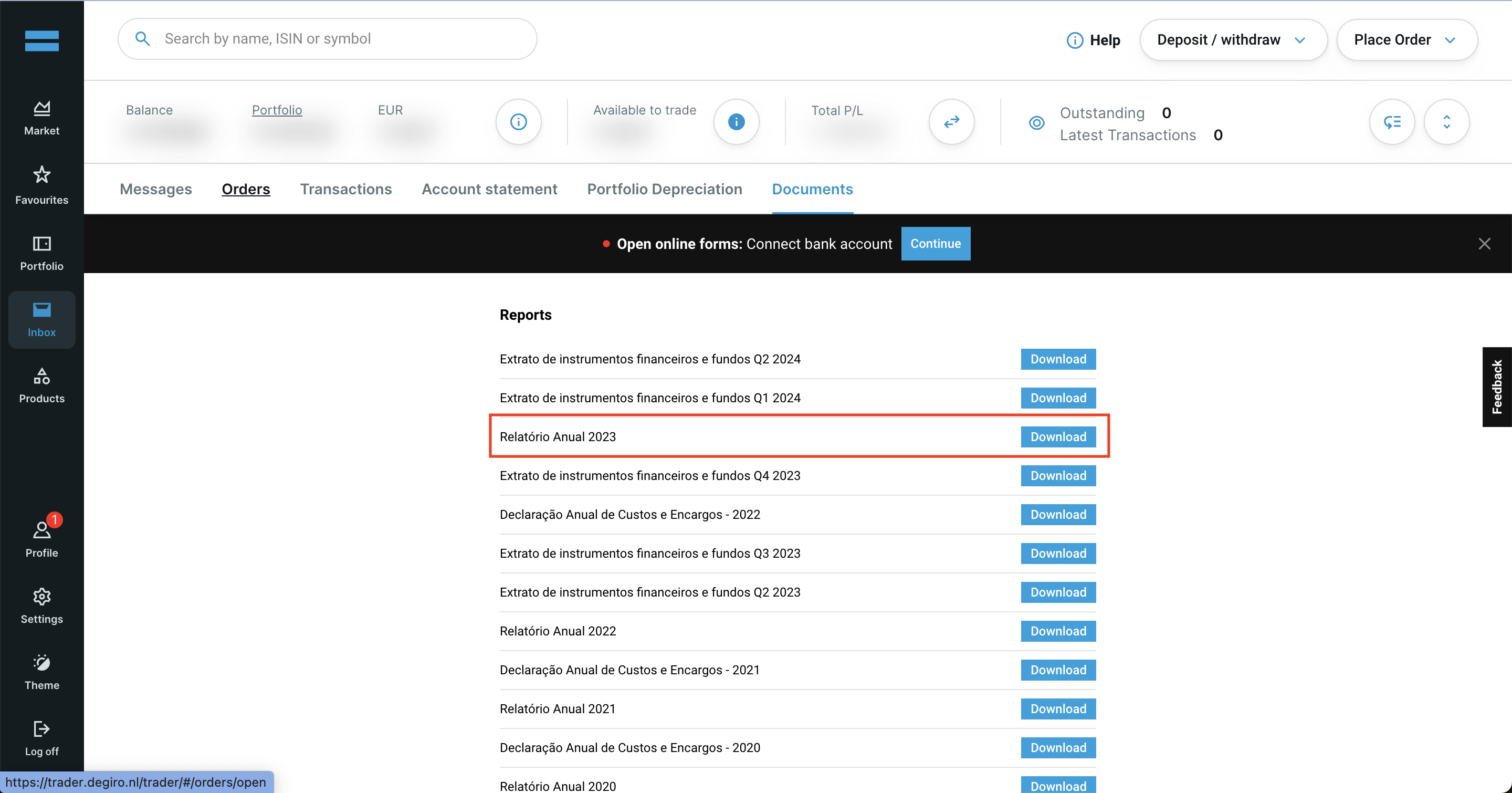
By following these steps, you can ensure you have the correct files needed to use with Tax-wizard.
From here you can upload them to Tax-wizard and have your tax report ready in minutes.
Comment déclarer mes investissements DEGIRO en France ?
DEGIRO est un courtier étranger : il n'établit pas d'IFU (imprimé fiscal unique), donc rien n'est prérempli sur votre déclaration et c'est à vous de tout reporter.
- Les plus-values de cession de titres se détaillent sur la 2074, puis le résultat est reporté sur la 2042 C.
- Les revenus étrangers (dividendes, intérêts) et les crédits d'impôt conventionnels se déclarent sur la 2047.
- Chaque compte détenu à l'étranger exige une déclaration 3916 / 3916-bis et la case 8UU cochée - l'amende est de 1 500 € par compte bancaire non déclaré et de 750 € à 1 500 € par compte d'actifs numériques.
- Les montants en devises doivent être convertis en euros au cours de chaque opération.
Quel taux s'applique aux plus-values DEGIRO ?
Le PFU (« flat tax », CGI art. 200 A) s'applique par défaut : 12,8 % d'impôt sur le revenu plus les prélèvements sociaux. La LFSS 2026 a porté la CSG sur les revenus du capital de 9,2 % à 10,6 %, ce qui fait passer les prélèvements sociaux de 17,2 % à 18,6 % - soit 31,4 % au total pour les plus-values sur titres des revenus 2025, contre 30 % pour 2024.
Vous pouvez renoncer au PFU et opter pour le barème progressif en cochant la case 2OP, mais cette option est annuelle, globale (elle couvre tous vos revenus soumis au PFU, sans panachage possible) et irrévocable pour l'année concernée.
Pour le détail des cases, l'imputation des moins-values et la liste des comptes à déclarer, lisez le guide complet de la fiscalité des investissements en France. Avec Tax-wizard, vous chargez les fichiers DEGIRO exportés ci-dessus et obtenez en quelques minutes les montants prêts à recopier sur impots.gouv.fr.
Combien vaut vraiment votre temps ?
Pensez à la valeur de votre temps et à la tranquillité d'esprit qu'apporte un outil fiable et précis pour gérer votre déclaration fiscale
(le paiement couvre la déclaration de cette année pour 2025 et les années précédentes, renouvellement manuel l'année prochaine)
Premium
Toutes les fonctionnalités, pour Revolut, Degiro, eToro, XTB, Trading212, Interactive Brokers, Freedom24, Lightyear, Trade Republic, Coinbase, Robinhood Crypto,...
- Prise en charge de tous les courtiers et devises
- Calcul automatique des plus-values
- Rapport avec acquisitions, réalisations, dividendes et intérêts
- Rapport et statistiques des positions ouvertes
- Statistiques des transactions et des dividendes
- Export des positions ouvertes vers Yahoo Finance
Business
Toutes les fonctionnalités Premium, pour les comptables, conseillers financiers, consultants fiscaux ou autres professionnels et entreprises souhaitant utiliser Tax-Wizard pour plusieurs clients.
- Prise en charge de tous les courtiers et devises
- Calcul automatique des plus-values
- Rapport avec acquisitions, réalisations, dividendes et intérêts
- Rapport et statistiques des positions ouvertes
- Statistiques des transactions et des dividendes
- Export des positions ouvertes vers Yahoo Finance