- Home
- Tuetut välittäjät
- Strike
Näin ilmoitat Strike-bitcoinverosi 2026
Laske Strike-bitcoinisi verot helposti Tax-Wizardilla. Vie Striken vuosittainen tapahtumaraportti ja automatisoi vuoden 2026 veroilmoituksesi.
Viimeksi päivitetty: · Tax-Wizard-tiimin tarkistama · Virallinen Strike-tukikeskus ↗
This guide is designed to assist anyone who buys Bitcoin on Strike and is seeking clarity on how to pay taxes. The information provided here should be useful when calculating your Strike taxes. However, it's important to supplement this guide with the tax regulations specific to your country.
If you need to calculate taxes for your Strike Bitcoin, you're in the right place! There are several ways to do this, such as calculating taxes manually in Excel, using an automated tax tool like Tax-wizard, or hiring a tax professional. Your choice will often depend on your budget and preferences.
How to export your Strike history
Start by opening the Strike app and tapping the account icon in the top-right corner of the main screen.
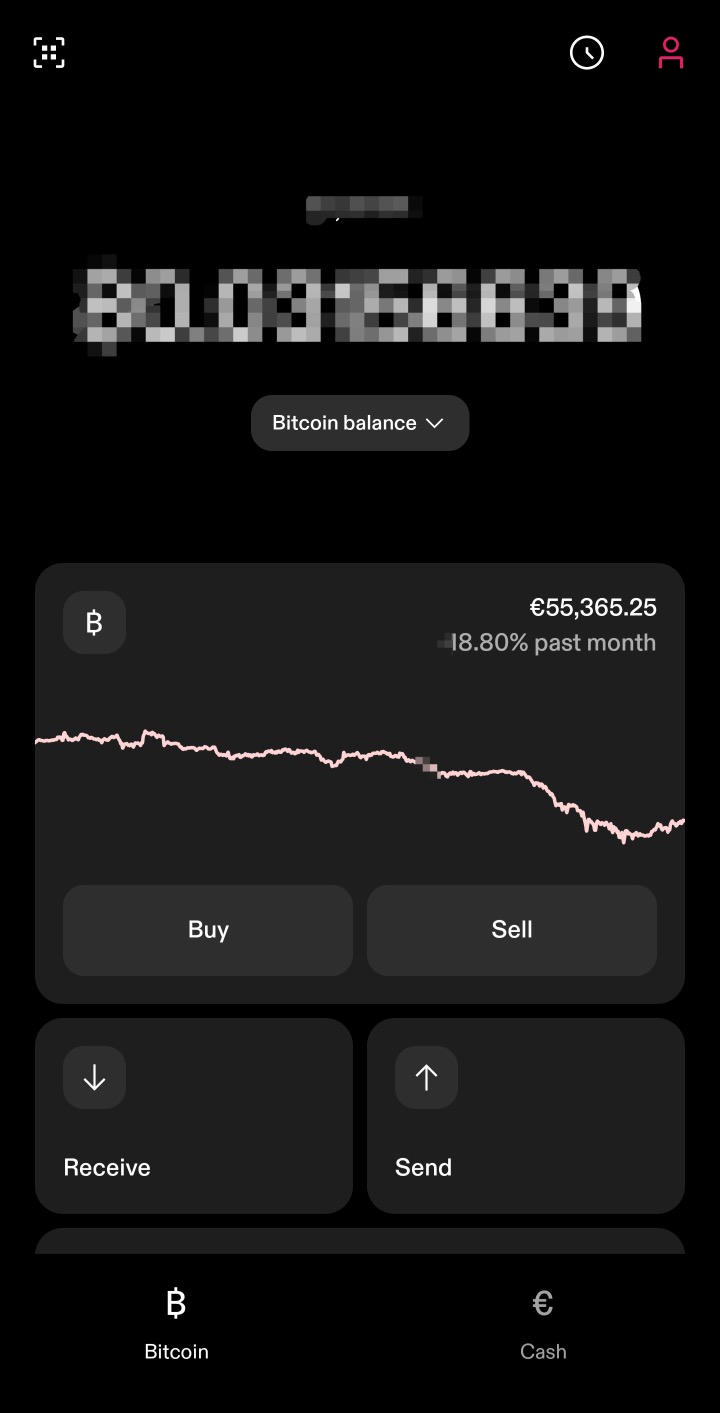
Scroll down to the "Account" section and select "Documents".
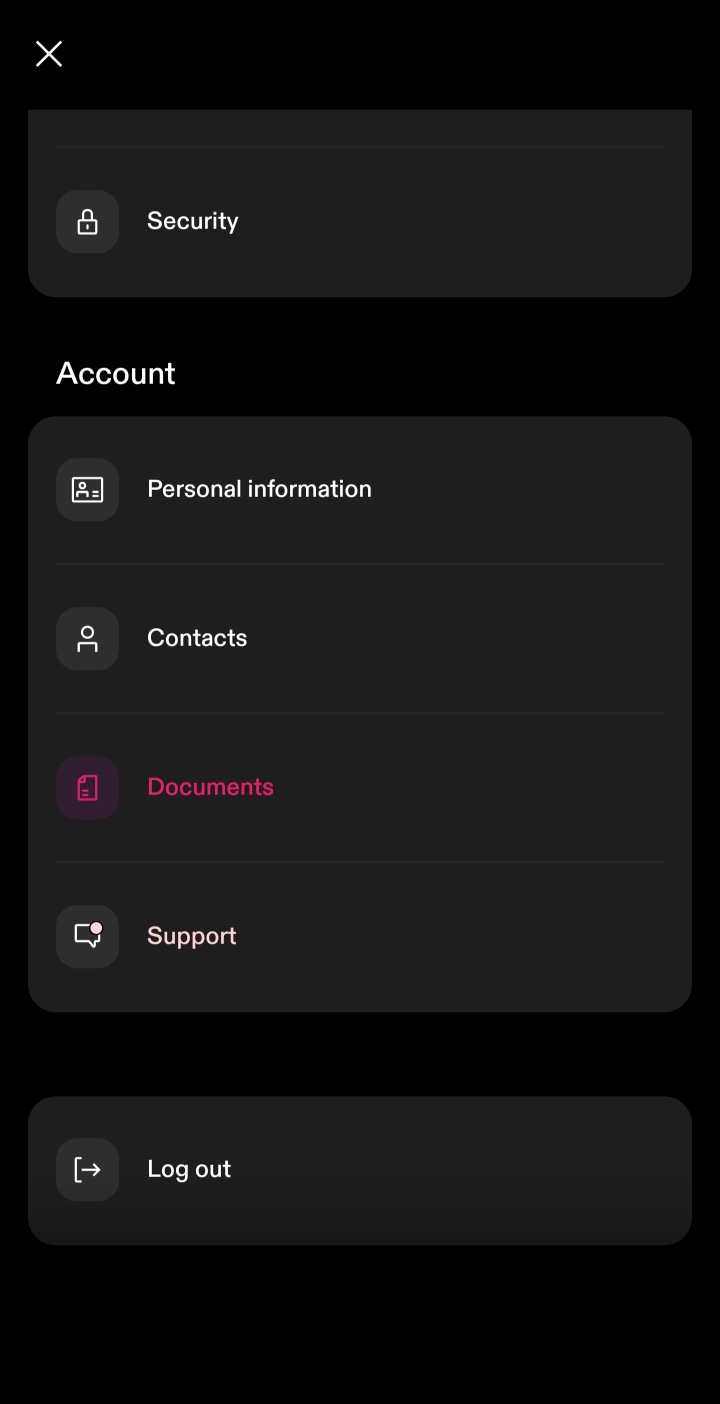
Under Documents, choose "Account statements".

Strike groups statements by year. Under each year you need to report, tap "Annual transactions" and download the CSV file. Download one file for every year your account was open - not just the tax year you are filing - so your full purchase history is included, which is required to calculate accurate cost basis.
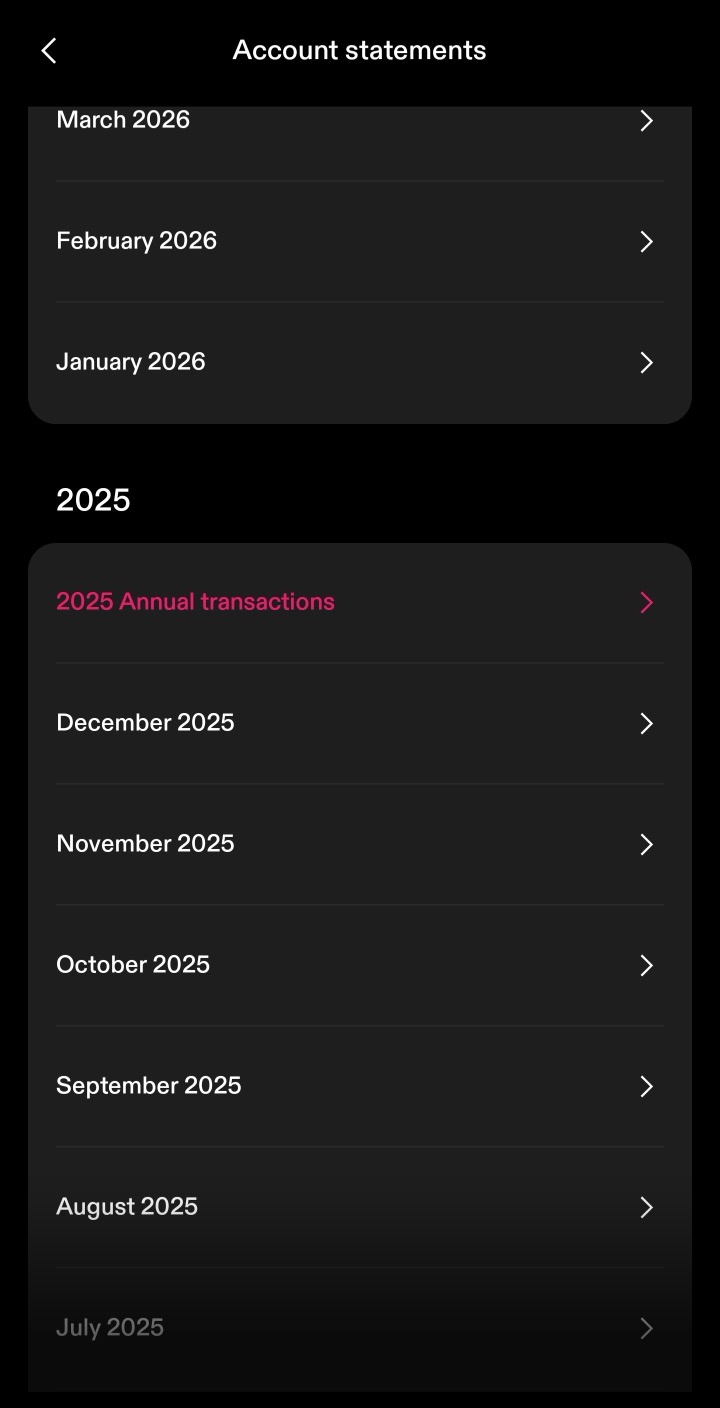
By following these steps, you can ensure you have the correct files needed to use with Tax-wizard.
From here you can upload every year at once to Tax-wizard and have your tax report ready in minutes.
Frequently Asked Questions
Which Strike file should I download - the monthly statement or Annual transactions?
Download "Annual transactions" in CSV format, one file per year your account was open. That's the file Tax-wizard's Strike parser reads: it contains every purchase, sale, Bitcoin transfer and reward for the year. The monthly statements are summaries and aren't supported.
What about Bitcoin I sent to or received from an external wallet?
"Send" and "Receive" rows are transfers to and from external wallets and aren't taxable events - Tax-wizard treats them as deposits and withdrawals, not sales. If you bought that Bitcoin on another platform, upload that platform's files too so the cost basis is complete.
Why might Tax-wizard's numbers differ from Strike's own figures?
A few reasons: Tax-wizard lets you choose the cost-basis method (FIFO, LIFO, or average cost), while Strike's own "Cost Basis" column may use a different convention. Tax-wizard also converts non-EUR amounts using official European Central Bank exchange rates, which can differ slightly from the rates Strike applies.
Kuinka arvokasta aikasi todella on?
Mieti, mikä on aikasi arvo ja millainen mielenrauha syntyy siitä, että käytössäsi on luotettava ja tarkka työkalu veroraportointiin
(maksu kattaa tämän vuoden ilmoituksen vuodelle 2025 sekä aiemmat vuodet, uusinta ensi vuonna manuaalisesti)
Premium
Kaikki ominaisuudet Revolutille, Degirolle, eTorolle, XTB:lle, Trading212:lle, Interactive Brokersille, Freedom24:lle, Lightyearille, Trade Republicille, Coinbaselle, Robinhood Cryptolle,...
- Tuki kaikille välittäjille ja valuutoille
- Luovutusvoittojen automaattinen laskenta
- Raportti hankinnoista, luovutuksista, osingoista ja korkotuloista
- Avointen positioiden raportti ja tilastot
- Transaktio- ja osinkotilastot
- Avointen positioiden vienti Yahoo Financeen
Business
Kaikki premium-ominaisuudet kirjanpitäjille, talousneuvojille, verokonsulteille tai muille ammattilaisille ja yrityksille, jotka haluavat käyttää Tax-Wizardia useille asiakkaille.
- Tuki kaikille välittäjille ja valuutoille
- Luovutusvoittojen automaattinen laskenta
- Raportti hankinnoista, luovutuksista, osingoista ja korkotuloista
- Avointen positioiden raportti ja tilastot
- Transaktio- ja osinkotilastot
- Avointen positioiden vienti Yahoo Financeen